┌────────┐
│ n_rows │
│ int64  │
├────────┤
│  59024 │
└────────┘DATASCI 350 - Data Science Computing
Lecture 26 - Revision: Scaling, SQL and Containers
Hello, everyone! 😊
Where we are
The last class before the quiz and the project
- The eight modules so far:
- Introduction: how a computer stores and runs your code
- Command line and version control: Bash, Git, GitHub
- Reproducible research: Quarto and project structure
- AI-assisted programming: local models, APIs, RAG
- Cloud computing: EC2, S3, and a bill you control
- Getting data from the web: APIs, JSON, a saved snapshot
- Scaling and performance: joblib, Dask, DuckDB
- Containers: environments and Docker
- Today we revise the last two modules
- Quiz 05 covers Lectures 21, 22, 23 and 25
- The final project is due on the last day of class, and it must render inside a container
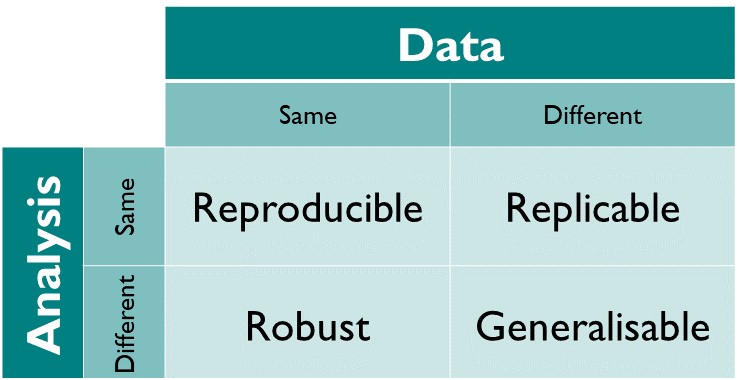
Source: The Turing Way Community (2025)
Lecture overview
What we will cover today
1. Scaling and performance
- Parallel tools, Big O and Amdahl, the GIL, Dask
2. SQL revision
- The query order,
WHEREandHAVING,COUNT, joins
3. SQL practice
- Two exercises, about ten minutes
4. Containers
- Pinning an environment
- The project Dockerfile, and running it
- The project checklist
5. Quiz 05 preparation
- What each lecture brings, and five Dockerfile questions
Scaling and performance ⚡
Parallel work and its tools
Lecture 21: map, joblib and concurrent.futures
- Serial: one line after another
- Parallel: independent tasks at the same time, on several cores
- Embarrassingly parallel: the tasks share nothing and need no result from each other
- Before parallelising, ask: are the tasks independent? Is each one big enough to be worth a worker?
- Four calls in parallel never reach a full 4×: starting workers takes time
| Your task | Tool |
|---|---|
| Number crunching | ProcessPoolExecutor |
| Downloading many URLs | ThreadPoolExecutor |
| sklearn, numeric loops | joblib (n_jobs=-1) |
| Bigger than RAM | Dask |
- CPU-bound: the processor is busy, so use processes
- I/O-bound: the program waits for the network or disk, so use threads
concurrent.futuresships with Python, so it works where you cannot install anything
Big O and Amdahl’s law
What parallelism can and cannot fix
- Big O: how the runtime grows with the input size
n - O(1), O(n), O(n²): doubling
ncosts nothing, twice as much, or four times as much pcores turn O(n) into O(n/p + overhead). The class stays the same- O(n log n) beats a parallel O(n²) on large inputs
- Poor candidates for parallelism:
- Steps that need the result of the step before
- Tasks that share a variable, like a running total
- Tasks limited by the disk or memory
- Amdahl’s law: the serial share \(s\) limits the speed-up
- \(\text{speedup} = \dfrac{1}{s + p/N}\), with \(p = 1 - s\) and \(N\) cores
- 90% parallel on 8 cores:
- The ceiling is \(1/s\): 10× here, and 2× for a program that is 50% serial
- Expect this arithmetic in the quiz
The GIL
Why one thread runs Python at a time
- CPython has a Global Interpreter Lock: one thread runs Python at a time
- Threads help when code waits: the lock is released during downloads
- Threads do not help when code computes
- For computing, use processes, each with its own lock
- NumPy and DuckDB release the GIL in their C and C++ code
- Python 3.14 has an official free-threaded build, but not by default
- Swap
calculationfor a download, and the threads win - Expect a question on which pool fits which task
Dask, and which tool when
Lazy evaluation and the 200-million-row benchmark
- Dask gives lazy versions of NumPy arrays, pandas DataFrames, and your own functions (
delayed) - Lazy: nothing runs until
.compute(). Until then, Dask builds a task graph .persist()keeps a small result in memory- Dask chunks the data, so it can be bigger than your RAM
- The dashboard at
localhost:8787shows the tasks live - On data that fits in memory, Dask can be slower than pandas
- Parquet cut our January 2000 data from 182 MB to 86 MB
- Mean
valueby indicator and decade, on 200,681,600 rows, Apple M5 laptop:
| pandas | Dask | DuckDB |
|---|---|---|
| 9.65 s | 5.39 s | 0.53 s |
- DuckDB reads only the columns it needs, and uses every core
| Your situation | Reach for |
|---|---|
| Fits in RAM, exploring, plotting | pandas |
| One large file on one machine | DuckDB |
| Bigger than the machine, or a cluster | Dask |
SQL revision 🦆
How a query runs
And why WHERE and HAVING differ
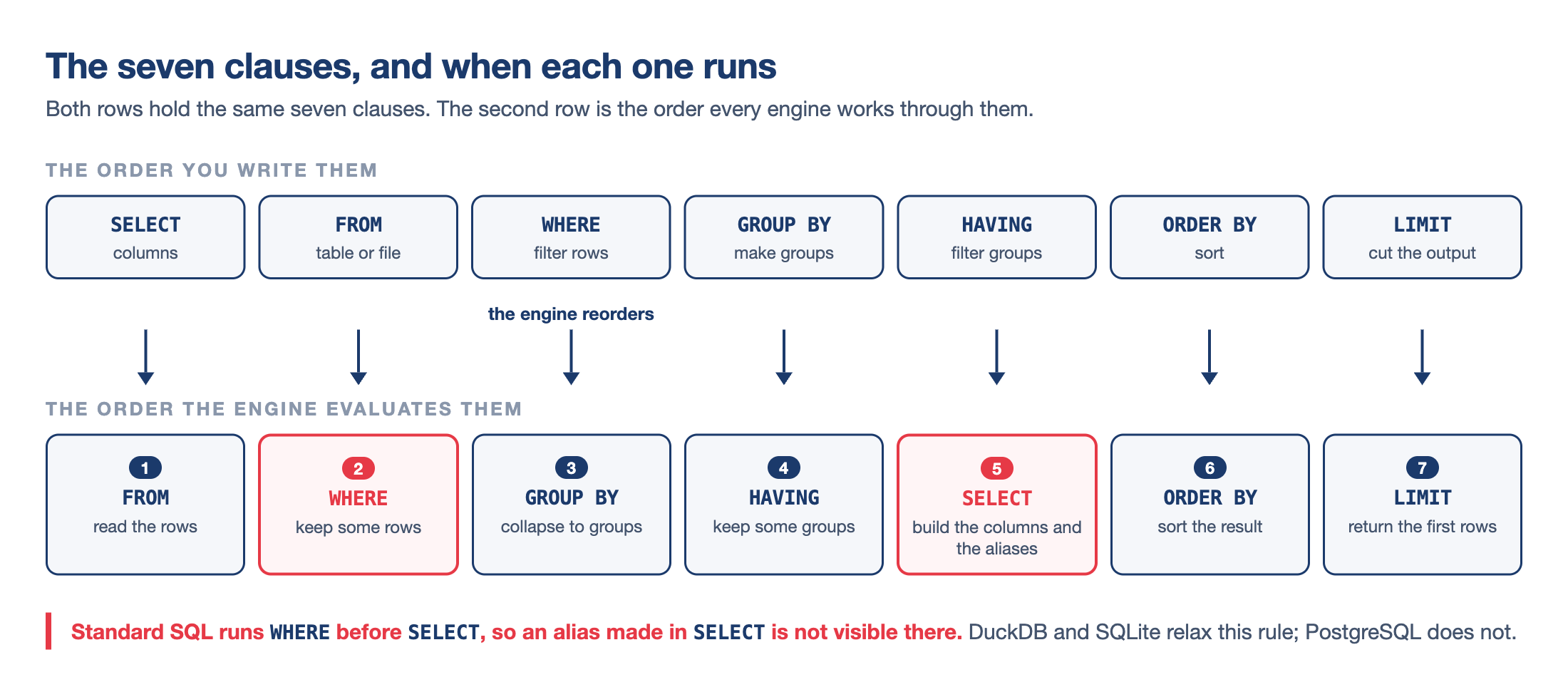
- You write
SELECTfirst, but the engine runs it fifth WHEREfilters rows before grouping.HAVINGfilters groups after- So no aggregate can go in
WHERE: the groups do not exist yet - Every
SELECTcolumn is inGROUP BYor inside an aggregate - DuckDB accepts a
SELECTalias inWHERE, but PostgreSQL does not
WHERE year >= 2010drops old rowsHAVING AVG(value) > 60000drops poorer countries- Monaco, Liechtenstein and Bermuda top the list, all with fewer than 100,000 people
COUNT(*) and COUNT(value)
Counting rows and counting values
COUNT(*)counts rows.COUNT(value)counts rows with a value- The difference is the number of missing values
AVG,SUM,MINandMAXskip missing values without warning- GDP in 2020: 217 rows, but only 208 numbers
primary_enrolment_netin 2020: 217 rows and no numbers, soAVGis NULL
- Missing: 9 in 1990, 21 in 2000, 33 in 2020. Coverage gets worse
- 26 countries with a 1990 figure have none for 2020, from Bermuda and Guam to Syria and Yemen
The three joins
Which rows survive
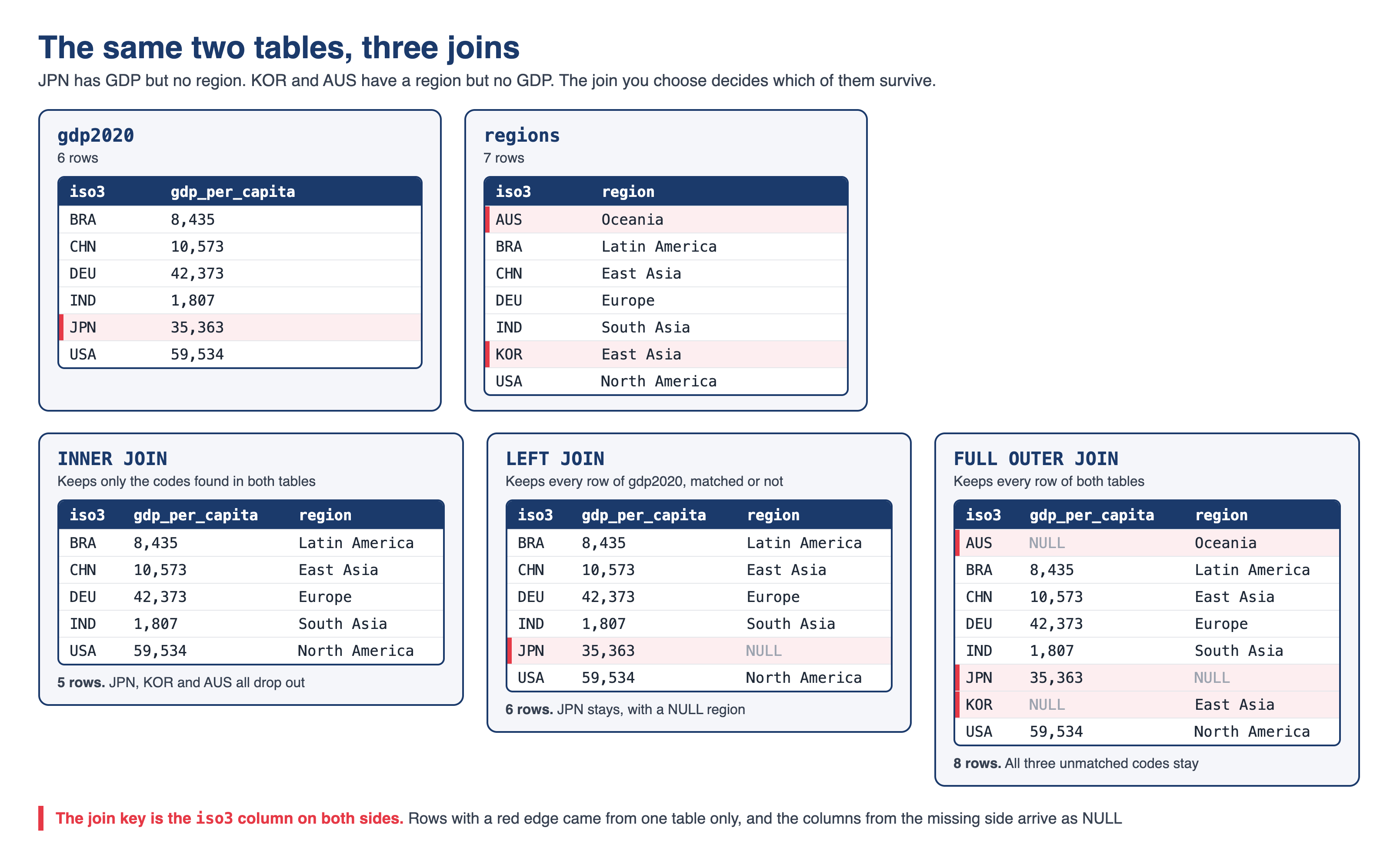
INNER JOINkeeps rows that match on both sides. It filters silentlyLEFT JOINkeeps the left table whole, with NULL where there is no partnerFULL OUTER JOINkeeps everything from both sides- Lecture 22’s tables gave 5, 6 and 8 rows
- To choose, ask which table must survive whole
SQL practice 🧠
The setup for both exercises
Run this once
- Download the dataset here or use the path
../lecture-19/data/wdi_panel.parquet
- The panel from Module 06: 59,024 rows of
country,iso3,indicator,yearandvalue - Eight indicators, including
gdp_per_capita,life_expectancy,co2_per_capitaandinternet_users_pct - The second exercise is harder than the first
- Work in pairs if you like. We look at the solutions together
Try it yourself! 🧠
Five minutes
Which countries emitted the most CO2 per person in 2020?
- Run the setup cell so the
wdiview exists - Keep only the rows for
co2_per_capita - Keep only the year 2020
- Return
countryandvalue, rounded to one decimal - Rename the rounded column
co2_pc - Sort from highest to lowest
- Return the top five rows
What to look for:
- Two conditions join with
ANDinside oneWHERE - Text goes in single quotes
- Double quotes mean a column name, and DuckDB will say the column does not exist
- Sorting needs
DESC, becauseASCis the default - The winner is a Pacific island with fewer than 20,000 people
- Four of the five are oil or gas economies
Solution and the full output: Appendix 01
Try it yourself! 🧠
Five minutes
Which countries have been the most connected since 2015?
- Keep only the rows for
internet_users_pct - Keep only the years from 2015 onwards
- Report one row per country
- Count how many years have a number in
value, and call itn_years - Compute the mean of
value, rounded to one decimal, asmean_internet - Keep the countries with at least 5 years of data and a mean above 95
- Sort by the mean, highest first, and return five rows
What to look for:
- The filter on
yearand the two filters on the group go in different clauses COUNT(value)andCOUNT(*)disagree here, and only one of them counts years with data- Five countries come back, every one of them above 97%
- The list mixes Nordic countries with Gulf states, and one country is neither
- An error about an aggregate in
WHEREmeans the evaluation ladder is worth another look
Solution and the full output: Appendix 02
Containers and Docker 🐳
Why code breaks, and how to pin it
Lecture 23 in one slide
- “It works on my machine”: your code relies on software you never wrote down
print "hello"was valid Python 2. In Python 3 it is aSyntaxError- In a 2016 Nature survey, over 70% of researchers had failed to reproduce someone else’s experiment
- The ladder: declare your dependencies, manage them with a tool, pin exact versions, then containerise
- Your project is on the last step: my machine has only Docker
| Tool | File you commit | Key commands |
|---|---|---|
venv + pip |
requirements.txt |
pip freeze, pip install -r |
| conda | environment.yml |
conda env export --from-history |
uv |
pyproject.toml, uv.lock |
uv add, uv sync, uv export |
pip freezeinside conda writes@ file:///paths that break elsewhereuvin more detail: Appendix 05
Whichever tool you use, you hand in requirements.txt with == pins, because every Dockerfile reads it
The project Dockerfile
What each block does
# 1. Base image
FROM ubuntu:24.04

# 2. Build-time settings
ENV DEBIAN_FRONTEND=noninteractive
SHELL ["/bin/bash", "-c"]

# 3. System packages
RUN apt-get update && apt-get install -y [...]

# 4. Quarto
RUN ARCH=$(dpkg --print-architecture) && [...]

# 5. Python environment
RUN python3 -m venv /opt/venv
ENV PATH="/opt/venv/bin:$PATH"
COPY requirements.txt /project/requirements.txt
RUN pip install --no-cache-dir -r /project/requirements.txt

# 6. Project files
WORKDIR /project
COPY . /project

# 7. Default command
ENV QUARTO_PYTHON=/opt/venv/bin/python
CMD ["bash", "-c", "quarto render report.qmd && [...]"]FROMpins the base image.latestmoves, which breaks reproducibilityDEBIAN_FRONTEND=noninteractivestops apt asking questions- Quarto 1.10.18 comes as a
.deb.dpkg --print-architecturepicks arm64 or amd64 - Ubuntu protects its own Python, so packages go in a venv at
/opt/venv, first on thePATH COPY requirements.txtcomes beforeCOPY . /project, so editing the report keepspip installcached- 13 instructions, 8 build steps:
[1/8]to[8/8]
Building and running the image
Image, container, registry, and the -v flag
- An image is a read-only template, built from a
Dockerfile - A container is a running image. A registry, like Docker Hub, stores images
- A container carries system libraries, the interpreter and your code, and starts in a second
- Edit the report and rebuild: almost instant. Edit
requirements.txt: pip runs again
--rmdeletes the container when it exits-v host:containerlinks a folder on your laptop to one in the container- Without
-v, the report renders, then disappears with the container -p host:containerdoes the same for ports. Your project needs only-v.dockerignorekeeps.git, caches and outputs out of the image- Docker Desktop is free for personal and educational use. OrbStack, Podman and Colima take the same commands
- Free Docker Hub: 200 pulls every six hours, 100 without logging in
The project checklist
And the problems I expect to hear about
- Commit
data/raw/, and check withgit ls-files data/raw - Pin every package with
==, to a version that exists on PyPI - Test from a fresh clone, in an empty folder
- Run
ls outputafter the container exits, and check the file’s timestamp - The five commands in Appendix 03 are 30% of the project grade
- My machine has Docker and nothing else: no Python, no Quarto, no packages
- Data not committed: the build works, and the run fails with
IOException: No files found - A pin that does not exist: pip stops the build
- No
-v: the report disappears with the container - Where to find help:
- Installation errors: Lecture 23, Appendix 02
- Build and run errors: Lecture 25, Appendix 02
Working in a mixed group
macOS and Windows (WSL) in the same repository
- The container runs Linux, whatever laptop you use
- Match the letter case of file names. macOS treats
Data.csvanddata.csvas the same file, but Linux does not- A path that works on a Mac can fail inside the container
- Keep Linux line endings. The starter’s
.gitattributesfile does this for you, so do not delete it - On Windows, clone the repository in your WSL home folder (
~/), not under/mnt/c/- Turn on WSL integration in Docker Desktop, and run every command in the WSL terminal
- Everyone builds, nobody shares images
- Each member runs
docker buildfrom the shared repository - An image built on an Apple Silicon Mac does not run on most Windows laptops
- Each member runs
- You never need to push an image for the project: I build it from your repository
- The same advice is in the starter’s
README.md, under “Working in a mixed group”
Quiz 05 and the project 📝
What to expect
- Lecture 21
- Name the tool for a task and say why
- Decide whether a small function is embarrassingly parallel
- Do an Amdahl calculation with the numbers given
- Lecture 22
- Read a query and say what comes back
- Fix a query that puts an aggregate in
WHERE - Say how many rows a given join returns, and what
COUNTdoes with a NULL
- Lecture 23
- Match
venv, conda anduvto their files - Explain what
pip freezewrites and what==means - Define image, container and registry
- Match
- Lecture 25
- Read a
Dockerfileblock and say what it does - Explain why
COPY requirements.txtcomes beforeCOPY . - Say what happens to the report without
-v
- Read a
Read this Dockerfile
Five questions, answers in the appendix
FROM ubuntu:24.04

ENV DEBIAN_FRONTEND=noninteractive

RUN apt-get update && apt-get install -y [...]

RUN python3 -m venv /opt/venv
ENV PATH="/opt/venv/bin:$PATH"

COPY requirements.txt /project/requirements.txt
RUN pip install --no-cache-dir -r \
    /project/requirements.txt

WORKDIR /project
COPY . /project

CMD ["bash", "-c", "quarto render report.qmd"]- What does
FROM ubuntu:24.04pin, and why do we avoidlatest? - Why does
COPY requirements.txtcome beforeCOPY . /project? - What does
ENV PATH="/opt/venv/bin:$PATH"change? - Which line reruns if you edit
report.qmd, and which if you editrequirements.txt? - What happens to
output/report.htmlif you run the container without-v?
Answers: Appendix 04
Summary
What to revise
- Parallel work:
joblib, processes for computing, threads for waiting - Big O: parallelism divides the time, but the class stays the same
- Amdahl’s law: 90% parallel on 8 cores gives 4.7×
- The GIL: one thread runs Python at a time
- Dask is lazy until
.compute(). A DuckDB result runs when you print it or call.df()
- The query order:
FROM,WHERE,GROUP BY,HAVING, thenSELECT COUNT(*)counts rows, andCOUNT(value)counts values- Joins: 5, 6 and 8 rows on the same two tables
requirements.txtwith==pins, whichever tool wrote it- Image, container, registry, and the
-vflag that saves the report
Before we finish
- Thank you for a great semester! 🥳🎉
- You have gone from
cdandlsto shipping an image someone else can run
- You have gone from
- We meet on 8 December for a Q&A session and project work time, with no lecture
- Test your container from a fresh clone, while there is still time to fix it
- Email me before Thursday if a topic is still unclear, and we can meet in office hours
- Please fill in the course evaluation
- I read every comment, and this course changes every year because of them 😊
Source: datasci350-project-starter
Thank you very much! 🙏
Appendix 📚
Appendix 01: Solution to Exercise 01
┌─────────────────────┬────────┐
│       country       │ co2_pc │
│       varchar       │ double │
├─────────────────────┼────────┤
│ Palau               │   71.7 │
│ Qatar               │   41.3 │
│ Bahrain             │   25.0 │
│ Brunei Darussalam   │   22.6 │
│ Trinidad and Tobago │   21.8 │
└─────────────────────┴────────┘WHEREdrops every other indicator and every other yearROUND(value, 1)computes a new column, andAS co2_pcnames itORDER BY value DESCsorts on the original column, which works just as well as sorting on the alias- Palau reports 71.7 tonnes per person, almost twice Qatar’s 41.3, with fewer than 20,000 residents and a large tourist economy
- Qatar, Bahrain, Brunei and Trinidad and Tobago follow, all of them oil or gas producers
Appendix 02: Solution to Exercise 02
┌────────────┬─────────┬───────────────┐
│  country   │ n_years │ mean_internet │
│  varchar   │  int64  │    double     │
├────────────┼─────────┼───────────────┤
│ Iceland    │       9 │          98.7 │
│ Bahrain    │       9 │          98.4 │
│ Luxembourg │       9 │          97.9 │
│ Qatar      │       9 │          97.8 │
│ Denmark    │       9 │          97.5 │
└────────────┴─────────┴───────────────┘WHEREkeeps rows, and bothHAVINGconditions test the groupCOUNT(value)returns 9 for each of these countries, so the panel holds 2015 to 2023COUNT(*)would return 9 for every country in the world, including the ones with no numbers at all- Iceland leads at 98.7%, with Bahrain, Luxembourg, Qatar and Denmark behind it
ORDER BYnamesmean_internet, the alias created inSELECT
Appendix 03: Checking your container
The commands I run on your repository
- The machine has Docker installed and nothing else: no Python, no Quarto, no packages
- The build has internet; the run is promised none
- Check that the snapshot is committed:
- It should print your data files, and an empty answer means the render fails inside the container
- Installation errors: Lecture 23, Appendix 02
- Build and run errors: Lecture 25, Appendix 02
Appendix 04: Answers to the Dockerfile questions
FROM ubuntu:24.04pins the base operating system to one Ubuntu releaselatestmoves: it resolved to 24.04 last year and to 26.04 today- A base image that moves breaks reproducibility
COPY requirements.txton its own line gives pip a layer of its own- Editing your report leaves that slow
pip installcached
- Editing your report leaves that slow
ENV PATH="/opt/venv/bin:$PATH"puts the virtual environment first on thePATHpythonandpipthen mean the ones in/opt/venv, and Ubuntu’s own Python stays untouched
- Editing
report.qmdmisses the cache atCOPY . /project, so only that step rebuilds- Editing
requirements.txtmisses atCOPY requirements.txt, so pip and everything below it runs again
- Editing
- Without
-vthe render succeeds inside the container--rmthen deletes the container, and the file goes with itls outputon your laptop says there is no such directory
Appendix 05: uv in more detail
Two files, four commands
uvis an environment and package manager from Astral, written in Rust- Eight packages (seven, plus the project) resolved in 378 milliseconds in lecture 23
uv initstarts the project,uv addinstalls a package and records ituv syncrebuilds the environment from the lock fileuv runexecutes inside that environment, so there is nothing to activatepyproject.tomlholds your direct dependencies, and you read and edit ituv.lockholds the exact version and hash of every package, direct or not- Commit both files, and never edit the lock by hand
uv export --format requirements-txt --no-hashes > requirements.txtwrites the file your Dockerfile reads