DATASCI 350 - Data Science Computing
Lecture 25 - Docker for Data Science
Hello again! 😊
Brief recap 📚
Dependencies, environments, and one small container
- We wrote dependencies down and pinned them with
== venvandpipgave us an isolated Python- The project starter builds the same thing at
/opt/venv
- The project starter builds the same thing at
- Docker’s three main concepts:
- An image is the recipe
- A container is a running instance
- A registry is where images live
- We built a six-instruction Dockerfile from
python:3.14-slimin about two minutes - Layer caching brought the rebuild down to 0.754 seconds
- We pushed the result to
danilofreire/datasci350-example - Today we also install Quarto and render a report
- Lecture 23’s cached rebuild, the output we finished on:
- I ran today’s build once before class, so the project image is already on this laptop (to save time)
Today’s agenda
Lecture overview
1. The project starter
- The five commands I run when I mark your container
- Six files, keeping the API and your keys out of the image
2. The Dockerfile, instruction by instruction
- One instruction at a time, from
FROMtoCMD .dockerignore,docker history, and the cold build timed on this laptop
3. Run, change, rebuild
- The
-vflag that decides whether you ever see the report - Layer caching on a real project: 3 minutes 12 seconds down to 0.666 seconds
4. What breaks, and the wider world
- Two failures, an inspection session, and cleaning up
- Ready-made images and Docker Hub
The project starter 📦
What the grader will do
You should test your container before submission
- My whole grading procedure for the container:
- My machine has Docker installed and nothing else: no Python, no Quarto, no packages
- It has internet during the build
- These five commands are 30% of the project grade
- Run them tonight on your own repository, and you know your mark for that criterion
- The full rubric, from project/project-instructions.pdf (page 5):
| Criterion | Weight |
|---|---|
Reproducibility: the container builds and the report renders from a clean docker run |
30% |
| Analysis quality: the research question, the method, the interpretation | 30% |
| Communication: clarity of the writing and the visualisations | 20% |
| Code quality: organised, readable, no dead code | 10% |
| Git workflow: meaningful commits from all members, sensible repository structure | 10% |
A report that calls the API at render time fails on the day the API is down. Pull once, commit data/raw/, and leave it alone
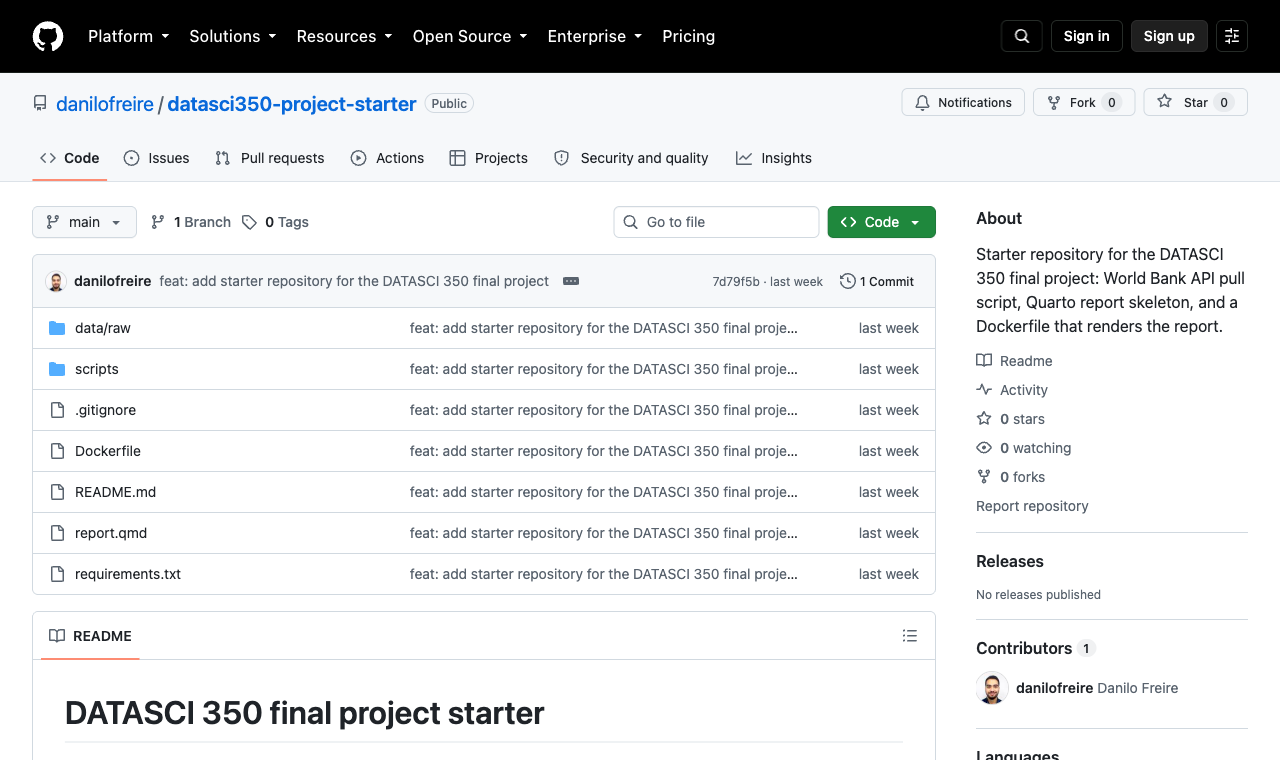
The starter repository
- Clone it from github.com/danilofreire/datasci350-project-starter:
- The split that matters:
scripts/pull_data.pytalks to the API, andreport.qmdreads onlydata/raw/
| Path | What it does |
|---|---|
scripts/pull_data.py |
Calls the World Bank API once and saves the response |
data/raw/ |
The saved snapshot, committed on purpose |
report.qmd |
The Quarto report, headings matching the rubric |
requirements.txt |
Some Python packages, pinned |
Dockerfile |
The recipe that builds the container |
.dockerignore |
What stays out of the image |
The pull script and the snapshot
Why data/raw/ is committed
scripts/pull_data.pyasks the World Bank for one indicator and writes two files:
- The tidy CSV is 97 lines: a header and 96 rows
- Four countries, 2000 to 2023
- Same API as Lectures 18 and 19, where we parsed the JSON by hand
- The starter’s
.gitignorecontains a note:
- The raw JSON lets you fix a tidying mistake without calling the API again
- 33 kB of JSON and 4 kB of CSV. Git handles that without complaint
Add data/raw/ to .gitignore and your build still succeeds. The failure arrives later, in my clone, when the report tries to read a file that never left your laptop: see it happen
requirements.txt for a report
The nine packages the report needs
- The file, comments and all:
# Talking to web APIs
requests==2.32.5

# Data processing (use either, or both)
# DuckDB runs SQL over your CSV files and
# hands the answer back as a pandas
# DataFrame when you call .df() on it.
pandas==3.0.5
duckdb==1.5.5

# Plotting
matplotlib==3.10.8

# Quarto needs these to run Python code
# inside report.qmd
ipykernel==7.2.0
jupyter-client==8.8.0
nbclient==0.10.4
nbformat==5.10.4
pyyaml==6.0.3| Package | Why it is there |
|---|---|
requests |
The pull script calls the API with it |
pandas |
The pull script tidies the API response with it, and DuckDB hands results back as pandas DataFrames |
duckdb |
Lecture 22’s SQL over files, used in the demo chunk |
matplotlib |
Draws the figure |
ipykernel |
Quarto starts a Python kernel through it |
jupyter-client |
Talks to that kernel |
nbclient, nbformat |
Execute and store the notebook Quarto builds |
pyyaml |
Quarto’s Python helper imports it |
- Students forget the last five. Quarto runs Python through Jupyter, so the image needs a kernel
- Nine pinned lines produce 53 installed packages inside the image
pip freeze | wc -lprinted 53, because every dependency brings its own
report.qmd and what it needs from the image
Python inside Quarto inside Ubuntu
- The demo chunk (trimmed):
import duckdb
import matplotlib.pyplot as plt

data = duckdb.sql(
    "SELECT country, year, value "
    "FROM 'data/raw/life_expectancy.csv' "
    "ORDER BY country, year"
).df()

print(f"Loaded {len(data)} rows covering "
      f"{data['country'].nunique()} countries.")

fig, ax = plt.subplots(figsize=(7, 4))
for country, subset in data.groupby("country"):
    ax.plot(subset["year"], subset["value"])
[...]
plt.show()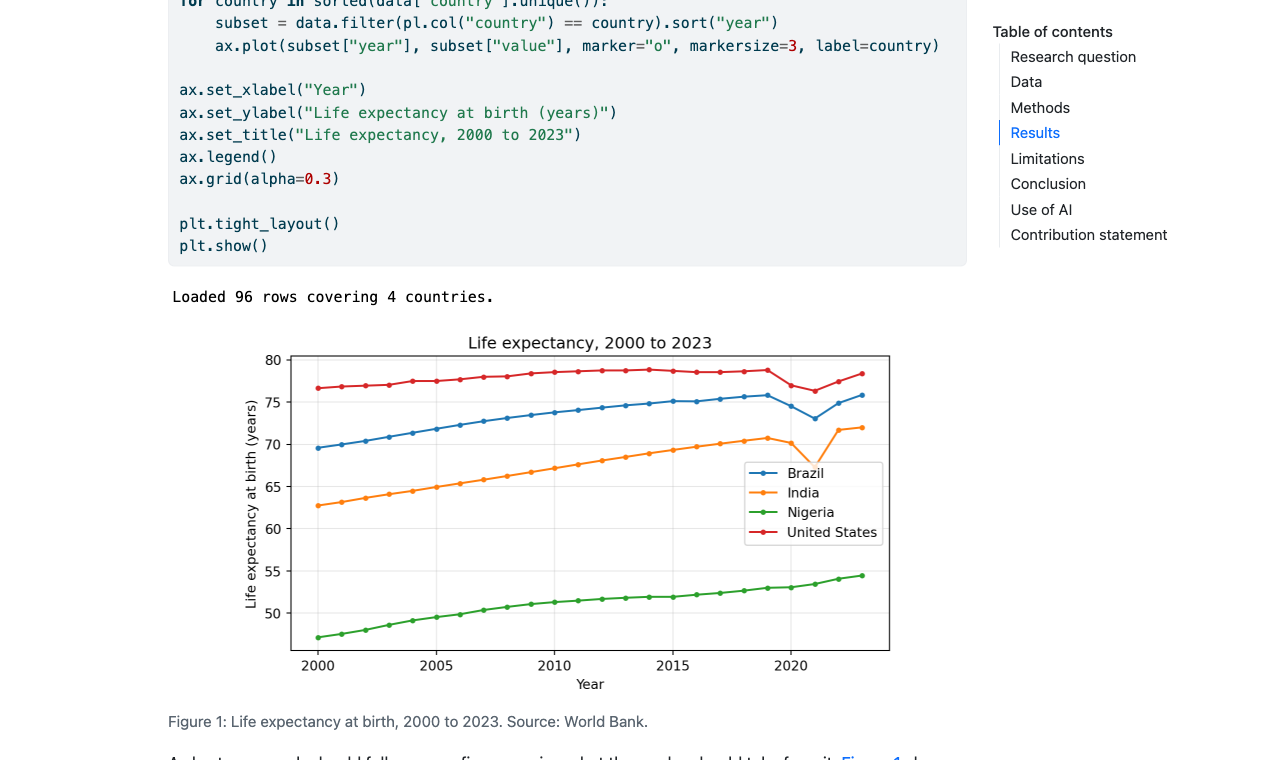
output/report.html
- Three things the image has to provide:
- A Python that has
duckdb,pandasandmatplotlib, and a kernel Quarto can start - The
quartobinary itself - The file
data/raw/life_expectancy.csvat that exact relative path
- A Python that has
embed-resources: trueputs the figures inside the HTMLoutput/report.htmlis one file you can email, 1.3 MB for mine
- Rendered inside the container, that print statement says
Loaded 96 rows covering 4 countries. - The header sets
echo: true, which shows your code in the report- The rubric asks for visible code, so leave that setting alone
The Dockerfile 🐳
The whole file
# 1. Base image
FROM ubuntu:24.04

# 2. Build-time settings
ENV DEBIAN_FRONTEND=noninteractive
SHELL ["/bin/bash", "-c"]

# 3. System packages
RUN apt-get update && apt-get install -y [...]

# 4. Quarto
RUN ARCH=$(dpkg --print-architecture) && [...]

# 5. Python environment
RUN python3 -m venv /opt/venv
ENV PATH="/opt/venv/bin:$PATH"
COPY requirements.txt /project/requirements.txt
RUN pip install --no-cache-dir -r /project/requirements.txt

# 6. Project files
WORKDIR /project
COPY . /project

# 7. Default command
ENV QUARTO_PYTHON=/opt/venv/bin/python
CMD ["bash", "-c", "quarto render report.qmd && [...]"]- Thirteen instructions in seven commented blocks
- Eight of them get a step number in the build log,
[1/8]to[8/8] ENV,SHELL, andCMDset metadata, so BuildKit does not number them- The comments in the real file are longer than the instructions
- Read them once, and change only what you need
- Lecture 23’s file had six instructions and one job: install two packages, run a script
- These thirteen install an operating system, a document engine, and a Python environment
Blocks 1 and 2: FROM, ENV, SHELL
# We pin the tag to "24.04" rather than "latest".
# "latest" changes over time, and a base image
# that changes breaks reproducibility.
FROM ubuntu:24.04

# DEBIAN_FRONTEND=noninteractive stops apt-get
# from asking questions during the build.
# Nobody is at the keyboard to answer them.
ENV DEBIAN_FRONTEND=noninteractive

# Use bash for the RUN steps below. Docker uses
# the simpler "sh" shell by default.
SHELL ["/bin/bash", "-c"]lateston the Ubuntu repository resolved to 24.04 last year, and today to 26.04FROM ubuntu:latestin September builds a different operating system in Decembertzdatais the package that would otherwise stop and ask you for a time zoneubuntu:24.04is about 29MB compressed, and 108MB once unpacked
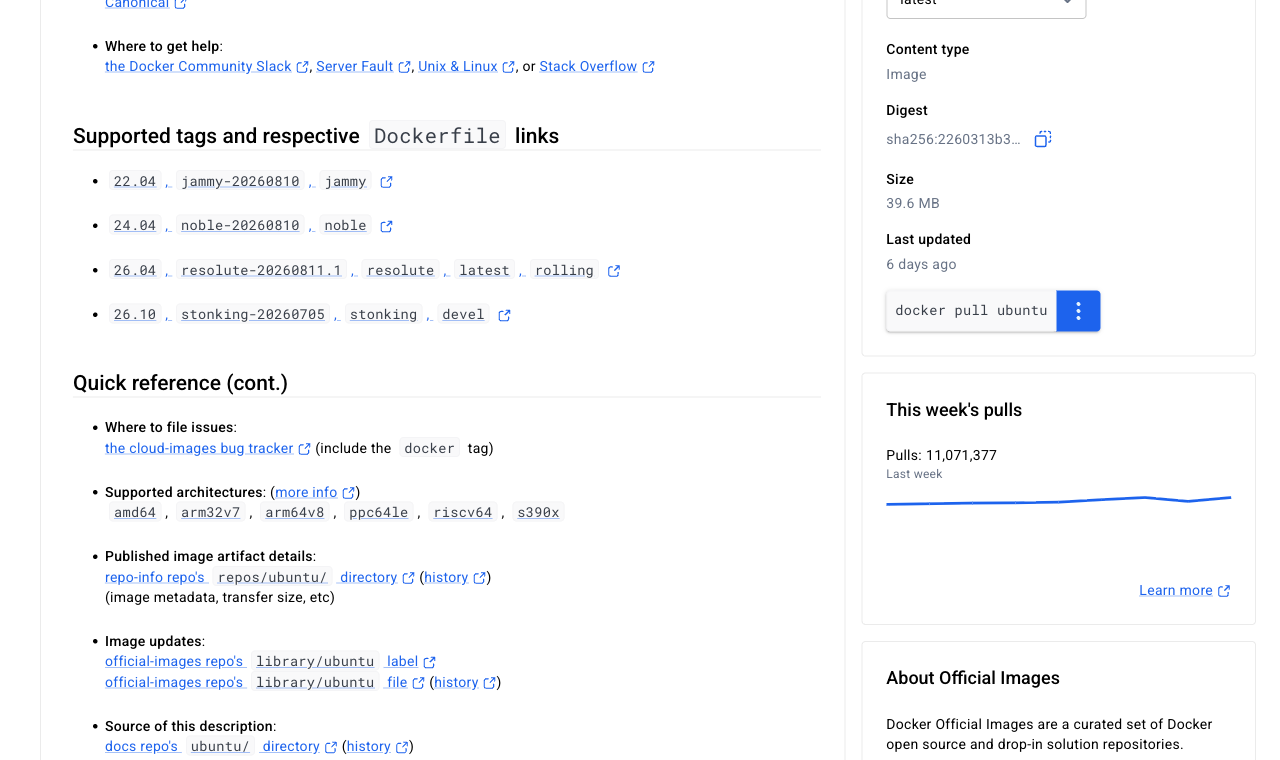
ENVpersists into the running container, sodocker runsees it tooSHELLmakes everyRUNbelow it usebashinstead of the simplersh-clets you pass a string of commands to the shell- The
ubuntuimage has no Python, so block 3 installs it - Quarto comes as a
.debfile, which needs a Debian-based system like Ubuntu
Block 3: RUN apt-get install
System packages in one layer
- One
RUNis one layer- Six
RUNlines here would give six layers and a bigger image
- Six
- Clean up in the same
RUN: a later layer cannot shrink an earlier one --no-install-recommendsskips optional extras- This step took 36.0 seconds cold
| Package | Why |
|---|---|
ca-certificates |
HTTPS downloads fail without it |
wget |
Fetches the Quarto .deb |
git |
Some Quarto extensions want it |
python3.12 |
The interpreter, version 3.12.3 here |
python3.12-venv |
Ubuntu ships venv separately |
python3-pip |
Installs into the virtual environment |
Block 4: Quarto
dpkg --print-architecture and a .deb
RUN ARCH=$(dpkg --print-architecture) && \
wget -q "https://github.com/quarto-dev/quarto-cli/releases/download/v1.10.18/quarto-1.10.18-linux-${ARCH}.deb" && \
apt-get update && \
apt-get install -y --no-install-recommends ./quarto-1.10.18-linux-${ARCH}.deb && \
rm quarto-1.10.18-linux-${ARCH}.deb && \
apt-get clean && rm -rf /var/lib/apt/lists/*- Quarto is absent from the Ubuntu package list, so we download the
.debfrom GitHub - The build printed this near the end of the step:
- 92.0 seconds, the slowest step in the whole build, well ahead of pip’s 51.4
- The
./in front of the filename tells apt to install a local file rather than search the archive apt-get updateruns a second time because block 3 deleted the package lists
- The version 1.10.18 is written out in full, so everyone builds the same file
- It appears four times on that line, so change all four when you move to a new Quarto
dpkg --print-architectureprintedarm64on my Mac,amd64on most Windows and Linux laptops- The same Dockerfile fetches the other file
- This laptop has Quarto 1.9.38 and the image has 1.10.18
- The image’s version renders your report, and it is the one I will run
Block 5: the virtual environment and pip
The layer order that makes rebuilds fast
# Ubuntu protects its own Python installation,
# so we create a virtual environment at
# /opt/venv and install our packages there.
RUN python3 -m venv /opt/venv
# PATH tells the shell where to look for
# programs. Putting /opt/venv/bin first means
# "python" and "pip" refer to the virtual
# environment, without activating it by hand.
ENV PATH="/opt/venv/bin:$PATH"
# We copy requirements.txt on its own, before
# the rest of the project.
COPY requirements.txt /project/requirements.txt
RUN pip install --no-cache-dir -r /project/requirements.txt- Lecture 23’s
venv, inside an image:ENV PATHreplacessource .venv/bin/activate - Ubuntu refuses a system-wide
pip installand tells you to make a virtual environment- The error is
externally-managed-environment: Appendix 02
- The error is
requirements.txtis the hand-written file in your repository, the one we read a few slides agoCOPYtakes it from the build context and puts a copy inside the image, andpipreads that copy
--no-cache-dirstops pip keeping a copy of every wheel inside the image- The install took 51.4 seconds and produced 53 packages
COPY requirements.txtcomes beforeCOPY . /project, so editingreport.qmdkeeps this slow step cached- The most useful ordering in the file, and it pays off on the rebuild slide
Blocks 6 and 7: WORKDIR, COPY ., CMD
Rendering into /project, copying into output/
# WORKDIR sets the folder that later
# instructions run inside.
WORKDIR /project
# Copy everything else from your repository into
# the image, including report.qmd and the saved
# data snapshot in data/raw/.
# The .dockerignore file next to this one lists
# what stays out.
COPY . /project
# QUARTO_PYTHON points Quarto at the virtual
# environment's Python.
ENV QUARTO_PYTHON=/opt/venv/bin/python
CMD ["bash", "-c", "quarto render report.qmd && mkdir -p output && cp -a report.html output/ && echo 'Rendered report is in output/report.html'"]COPY . /projectcopies the build context: the folder named by the.indocker build- The next slide keeps things out of it
ENV PATHalready points Quarto at/opt/venv.QUARTO_PYTHONmakes it explicit- The
CMDis three commands joined with&&: render, makeoutput/, copy the HTML in - Quarto clears its output folder before writing, but it cannot clear a folder mounted from outside
- Rendering into
/projectand copying afterwards avoids that
- Rendering into
- Lecture 23’s
CMD ["python", "hello.py"]used the same exec form: a list of strings, with no shell- Here the array starts
bash, which gives us the shell we need for&&
- Here the array starts
.dockerignore
What never enters the image
# Version control
.git
# Python environments and caches
.venv/
venv/
__pycache__/
# API keys never enter the image
.env
# Quarto working files and rendered output
.quarto/
*.quarto_ipynb
report.html
report_files/
output/
# Operating system clutter
.DS_Store
# NOTE: data/raw/ is deliberately absent. The
# snapshot must reach the image, because
# report.qmd reads it.- The file lives in the root of the build context, next to the
Dockerfile, and is committed with it
- Before the first instruction, Docker sends the build context to the engine. The same folder, with and without the file:
- 1.42MB down to 59.36kB. Both folders held
.git, the data, and a rendered report .gitignorekeeps files out of your repository;.dockerignorekeeps them out of your imagedata/raw/belongs in neither
- Leave
report.htmlout of the list and every render changes the context- That breaks the cache on
COPY . /projecteven when your source did not move
- That breaks the cache on
The first build
time docker build --no-cache --progress=plain -t datasci350-project .
#5 [1/8] FROM docker.io/library/ubuntu:24.04
#5 CACHED
#6 [2/8] RUN apt-get update && apt-get install [...]
#6 DONE 36.0s
#7 [3/8] RUN ARCH=$(dpkg --print-architecture) [...]
#7 91.74 Setting up quarto (1.10.18) ...
#7 DONE 92.0s
#8 [4/8] RUN python3 -m venv /opt/venv
#8 DONE 1.3s
#9 [5/8] COPY requirements.txt /project/requirements.txt
#9 DONE 0.0s
#10 [6/8] RUN pip install --no-cache-dir -r [...]
#10 50.70 Successfully installed asttokens-3.0.2 [...]
#10 DONE 51.4s
#11 [7/8] WORKDIR /project
#11 DONE 0.1s
#12 [8/8] COPY . /project
#12 DONE 0.1s
#13 exporting to image
#13 DONE 10.5s
docker build [...] 3:11.77 total--progress=plainprints the whole log instead of the animated summary- Use it when a build misbehaves
--no-cacheforces every step to run again, which is how I timed this- Read the log as eight numbered steps matching the eight layer-making instructions
- Three steps carry the time: Quarto at 92.0s, pip at 51.4s, apt at 36.0s
- Step
[1/8]saysCACHEDbecauseubuntu:24.04was already on my laptop- Pulling that base (about 29MB) took 38.6 seconds, once per machine
- Total wall clock: 3 minutes 11.77 seconds
- On an amd64 laptop, the same Dockerfile fetches amd64 files and gives the same report
Layer sizes
docker history shows what each instruction cost
docker history --format "{{.Size}}\t{{.CreatedBy}}" \
datasci350-project
0B CMD ["bash" "-c" "quarto render [...]
0B ENV QUARTO_PYTHON=/opt/venv/bin/python
81.9kB COPY . /project
0B WORKDIR /project
421MB RUN pip install --no-cache-dir -r [...]
4.1kB COPY requirements.txt [...]
0B ENV PATH=/opt/venv/bin:/usr/local/sbin:[...]
15.6MB RUN python3 -m venv /opt/venv
459MB RUN ARCH=$(dpkg --print-architecture) [...]
169MB RUN apt-get update && apt-get install [...]
0B SHELL [/bin/bash -c]
0B ENV DEBIAN_FRONTEND=noninteractive
108MB ADD file:0387b3d029de8fa08[...] in /
0B [...]docker historylists one row per layer, newest at the top- Quarto is the biggest layer at 459MB, ahead of pip’s 421MB
- apt adds 169MB, and the
ubuntu:24.04base is only 108MB
- apt adds 169MB, and the
ENV,SHELLandCMDonly set metadata.WORKDIRgets a step number but adds 0B- A
CACHEDstep skips the download as well as the work docker imagesreports 1.52GB on disk and 347MB content, because content size is measured compressed
Run, change, rebuild
Running the container
One flag decides whether you ever see the report
time docker run --rm \
-v "$(pwd)/output:/project/output" \
datasci350-project
Starting python3 kernel...Done
Executing 'report.quarto_ipynb'
Cell 1/1: 'fig-demo'...Done
[...]
Output created: report.html
Rendered report is in output/report.html
docker run [...] 3.237 total
ls -la output
-rw-r--r-- 1 dafreir staff 1314625 report.html- Three seconds, because the slow work happened at build time
| Part | What it does |
|---|---|
--rm |
Deletes the container when it exits |
-v host:container |
Connects a folder on your machine to one inside the container |
datasci350-project |
The image to start |
-vis short for volume: left of the colon is your laptop, right of it is the container$(pwd)is your current folder- PowerShell wants
${PWD}, the old Windows terminal%cd%
- PowerShell wants
$(pwd)gives an absolute path, which works everywhere. Recent Docker also accepts-v ./output:...docker runcreates a container from the image and starts it--rmdeletes it again before you finish reading the output
- The report is the only thing that survives the container, and it survives because of the mount
Forgetting the mount
The report renders and then vanishes
- The container said it succeeded, and it did succeed
- It wrote the report inside itself.
--rmthen deleted the container, and the file went with it - Nothing on your laptop changed
- The file really existed:
- Listed from inside the container before it exited, the file is there
- It is the same file the mounted run produced
- This is the most common Docker mistake in the course, and the terminal gives you no warning at all
A render inside a container that has already been deleted leaves nothing on your laptop. Check ls output after every run, and check the timestamp on the file
Change one line, rebuild
Layer caching on a real project
- I changed the title in
report.qmdand built again:
time docker build --progress=plain -t datasci350-project .
#4 transferring context: 4.95kB done
#5 [1/8] FROM docker.io/library/ubuntu:24.04
#5 DONE 0.0s
#6 [3/8] RUN ARCH=$(dpkg --print-architecture) [...]
#6 CACHED
#7 [2/8] RUN apt-get update && apt-get install [...]
#7 CACHED
#8 [5/8] COPY requirements.txt /project/requirements.txt
#8 CACHED
#9 [4/8] RUN python3 -m venv /opt/venv
#9 CACHED
#10 [6/8] RUN pip install --no-cache-dir -r [...]
#10 CACHED
#11 [7/8] WORKDIR /project
#11 CACHED
#12 [8/8] COPY . /project
#12 DONE 0.0s
docker build [...] 0.666 total- Seven steps cached, one rebuilt: 0.666 seconds, against 3 minutes 11.77 seconds cold
- Only
COPY . /projectsaw new input, because onlyreport.qmdchanged requirements.txtwas untouched, so the 51-secondpip installabove it stayed cached- The
#numbers are log IDs. The[n/8]labels give the real order - Edit
requirements.txtinstead, and the cache misses at[5/8]: pip and everything below run again - Rebuild after every edit. A second is cheap, and it keeps the image and your source in step
When something goes wrong ⚠️
Failure one: the data is not in the repository
What my clone sees
- I added
data/raw/to.gitignore, committed, and cloned the result into a fresh folder:
- The build succeeded. Nothing in the Dockerfile mentions the CSV, so nothing complained
- The failure waits until someone runs it
Test from a fresh clone in an empty folder. The folder where you wrote the code already has everything, including the files you forgot to commit
- The run, with the traceback trimmed to its last lines:
docker run --rm -v "$(pwd)/output:/project/output" \
datasci350-project-nodata
Starting python3 kernel...Done
Executing 'report.quarto_ipynb'
Cell 1/1: 'fig-demo'...
An error occurred while executing the following cell:
[...]
data = duckdb.sql("SELECT country, year, value "
"FROM 'data/raw/life_expectancy.csv' [...]").df()
[...]
IOException: IO Error: No files found that match
the pattern "data/raw/life_expectancy.csv"
WARN: Error encountered when rendering files
exit code: 1- The fix is two commands:
git add data/raw/andgit commit - Check it worked with
git ls-files data/raw, which should print two file names
Failure two: a pin that does not exist
pip fails, the build stops, nothing below it is cached
- I changed
duckdb==1.5.5toduckdb==1.5.9and built:
#10 [6/8] RUN pip install --no-cache-dir -r [...]
#10 0.818 Collecting pandas==3.0.5 [...]
#10 1.302 ERROR: Could not find a version that
satisfies the requirement duckdb==1.5.9
(from versions: [...] 1.5.4, 1.5.5, 1.5.6.dev36,
1.6.0.dev379, 2.0.0.dev2609121639)
#10 1.302 ERROR: No matching distribution found
for duckdb==1.5.9
Dockerfile:85
--------------------
84 | COPY requirements.txt /project/requirements.txt
85 | >>> RUN pip install --no-cache-dir -r /project/requirements.txt
--------------------
ERROR: failed to build: failed to solve: process
"/bin/bash -c pip install [...]" did not complete
successfully: exit code: 1- A BuildKit error has three useful parts:
- The step number
[6/8]names the instruction Dockerfile:85with the>>>marker names the line- The message above it is pip’s own output
- The step number
- The image is never created, so
docker imagesshows no new entry - Layers
[1/8]to[5/8]stay cached, so fixing the pin costs you the pip step and nothing more - Lecture 23’s appendix warned about
No matching distribution found. Here it is in a real build - Check a version before you pin it:
Inspecting a container that misbehaves
docker run -it and what it tells you
- Anything after the image name replaces the
CMD, so this starts a shell instead of rendering:
- Then look around, the way you would on any Linux machine:
- It answers the usual questions: which Quarto, which Python, which packages, is the data there?
-ikeeps input open and-tgives you a terminal: an interactive sessiondocker exec -it <container> bashdoes the same on a container already running- Anything you install in there is lost on exit. Fix
requirements.txtand rebuild instead docker logs <container>prints the output of a container you started without watching- Ten seconds inside the container settles whether a package is in the image
Cleaning up
Images are big, and Docker never deletes anything by itself
$ docker ps -a
CONTAINER ID IMAGE STATUS
5594bb583fbd hello-world Exited (0) 2 hours ago
$ docker system df
TYPE TOTAL ACTIVE SIZE RECLAIMABLE
Images 7 1 10.88GB 4.029GB (37%)
Containers 1 0 0B 0B
Build Cache 37 0 3.046GB 1.403GB
$ docker rm 5594bb583fbd
$ docker rmi datasci350-project-nodata
[...]
$ docker system prune
[...]
Total reclaimed space: 1.931GB
$ docker system df
Images 4 0 3.217GB 1.97GB (61%)
Containers 0 0 0B 0B
Build Cache 8 0 1.643GB 0B- One project image is 1.52GB on disk. A few experiments and failed builds soon reach 10GB or more
| Command | What it removes |
|---|---|
docker ps -a |
Nothing, it lists containers including exited ones |
docker rm <id> |
One stopped container |
docker rmi <image> |
One image |
docker system df |
Nothing, it reports what is using space |
docker system prune |
Stopped containers, unused networks, dangling images, build cache |
docker system prune -a |
All of the above plus every image not in use |
- A dangling image has no tag, usually left behind when you rebuild a tag
--rmondocker runis what stops the container list growing in the first place
docker system prune -a deletes every image no running container is using, including the one you spent three minutes building. Read the prompt before you type y
Beyond one Dockerfile
Ready-made images
Jupyter Docker Stacks and rocker
- The Jupyter Docker Stacks are official images with JupyterLab and scientific Python, on Quay.io
quay.io/jupyter/scipy-notebookis 5.28GB on disk (1.24GB of content), and took 23 minutes to pull here- It carries NumPy, pandas, SciPy, scikit-learn, matplotlib, and JupyterLab
- Start it and it prints a URL with a token, on port 8888:
- rocker does the same for R:
r-ver,rstudio,tidyverse,verse,geospatial
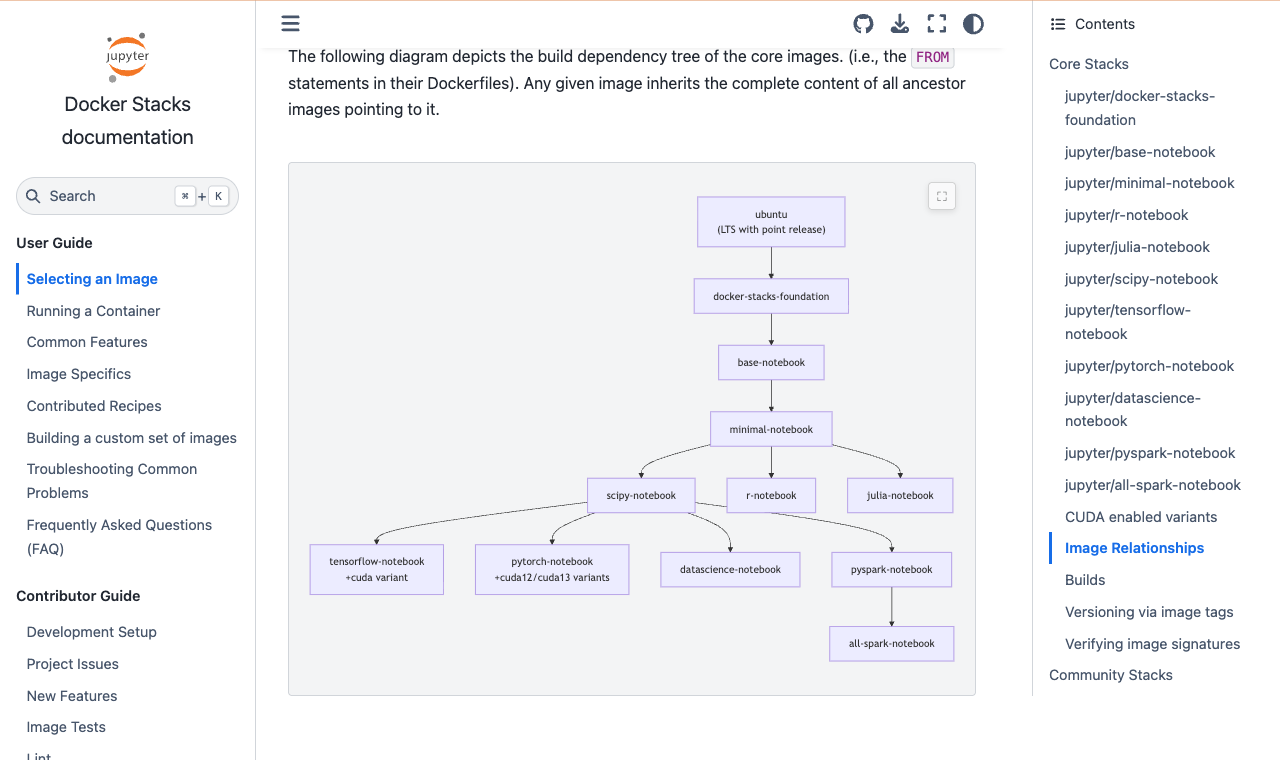
The stack builds on itself: ubuntu → docker-stacks-foundation → base-notebook → minimal-notebook → scipy-notebook. Docs
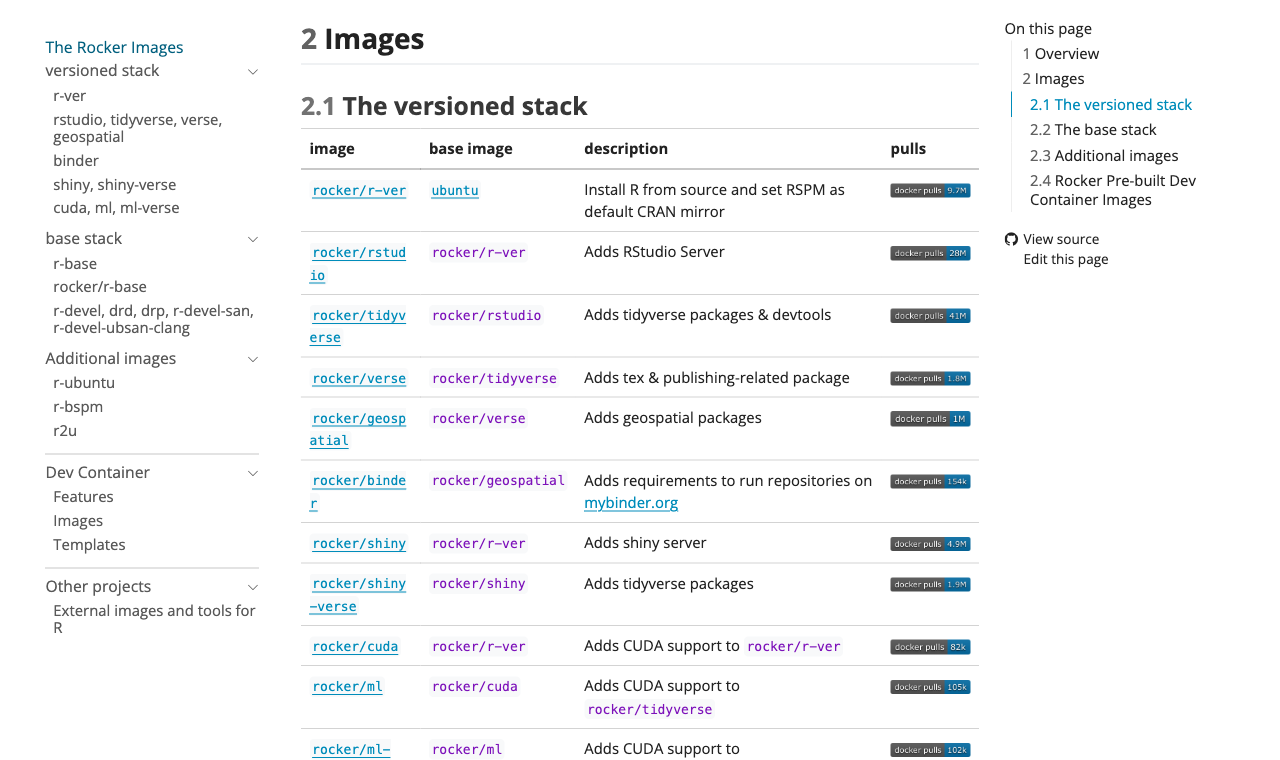
For the project, write your own Dockerfile: a 5GB image for one CSV reader is a poor trade
Where to put a built image
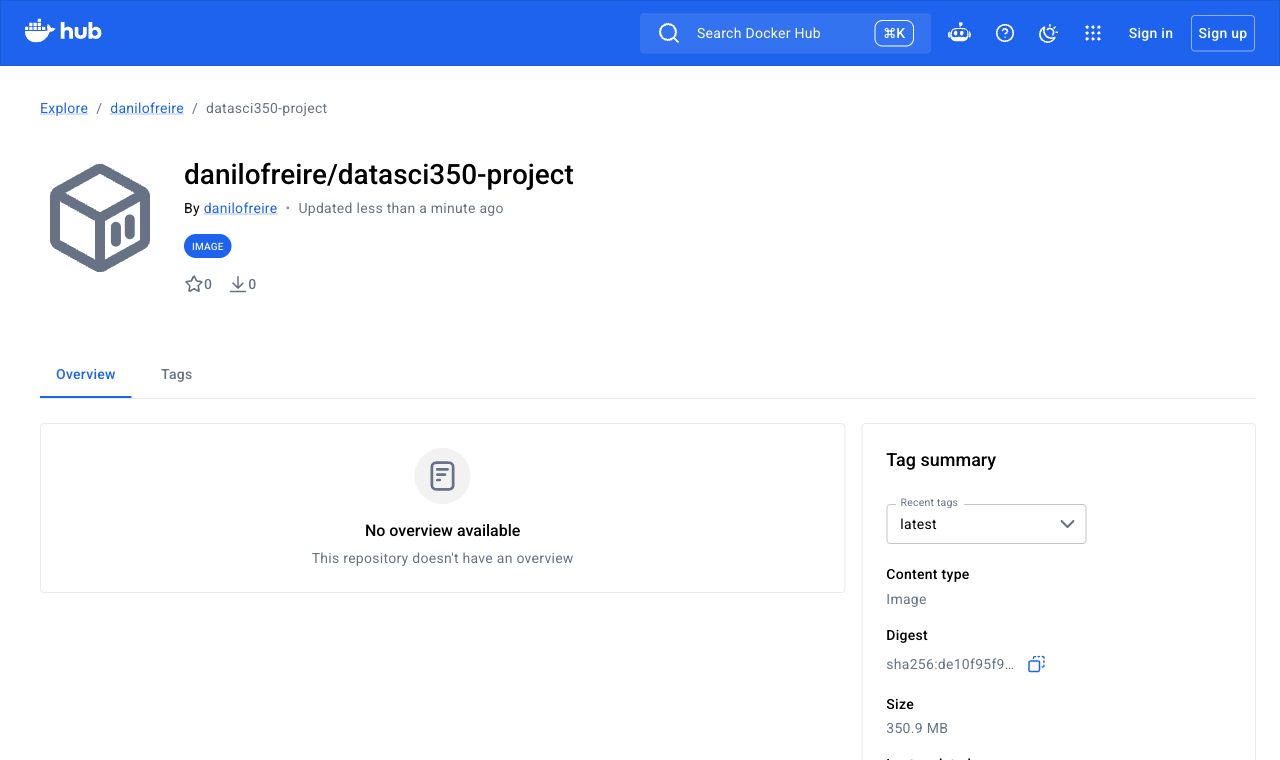
Docker Hub is optional for the project
- Push it with Lecture 23’s
buildxcommand, which builds for both kinds of chip:
- Docker Hub stores one image per chip: 334 MB for amd64 and 331 MB for arm64
- Anyone with Docker can then
docker pullanddocker runit, on Windows, Linux or any Mac, with no build - For the project, you never need to push: I build your image from your repository
- A pushed image freezes today’s apt versions along with everything else
Try it yourself! 🧠
At home, after class
Do this at home with your clone of the starter. Step 2 takes about a minute.
- Add
seaborn==0.13.2underduckdb==1.5.5inrequirements.txt - Run
docker build -t datasci350-project . - Read the log. Note which steps say
CACHED - In the demo chunk of
report.qmd, addimport seaborn as snsunderimport duckdb - Add
print(f"seaborn {sns.__version__}")under theLoadedprint - Build again, then run
docker run --rm -v "$(pwd)/output:/project/output" datasci350-project - Open
output/report.htmland find the lineseaborn 0.13.2
Solution and captured output: Appendix 01
What to look for:
- Steps
[1/8]to[4/8]stayCACHED: Ubuntu, apt, Quarto, and the empty venv - The miss lands at
[5/8] COPY requirements.txt, because that file changed - Everything below the miss rebuilds, and
pip installruns again for 50.0 seconds - The second build rebuilds only
COPY . /project, so it finishes in seconds - The report gains one line, and the image’s content grows from 347MB to 348MB
pip freezeinside the image goes from 53 packages to 54
Summary
What we learned today
The container part of your project
- Starter: pull script, committed snapshot, report, Dockerfile
- Marker’s test: five commands from a fresh clone, 30% of the project grade
- Dockerfile: seven blocks, base image to
CMD .dockerignore: keeps.git,output/, and.envout of the image- Secrets:
.envstays out of the image, through.dockerignore - Layer order:
COPY requirements.txtaboveCOPY . /project, so a rebuild takes a second
-v: without it the report dies with the container- Failure one: an uncommitted snapshot builds fine, fails at run time
- Failure two: a pin that does not exist stops the build
docker run -it ... bash: look inside when a render failsdocker system prune: keeps the disk under control- Ready-made images and Docker Hub: for exploring and sharing
- The appendices have the exercise solution and the common errors
The whole lecture fits in one sentence: git clone, docker build, docker run -v, open the report. If that works from a fresh folder, the container part of your project is finished
Next class
What happens between now and 8 December
Thursday 26 November is Thanksgiving. No class
Lecture 26, on 1 December, is revision. Bring your project repository and your questions, and we will build containers together in class
Quiz 05, on 3 December, covers Lectures 21, 22, 23, and 25. Assignment 10 is due the same day
Before then:
- Clone your own repository into a new, empty folder
- Run the five commands from the marking slide
- Run
git ls-files data/raw. It should print two file names - Run
git shortlog -sn. Every group member should appear
And that’s all for today! 🎉
Appendix 📚
Appendix 01: Exercise solution
What the rebuild printed
Step 1, in requirements.txt:
Steps 4 and 5, in the demo chunk of report.qmd:
import duckdb
import seaborn as sns
import matplotlib.pyplot as plt
data = duckdb.sql(
"SELECT country, year, value "
"FROM 'data/raw/life_expectancy.csv' "
"ORDER BY country, year"
).df()
print(f"Loaded {len(data)} rows covering "
f"{data['country'].nunique()} countries.")
print(f"seaborn {sns.__version__}")Step 7, in the rendered report:
- Reverting both files and rebuilding took 2.06 seconds, all
CACHED, back to 347MB and 53 packages
Steps 2 and 3, the rebuild on my laptop:
#5 [1/8] FROM docker.io/library/ubuntu:24.04
#5 DONE 0.0s
#6 [3/8] RUN ARCH=$(dpkg --print-architecture) [...]
#6 CACHED
#7 [2/8] RUN apt-get update && apt-get install [...]
#7 CACHED
#8 [4/8] RUN python3 -m venv /opt/venv
#8 CACHED
#9 [5/8] COPY requirements.txt /project/requirements.txt
#9 DONE 0.0s
#10 [6/8] RUN pip install --no-cache-dir -r [...]
#10 18.77 Downloading seaborn-0.13.2-[...].whl (294 kB)
#10 49.45 Successfully installed [...] seaborn-0.13.2 [...]
#10 DONE 50.0s
#11 [7/8] WORKDIR /project
#11 DONE 0.1s
#12 [8/8] COPY . /project
#12 DONE 0.1s
docker build [...] 57.726 total- Four steps cached, four rebuilt. The miss at
#9forced everything below it to run again - pip reinstalled all 54 packages, because the layer is rebuilt from nothing
Appendix 02: When something goes wrong
Errors from this lecture’s build
IOException: No files found that match [...] life_expectancy.csv
The snapshot never reached the repository. Run git add data/raw/, commit, and check with git ls-files data/raw.
No matching distribution found for duckdb==1.5.9
That version does not exist on PyPI. Run pip index versions duckdb and pin one it lists.
ls: output: No such file or directory
You ran the container without -v. Add -v "$(pwd)/output:/project/output", or ${PWD} in PowerShell. On Linux the message reads ls: cannot access 'output'.
error: externally-managed-environment
You ran pip install against Ubuntu’s own Python. Create a virtual environment and put /opt/venv/bin first in PATH.
failed to read dockerfile: open Dockerfile
You are in the wrong folder. The . in docker build -t name . is where Docker looks, so cd into the folder with the Dockerfile.
NoSuchKernel: No such kernel named python3
ipykernel is missing from requirements.txt, so Quarto cannot start a kernel. Put ipykernel==7.2.0 back and rebuild.
toomanyrequests: pull rate limit
Docker Hub allows 100 anonymous pulls every six hours from one address, and 200 once you log in. Run docker login and build again.
Appendix 03: The complete Dockerfile
As shipped in the starter
# 1. Base image
# FROM chooses the starting point: Ubuntu 24.04,
# the system you saw in the containers lecture.
# We pin the tag to "24.04" rather than "latest".
FROM ubuntu:24.04
# 2. Build-time settings
ENV DEBIAN_FRONTEND=noninteractive
SHELL ["/bin/bash", "-c"]
# 3. System packages
# We do not pin apt versions here. Ubuntu replaces
# a version whenever it ships a security fix, and a
# pin that no longer exists stops the build. The
# base image tag and requirements.txt carry the pins.
RUN apt-get update && apt-get install -y --no-install-recommends \
    ca-certificates \
    wget \
    git \
    python3.12 \
    python3.12-venv \
    python3-pip && \
    apt-get clean && rm -rf /var/lib/apt/lists/*
# 4. Quarto
# Quarto is not in the Ubuntu package list, so we
# download the .deb from GitHub. The version is
# written out in full, so the image you build is
# the image everyone else builds.
RUN ARCH=$(dpkg --print-architecture) && \
    wget -q "https://github.com/quarto-dev/quarto-cli/releases/download/v1.10.18/quarto-1.10.18-linux-${ARCH}.deb" && \
    apt-get update && \
    apt-get install -y --no-install-recommends ./quarto-1.10.18-linux-${ARCH}.deb && \
    rm quarto-1.10.18-linux-${ARCH}.deb && \
apt-get clean && rm -rf /var/lib/apt/lists/*# 5. Python environment
# Ubuntu protects its own Python installation, so
# we create a virtual environment at /opt/venv and
# install our packages there.
RUN python3 -m venv /opt/venv
# PATH tells the shell where to look for programs.
ENV PATH="/opt/venv/bin:$PATH"
# We copy requirements.txt on its own, before the
# rest of the project. Docker caches each layer.
COPY requirements.txt /project/requirements.txt
RUN pip install --no-cache-dir -r /project/requirements.txt
# 6. Project files
# WORKDIR sets the folder that later instructions
# run inside.
WORKDIR /project
# Copy everything else from your repository into
# the image, including report.qmd and the saved
# data snapshot in data/raw/.
# The .dockerignore file next to this one lists
# what stays out.
COPY . /project
# 7. Default command
# We render first and copy afterwards. Quarto
# clears its output folder before writing, and it
# cannot clear a folder Docker mounted from outside.
# QUARTO_PYTHON points Quarto at the venv's Python.
ENV QUARTO_PYTHON=/opt/venv/bin/python
CMD ["bash", "-c", "quarto render report.qmd && mkdir -p output && cp -a report.html output/ && echo 'Rendered report is in output/report.html'"]- The starter is at commit
eb4b6f8 - Comments are trimmed here. The file in your clone explains every line
Appendix 04: Docker Compose
The same build and run, written down once
- Typing
docker run --rm -v "$(pwd)/output:/project/output" datasci350-projecttwenty times is how typos happen:
- Save it as
compose.yamlnext to yourDockerfile, thoughdocker-compose.ymlstill works:
- Compose reads the relative path
./outputfor you, so$(pwd)never appears - Compose is really for several containers working together: a database, an API, a notebook
downremoves the container and the network it createddocker composewith a space is the current command;docker-composewith a hyphen is the legacy one- This laptop runs Compose v5.1.2
- The starter ships no compose file, so write your own
- What it printed on this laptop: