sequenceDiagram
participant C as Your laptop
participant S as api.worldbank.org
C->>S: GET /v2/country/BRA/...
Note right of S: look up data
S-->>C: 200 OK + JSON
C->>C: parse and analyse
Lecture 18 - Web APIs and JSON
t3.micro running Ubuntu Server 26.04, on the free plan ($100 in credits, up to $100 more)chmod 400 on the private key, and connected with ssh -iaptscp and wget, then forwarded port 8888 so Jupyter on the instance opened in our own browsert3.micro left running costs about $7.50 a monthSource: K21
Create caseAccount and billing supportrequests, then process it with DuckDB or Polarsdata/raw/; the report reads only that snapshotThe starter repository: https://github.com/danilofreire/datasci350-project-starter
| Component | Weight |
|---|---|
| Reproducibility | 30% |
| Analysis quality | 30% |
| Communication | 20% |
| Code quality | 10% |
| Git workflow | 10% |
If docker run on my machine does not reproduce your report, your project does not exist 😅
.env fileEvery piece of this will make sense by the end of the module 😉
1. What an API is
2. HTTP
GET and POST3. JSON
4. The requests library
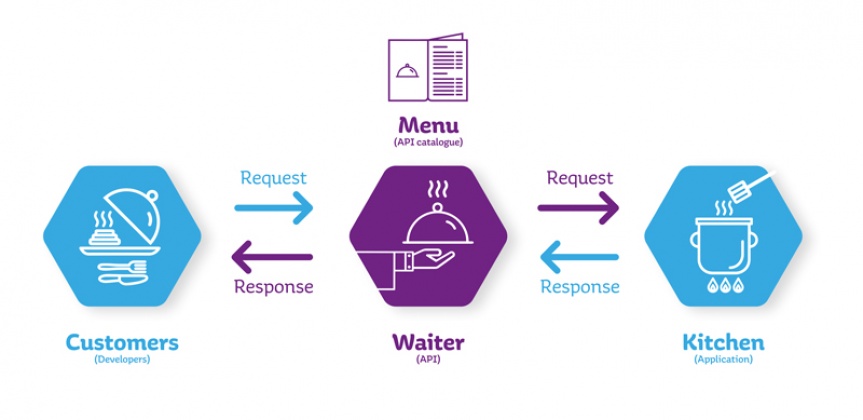
Source: Manutan
| Restaurant | API |
|---|---|
| Menu | Documentation |
| Order | HTTP request |
| Kitchen | Server |
| Dish | JSON response |
| “We’re out of that” | 404 Not Found |
| “One order per customer” | Rate limit |
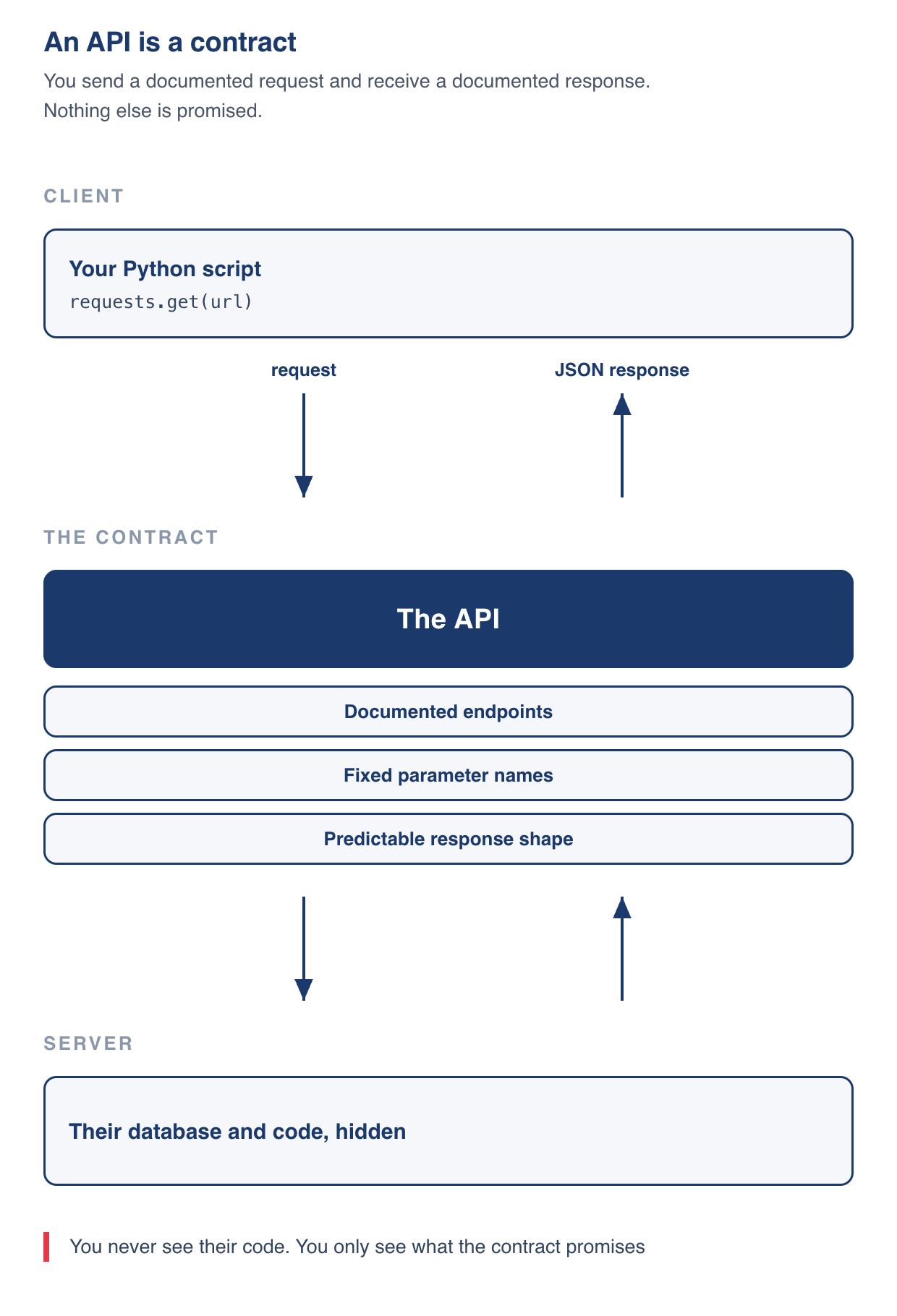
sequenceDiagram
participant C as Your laptop
participant S as api.worldbank.org
C->>S: GET /v2/country/BRA/...
Note right of S: look up data
S-->>C: 200 OK + JSON
C->>C: parse and analyse
pandas has an API. Your operating system has an APIcurl from the terminal all can do this/country/BRA). Most public data APIs follow it/v2/country/{code}/indicator/{code}| Kind | What it costs you | Examples |
|---|---|---|
| Open and keyless | Nothing. Just fetch the URL | Open-Meteo, World Bank, National Weather Service, USGS earthquakes, GitHub |
| Free but key-required | A signup form, then a key in every request | NASA, OpenWeatherMap, GitHub for higher limits |
| Paid | A key and a bill | OpenRouter, most commercial data vendors |
NY = Net Income, GDP = Gross Domestic Product, PCAP = Per Capita, KD = Constant Dollarshttps://api.worldbank.org/v2/country/BRA/indicator/NY.GDP.PCAP.KD?format=json&date=2014:2025
| Part | Name | What it does |
|---|---|---|
| https | scheme | Which protocol. Almost always https |
| api.worldbank.org | host | Which machine to ask |
| /v2/country/BRA/indicator/… | path | Which resource on that machine |
| format=json&date=2014:2025 | query string | Options, as key=value pairs joined by & |
? and never appears before itkey=value, and options are joined by &?format=json&date=2014:2025&per_page=100
^^^^^^^^^^ ^^^^^^^^^^^^^^ ^^^^^^^^^^^^
option 1 option 2 option 3
?a=1&b=2 and ?b=2&a=1 are the same request?, &, =, / or space, because those characters already mean something. They are percent-encoded insteadrequests does it for you| You write | It travels as | You write | It travels as | |
|---|---|---|---|---|
| space | %20 or + |
= |
%3D |
|
/ |
%2F |
: |
%3A |
|
? |
%3F |
# |
%23 |
|
& |
%26 |
% |
%25 |
% followed by the character’s byte in hexadecimal (remember them? 😉)America/New_York becomes America%2FNew_York, and 2014:2025 becomes 2014%3A2025urllib.parse.quoteGET: “please send me this”POST: “here is some data”POST body, because a paragraph of text does not belong in a URLThere are other methods (PUT, DELETE, PATCH). You will rarely need them for reading public data
2xx worked, 4xx you made a mistake, 5xx they made a mistake| Code | Name | What it really means |
|---|---|---|
200 |
OK | It worked. Go ahead and parse |
301 / 302 |
Moved | The resource lives elsewhere now. requests follows these for you |
400 |
Bad Request | Your URL is malformed. Check the query string |
401 |
Unauthorized | You need a key, or yours is wrong |
403 |
Forbidden | You authenticated but lack permission for this resource |
404 |
Not Found | Nothing at that path. Usually a typo |
429 |
Too Many Requests | You are asking too fast. Slow down |
500 |
Internal Server Error | Their problem. Wait and retry |
Some APIs answer errors with 200 and hide the failure in the body. The World Bank does this, so a status check alone is not enough (more on this later)
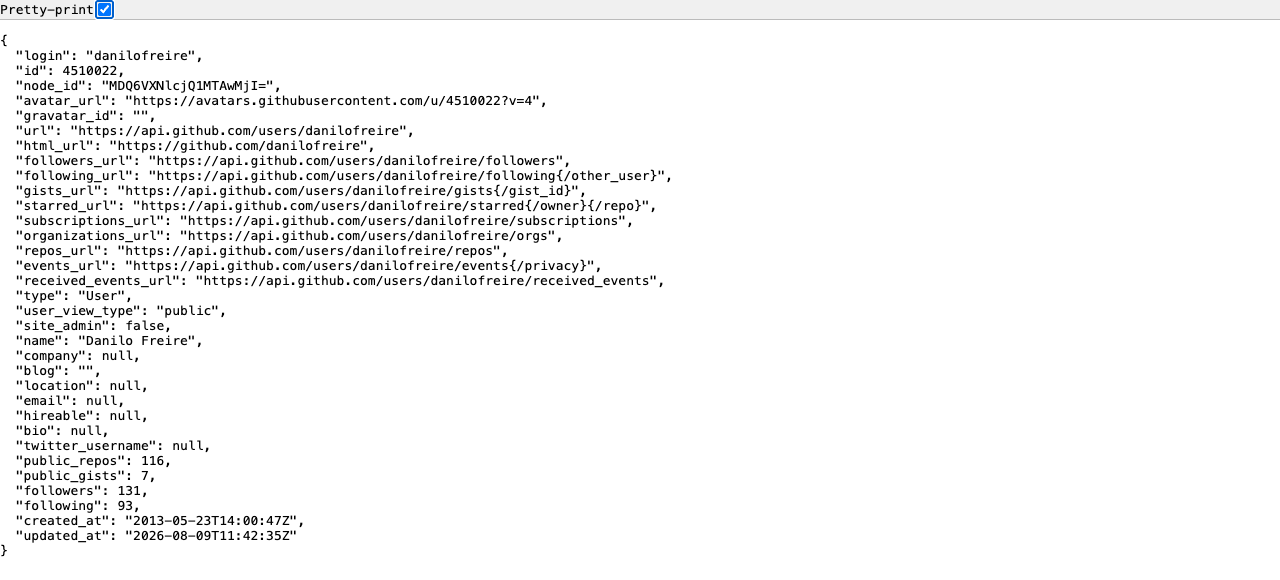
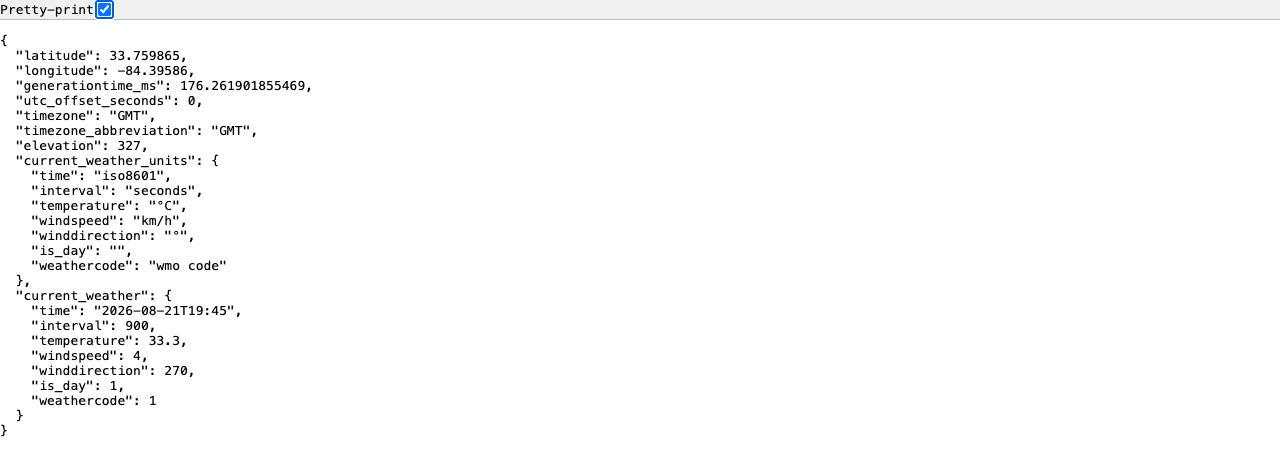
GET for you and shows you the raw responsecurl from Module 02:-s hides the progress meter, and python3 -m json.tool pretty-prints the resulthttps://api.open-meteo.com/v1/forecast33.75, longitude -84.39What to look for
Stuck, or want to compare your URL with mine?
It maps almost perfectly onto Python
| JSON | Python |
|---|---|
{...} object |
dict |
[...] array |
list |
"text" |
str |
42, 3.14 |
int, float |
true / false |
True / False |
null |
None |
JSON keys are always strings in double quotes, and JSON allows no trailing commas
json.loads() turns text into a dictionaryThe json module ships with Python, so there is nothing to install
json.loads(text) reads a string of JSON into Python objectsjson.load(file) does the same from an open filedict, so square brackets get you infalse arrives as a real Python False, never the text "false"The saved reply, printed with indentation so the nesting is visible
{
"latitude": 33.759865,
"longitude": -84.39586,
"generationtime_ms": 0.06091594696044922,
"utc_offset_seconds": -14400,
"timezone": "America/New_York",
"timezone_abbreviation": "GMT-4",
"elevation": 316.0,
"current_units": {
"time": "iso8601",
"interval": "seconds",
"temperature_2m": "\u00b0C",
"relative_humidity_2m": "%",
"wind_speed_10m": "km/h"
},
"current": {
"time": "2026-08-21T16:00",
"interval": 900,
"temperature_2m": 33.2,
"relative_humidity_2m": 42,
"wind_speed_10m": 4.4
}
}current holds another dict inside itcurrent_units names the unit of every field, so nobody has to guess whether 33.2 is Celsius or Fahrenheittime is a string, because JSON has no date type. Parsing it is your jobjson.dumps() converts a Python object back to JSON text, and indent=2 makes it readableNested data means chained lookups, and every step on the way is printable
data.keys() lists the keys available at one level.get("key") where a key might be missing, and get None instead of KeyErrorKeyError: 'temperature' means no such key at that level. Print the level and read the spelling the API uses
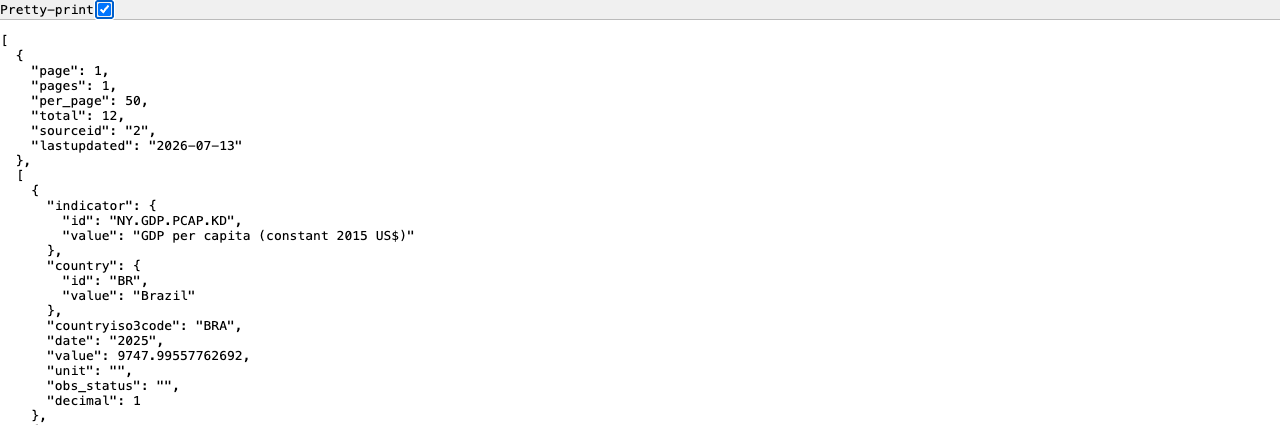
Not every API answers with a tidy dict at the top
Top level is a list with 2 elements
Element 0 (metadata): {'page': 1, 'pages': 1,
'per_page': 100, 'total': 12, 'sourceid': '2',
'lastupdated': '2026-07-13'}
Element 1 is a list with 12 records
First record: {
"indicator": {
"id": "NY.GDP.PCAP.KD",
"value": "GDP per capita (constant 2015 US$)"
},
"country": {
"id": "BR",
"value": "Brazil"
},
"countryiso3code": "BRA",
"date": "2025",
"value": 9747.99557762692,
[...]
}page, pages, per_page, total, lastupdatedwb[1][0] is the 2025 observationlastupdated tells you when the World Bank last revised the seriesAssume a plain list of records, write wb[0]["value"], and you get a confusing error or a wrong number
A real value lives at wb[1][0]["value"]: element 1 for the data, [0] for the newest record, ["value"] for the number
A response from a fictional course API:
{
"department": "Data and Decision Sciences",
"term": "Fall 2026",
"courses": [
{"code": "DATASCI 350",
"title": "Data Science Computing",
"enrolled": 40,
"instructor": {"name": "Danilo Freire",
"office": "PAIS 480"}},
{"code": "DATASCI 101",
"title": "Introduction to AI Applications",
"enrolled": 65,
"instructor": {"name": "Danilo Freire",
"office": "PAIS 480"}}
],
"updated": null
}json.loads()updated and its typeStuck, or want to compare your code with mine?
requests library 🐍requests is not in the standard library, so install it once with pip install requests
More information here: https://github.com/psf/requests
r.status_code is the number from the status-code slider.json() runs json.loads(r.text) for your.text hands you the raw body when the answer is not JSONrequests build the URLHand requests a params dictionary and it writes the query string for you
%2C and the slash became %2F, with no work from yourequests turns them into textr.url shows exactly what was sent, which makes it a debugging toolraise_for_status(), and the failure it cannot seer.json() on an error page raises a confusing exception, because an error page is not JSON
A friendlier version for scripts other people will run:
timeout. Without it a silent server hangs your script indefinitelyHTTPError means a status you did not want; RequestException means you never got oneThe World Bank retired the old CO2 indicator, and this is how it says so:
The status is 200, so raise_for_status() passes and r.json() succeeds. Check the shape of the body as well, every time
Twelve years of Brazilian GDP per capita, in one request
import requests, json
country = "BRA"
# GDP per capita, constant 2015 US$
indicator = "NY.GDP.PCAP.KD"
url = ("https://api.worldbank.org/v2"
f"/country/{country}/indicator/{indicator}")
params = {"format": "json", "date": "2014:2025",
"per_page": 100}
r = requests.get(url, params=params, timeout=10)
r.raise_for_status()
wb = r.json()
with open("data/wb_gdp_bra.json", "w") as f:
json.dump(wb, f)
print(r.status_code, wb[0]["total"], "records saved")format=json is not optional. Leave it out and the World Bank sends XMLdate takes a range with a colon: 2014:2025per_page=100 asks for the whole range in one page, so there is nothing to paginateurl from two variables makes the next country a one-word editUnpack the two elements, then sort the records oldest first
with open("data/wb_gdp_bra.json") as f:
wb = json.load(f)
meta, records = wb[0], wb[1]
print(f"{meta['total']} records, "
f"page {meta['page']} of {meta['pages']}\n")
# Build a list of (year, value) pairs, oldest first
series = [(int(r["date"]), r["value"]) for r in records]
series.sort()
for year, value in series:
print(f" {year} {value:>10,.0f} US$")meta, records = wb[0], wb[1] gives the two halves names you can readint(r["date"]) matters: the API sends years as strings, and strings sort oddlypage 1 of 1 says the whole range arrived, with nothing waiting on a second page{value:>10,.0f} right-aligns the number, adds thousands separators, and drops the decimalsYou already know pandas, so the analysis starts here
pd.DataFrame reads a list of tuples as rows, and columns names thempct_change() compares each row with the one above, so 2014 has no answer and prints NaNEvery API reference answers the same four questions
https://api.worldbank.org/v2{country} or :country in the docs?, with their defaults and allowed valuesRead in that order, then copy the example request, run it unchanged, and only then start editing
EN.ATM.CO2E.PC now answers with an error message and a 200/v2/, so a guide written for /v1/ may not matchThe World Bank’s call structures page
More information here: https://datahelpdesk.worldbank.org/knowledgebase/articles/898581-api-basic-call-structures
GET for reading, and a status code in replyrequests is the tool, and three lines cover the whole journeyparams build your query string, and read r.url to check ittimeoutraise_for_status(), then look at the body anywayjson_normalize, and why parquet beats CSVget_wdi(), the function you will use in your final projectBefore then
A table of keyless APIs to explore is in Appendix 04
Group names are due by Thursday 5 November, and I assign the rest at random
Open-Meteo needs latitude and longitude, and current asks for present conditions
https://api.open-meteo.com/v1/forecast?latitude=33.75
&longitude=-84.39¤t=temperature_2m
Adding a timezone makes the timestamp readable:
https://api.open-meteo.com/v1/forecast?latitude=33.75
&longitude=-84.39¤t=temperature_2m
&timezone=America%2FNew_York
The same request in Python:
requests encoded the / in the timezone as %2F, which is params earning its keeptimezone the time comes back in GMT, which reads oddly for Atlantaimport json
text = '''
{
"department": "Data and Decision Sciences",
"term": "Fall 2026",
"courses": [
{"code": "DATASCI 350",
"title": "Data Science Computing",
"enrolled": 40,
"instructor": {"name": "Danilo Freire",
"office": "PAIS 480"}},
{"code": "DATASCI 101",
"title": "Introduction to AI Applications",
"enrolled": 65,
"instructor": {"name": "Danilo Freire",
"office": "PAIS 480"}}
],
"updated": null
}
'''
data = json.loads(text)
# 1. Title of the second course: index 1 of the courses list
print(data["courses"][1]["title"])
# 2. Office of the first course's instructor: three steps down
print(data["courses"][0]["instructor"]["office"])
# 3. Total enrolment
print(sum(c["enrolled"] for c in data["courses"]))
# And the one that catches people out
print(data["updated"], type(data["updated"]))data["courses"] is a list, so [1] picks the second courseinstructornull became None, never the string "null", which is the JSON-to-Python mapping doing its jobURY, for Uruguay.SP.POP.TOTL, total population.format=json and set date to 2014:2025.timeout, then call raise_for_status().data/wb_pop_ury.json.Hint: only the two path pieces change. The parsing you wrote for Brazil still works
What to look for
Stuck, or want to compare your code with mine?
Only the two path pieces change
import requests, json
country = "URY"
indicator = "SP.POP.TOTL"
url = ("https://api.worldbank.org/v2"
f"/country/{country}/indicator/{indicator}")
r = requests.get(url,
params={"format": "json",
"date": "2014:2025",
"per_page": 100},
timeout=10)
r.raise_for_status()
with open("data/wb_pop_ury.json", "w") as f:
json.dump(r.json(), f)
print(r.status_code, r.json()[0]["total"], "records")country and indicator are the only two edits, and the rest of the script is the Brazilian one200 with an error message, so read the countimport json
with open("data/wb_pop_ury.json") as f:
wb = json.load(f)
records = wb[1]
# The 2020 value
for r in records:
if r["date"] == "2020":
print(f"Uruguay, 2020: {r['value']:,} people")
# The whole series, for context
print()
for r in sorted(records, key=lambda x: x["date"]):
print(f" {r['date']} {r['value']:>12,}")wb[1] is the data list, exactly as in the Brazilian responser["date"] with the string "2020", because the API sends years as text{:,} adds the thousands separators, which makes seven digits readableAll of these answered a keyless request on 21 August 2026
| API | What it gives you | Documentation |
|---|---|---|
| Open-Meteo | Weather forecasts and history, anywhere | https://open-meteo.com/en/docs |
| World Bank | 29,544 development indicators, all countries | https://datahelpdesk.worldbank.org/knowledgebase/topics/125589 |
| National Weather Service | US forecasts and alerts, from api.weather.gov/points/{lat},{lon} |
https://www.weather.gov/documentation/services-web-api |
| GitHub | Repositories, users, commits (keyless with low limits) | https://docs.github.com/en/rest |
| Open Library | Books, authors, covers, by ISBN (occasionally flaky) | https://openlibrary.org/developers/api |
| USGS Earthquakes | Every recorded earthquake, live | https://earthquake.usgs.gov/fdsnws/event/1/ |
Pick one this week and fetch something from it. Twenty minutes of playing beats another hour of slides
| Header | Purpose |
|---|---|
User-Agent |
Who is asking. Browsers set this; polite scripts should too |
Accept |
What format you want back (application/json) |
Authorization |
Your API key. Covered in Lecture 19 |
Content-Type |
Format of data you are sending (for POST) |
# What requests sends by default
r = requests.get(url, timeout=10)
print(r.request.headers)
# {'User-Agent': 'python-requests/2.34.2',
# 'Accept-Encoding': 'gzip, deflate, zstd',
# 'Accept': '*/*',
# 'Connection': 'keep-alive'}
# Response headers worth reading
print(r.headers["Content-Type"])
# application/json; charset=utf-8requests sends sensible defaults, so you can ignore headers until you need them