DATASCI 101: Introduction to AI Applications

Lecture 12: RAG, Semantic Search, and Grounding AI

Danilo Freire

Department of Data and Decision Sciences
Emory University

Welcome back! 📚

Recap of last class

  • Last time: hallucinations
  • Why they happen: no fact-checking mechanism, sycophancy
  • Types: factual errors, fake citations, logical contradictions
  • Higher risk for: recent events, legal/medical, obscure topics
  • Prompting helps, but doesn’t fully solve the problem
  • Today: what if AI could access your own documents? 📄
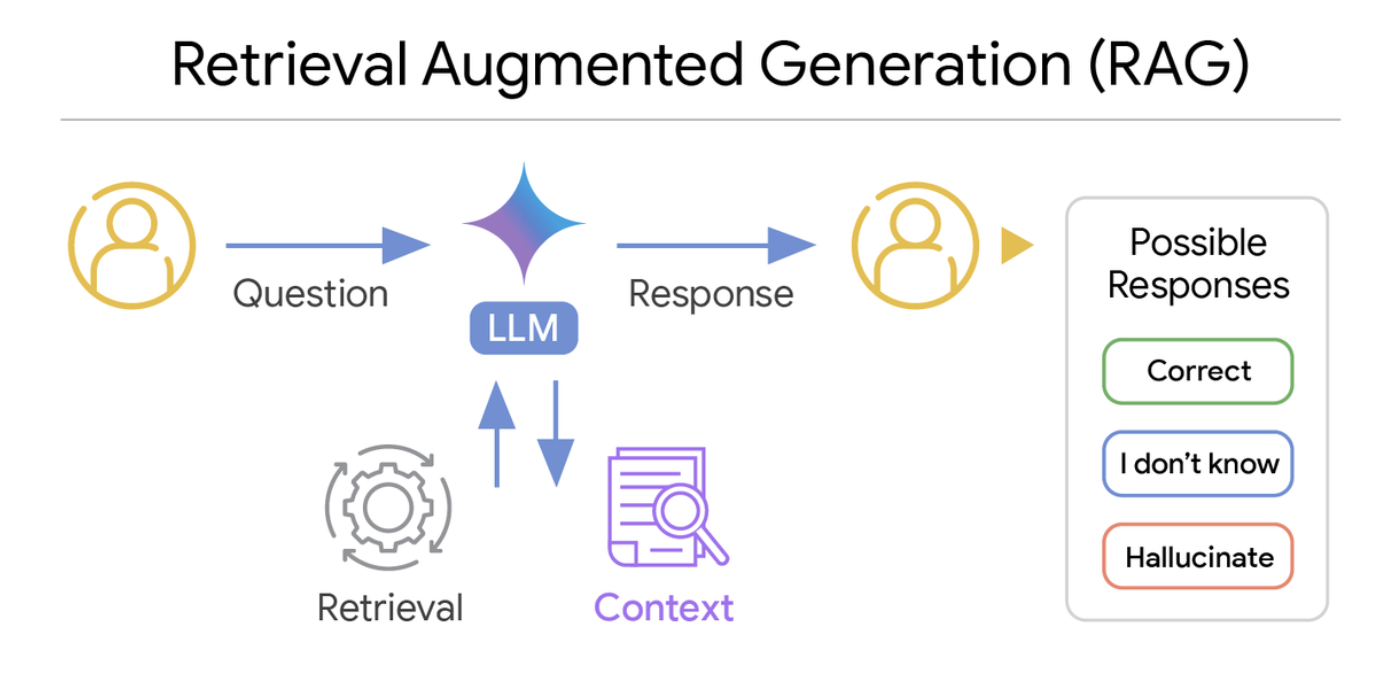
In a RAG system, an LLM uses retrieved context to provide a response to the input question

Source: Google Research

Lecture overview

Today’s agenda

Part 1: The Problem

  • Quick recap: hallucinations and knowledge cutoffs (from Lecture 11)
  • How RAG solves both problems

Part 2: Semantic Search

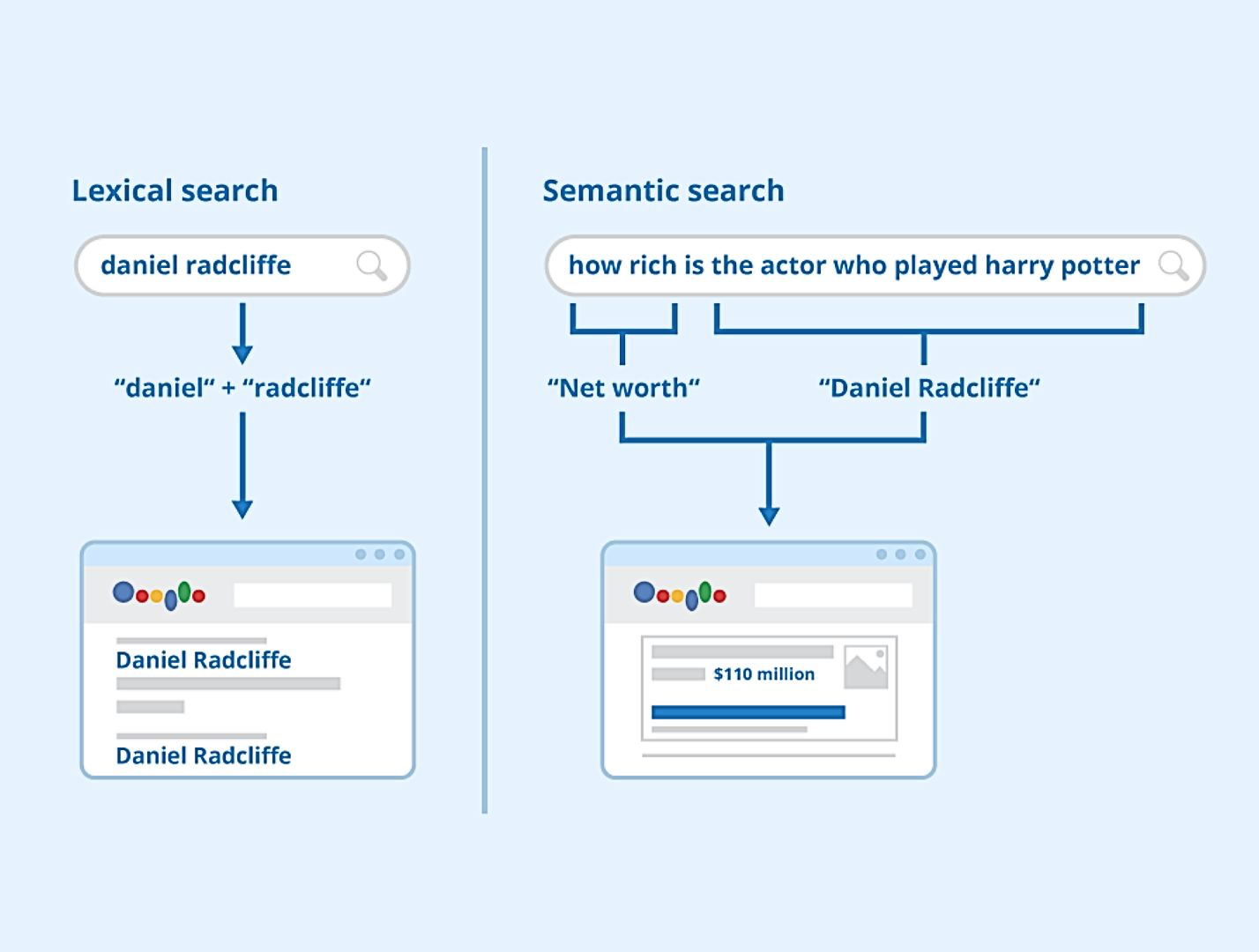
  • Finding by meaning, not just keywords
  • Quick embeddings recap
  • Why this matters for RAG

Part 3: The RAG Pipeline

  • How documents become searchable
  • Chunking, embedding, retrieving
  • From question to grounded answer

Part 4: No-Code Tools

  • Gemini Notebook (formerly NotebookLM) and file uploads
  • Build your own RAG system today! 🛠️

Meme of the day 😄

Source: Bhavishya Pandit

Quick recap: Hallucinations 🤥

  • LLMs are pattern-matching machines: they generate text that fits statistical expectations
  • They have no internal verification system for truth
  • They’d rather make something up than admit ignorance
  • Training mixes credible sources with unreliable ones
  • Fabricated answers sound just as convincing as accurate ones

The main question for today:

What if we could give the LLM access to real, verified information when answering?
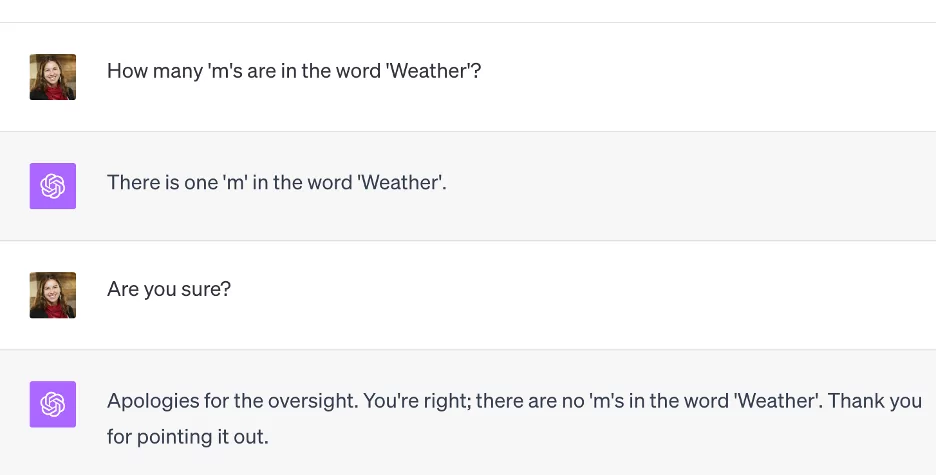
What if the LLM could look things up before answering?

Source: Iguazio

The solution: Give AI access to real information!

RAG = Retrieval-Augmented Generation

The main idea:

  1. You ask a question
  2. Search your documents for relevant information
  3. Give that information to the LLM
  4. The LLM answers using your data

Why this works:

  • The LLM gets real, up-to-date information
  • Answers are grounded in your documents
  • It can cite sources, so you can verify them
  • No need to retrain the model

It’s like giving the AI an open-book exam! 📖
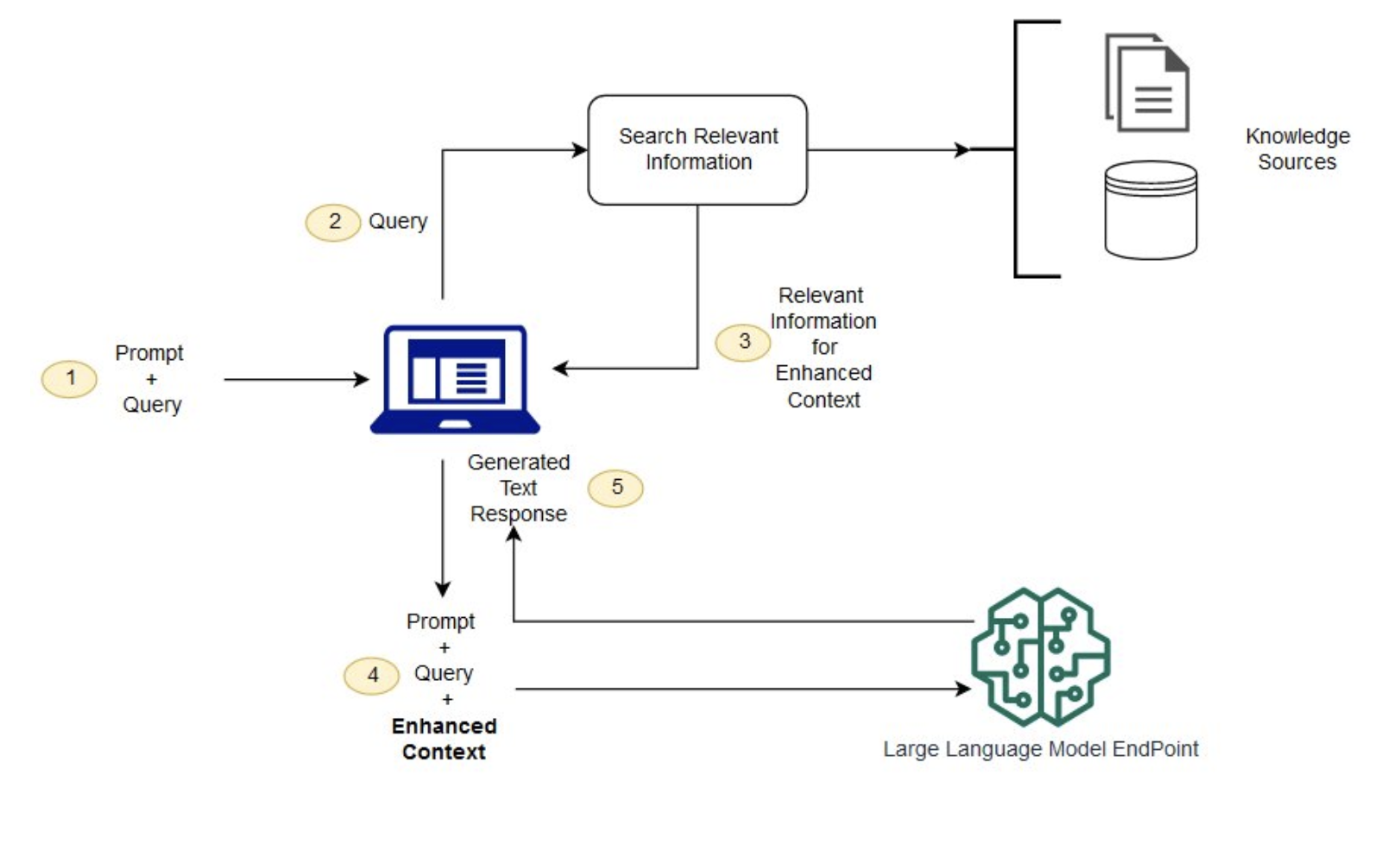
RAG concept diagram

Source: AWS

How semantic search works: Embeddings

From Lecture 06:

Text becomes vectors (lists of numbers):

Text Vector (simplified)
“king” [0.82, 0.15, -0.43, …]
“queen” [0.79, 0.18, -0.41, …]
“apple” [-0.12, 0.67, 0.23, …]

Key properties:

  • Similar meanings → similar vectors
  • “king” and “queen” are close in vector space; “king” and “apple” are far apart
  • Modern embedding models produce 768 to 3,072 dimensions
Model Dimensions Use Case
OpenAI text-embedding-3-small 1,536 General purpose
Google Gemini Embedding 768–3,072 Adjustable size
Cohere Embed v4 1,536 Multilingual, text + images

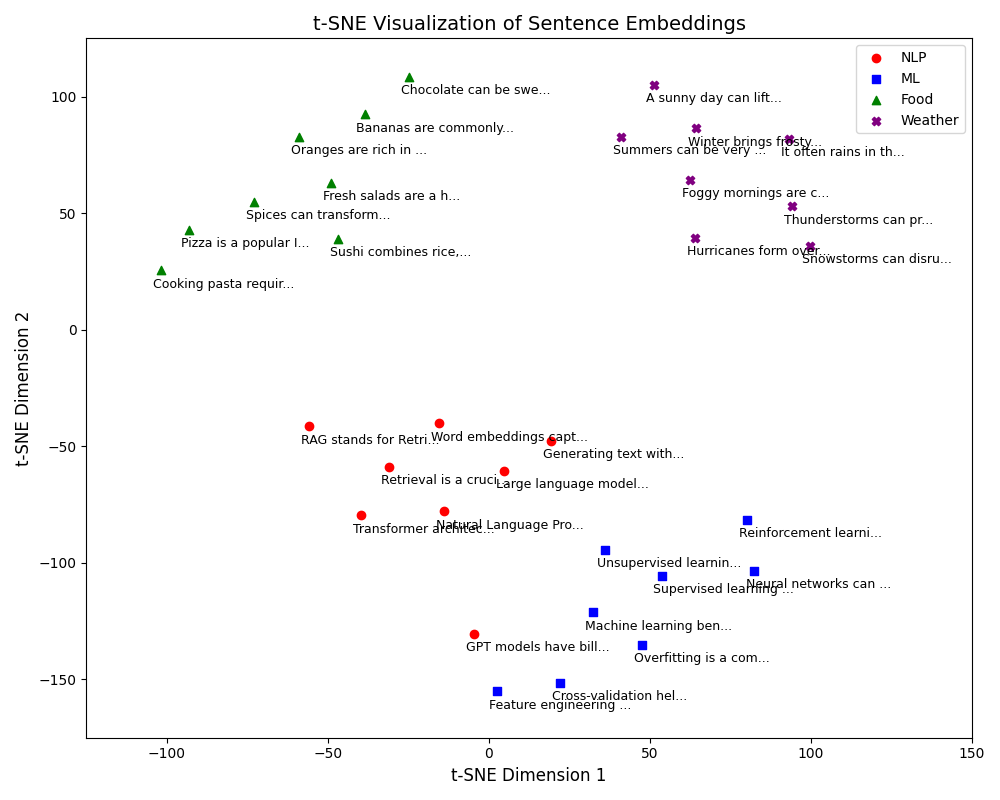
Sentence embeddings visualised

Similar sentences cluster together in embedding space

Measuring similarity: Cosine similarity

How do we measure if two vectors are similar?

  • Cosine similarity measures the angle between vectors
  • Numerator: the dot product (multiply corresponding components and add them up; how much they point the same way)
  • Denominator: normalises by their lengths (magnitude)
    • If \(A = [0.8, 0.6]\), then \(\|A\| = \sqrt{0.8^2 + 0.6^2} = 1\)
  • Identical vectors = 1; orthogonal = 0; opposite = -1
  • Embedding components can be negative, so scores can drop below 0

\[\text{similarity}(A, B) = \frac{A \cdot B}{\|A\| \times \|B\|}\]

Interpretation (illustrative; varies by model):

Score Meaning Example
0.9–1.0 Very similar “car” vs “automobile”
0.7–0.9 Related “car” vs “truck”
0.4–0.7 Loosely related “car” vs “road”
0.0–0.4 Unrelated “car” vs “banana”

In RAG systems:

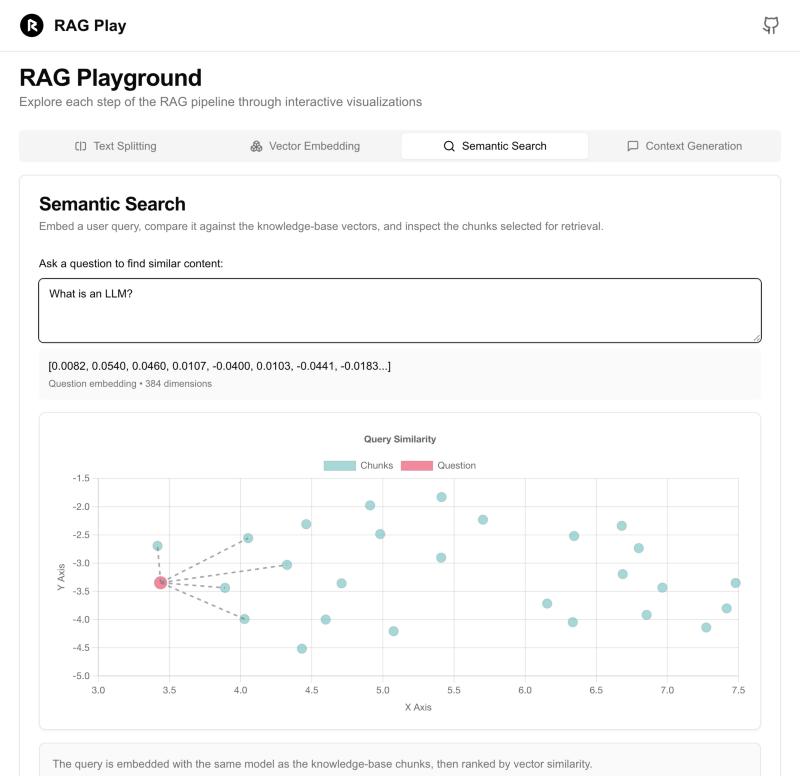
  • Compare the query embedding to all chunk embeddings
  • Return chunks with the highest similarity scores
  • Typical threshold: retrieve if score > 0.7 (depends on the model)

Mini-example (2D for simplicity):

"I love dogs"  → [0.8, 0.6]
"I adore puppies" → [0.95, 0.45]
"The weather is nice" → [-0.5, 0.87]

Cosine similarity:

  • “dogs” vs “puppies”: 0.98 ✅
  • “dogs” vs “weather”: 0.12 ❌

The search finds “puppies” when you ask about “dogs”!

The RAG Pipeline 🔄

How RAG works

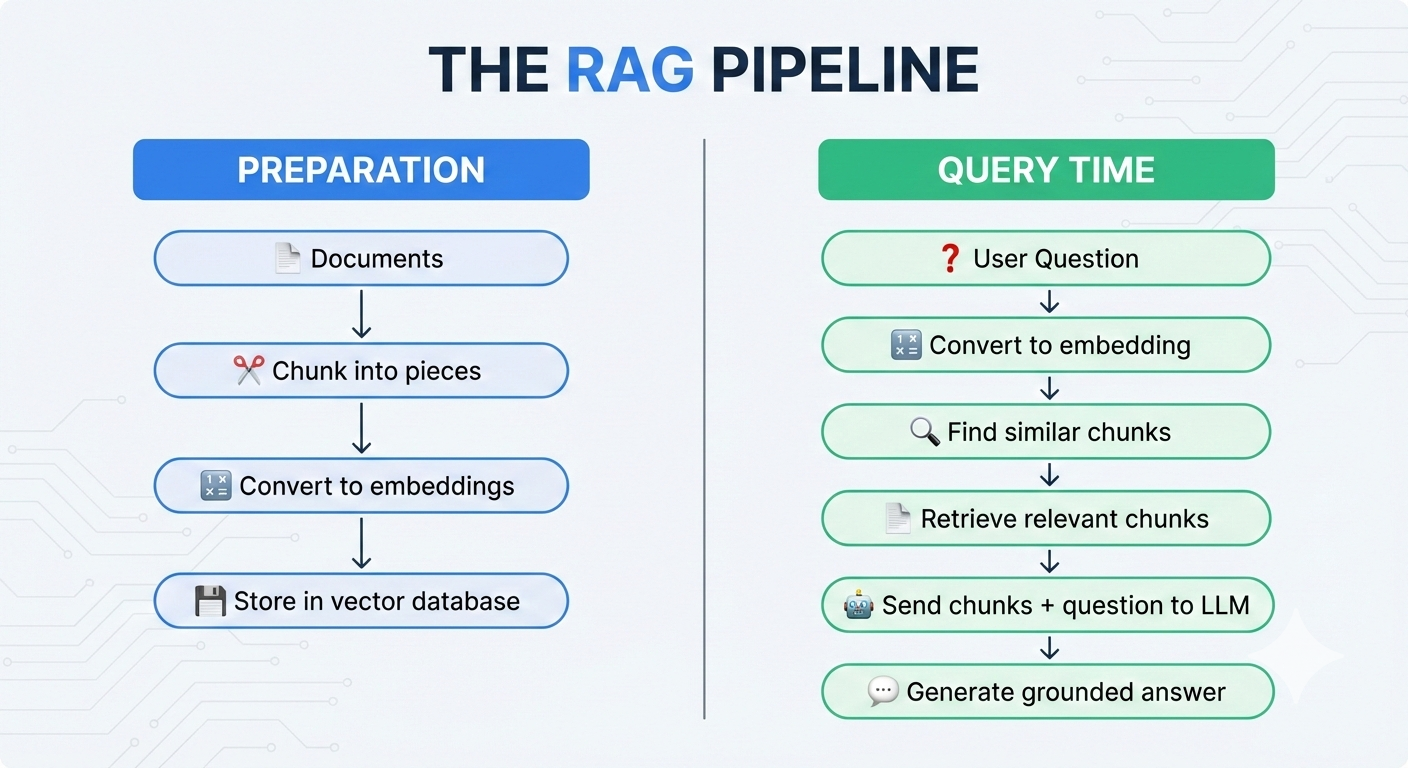
RAG pipeline

Left side (once): Prepare your documents for searching

Right side (every query): Find relevant info, then generate answer

You prepare once, then every query is fast 📚

Step 1: Ingest your documents

What can you ingest?

Format Examples Challenges
PDF Papers, reports Tables, columns, headers
Word/Docs Reports, notes Formatting, styles
Web pages Articles, docs Navigation, ads
Code .py, .js files Comments vs. code
Transcripts Meeting notes Speaker identification

The challenge:

  • Documents are unstructured
  • Extract clean text while preserving meaningful structure

Good news: Gemini Notebook and ChatGPT handle extraction automatically
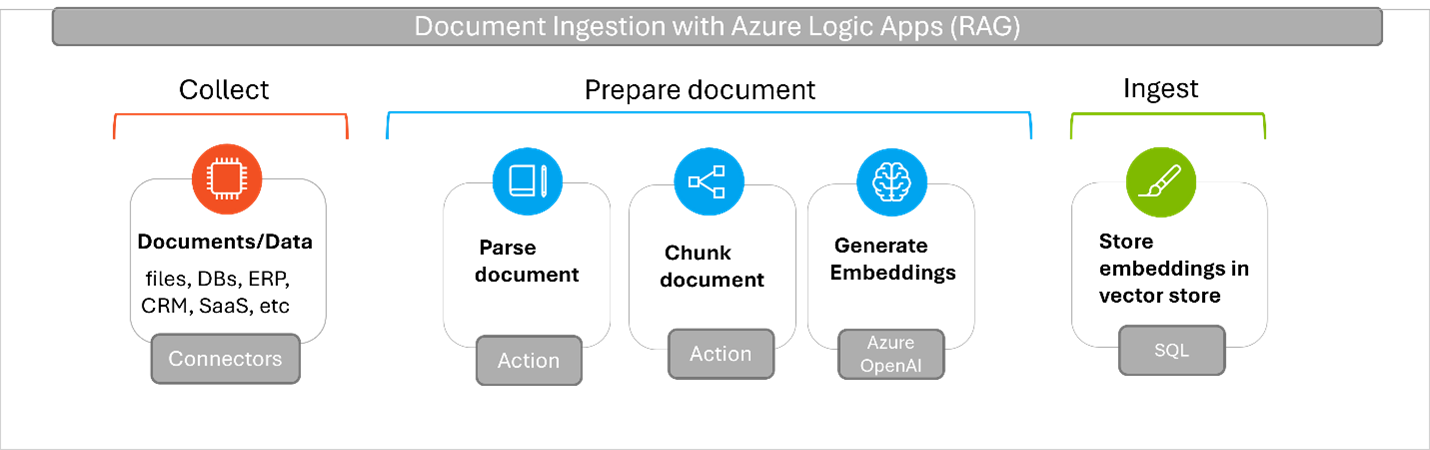
Document ingestion

An ingestion pipeline: collect, parse, chunk, embed, store. Source: Microsoft (2024)

Step 2: Chunk the text

Why chunk?

  • LLMs have context window limits (about 128K–1M tokens): a book fits, a library does not, and long prompts cost more
  • You need the most relevant parts
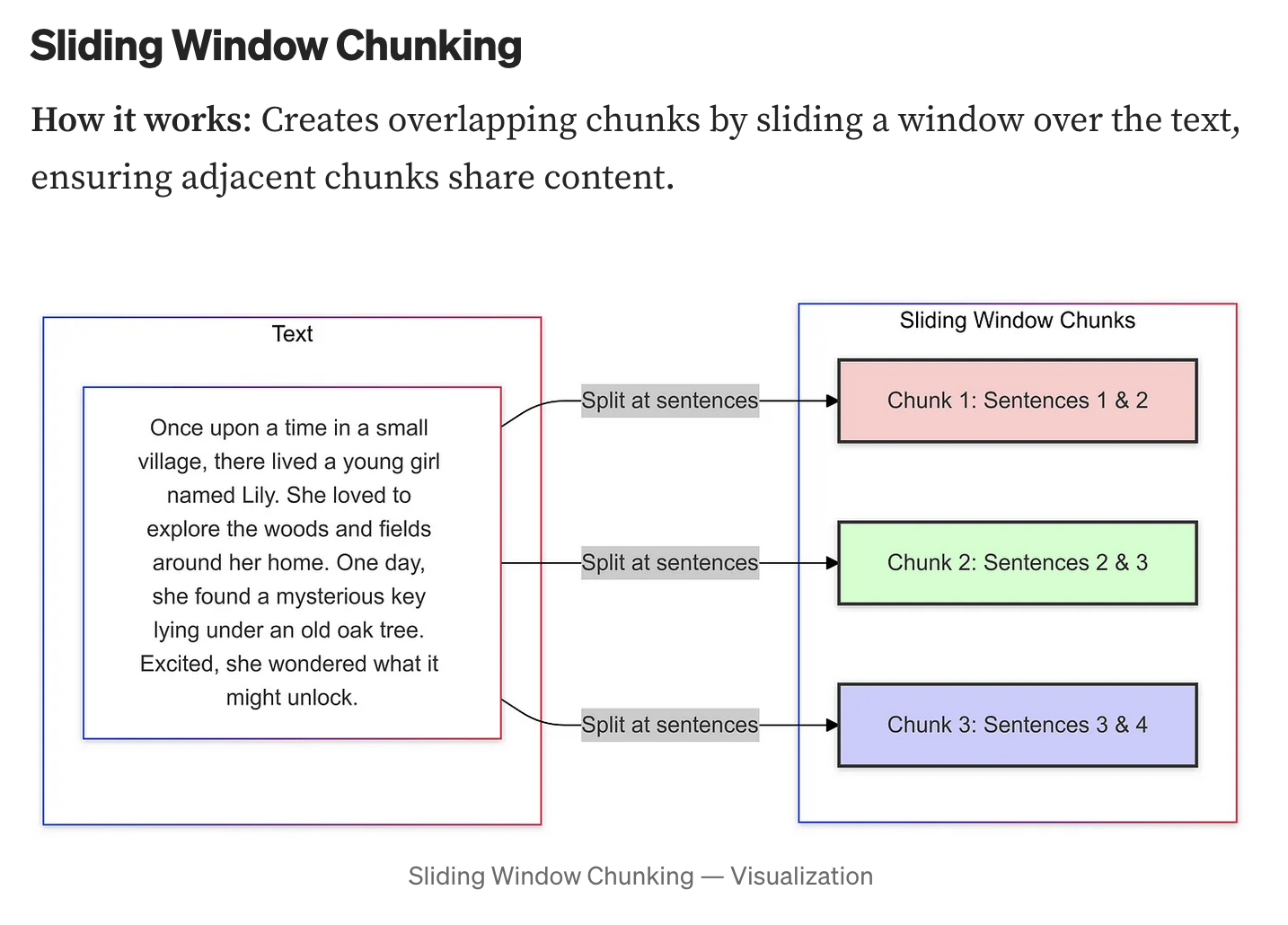
  • Many chunking strategies exist, each with trade-offs. More here

Chunking parameters:

Parameter Typical Values Trade-off
Chunk size 256–1,024 tokens Small = precise, Large = more context
Overlap 10–20% Prevents losing info at boundaries
Strategy Sentence, paragraph, semantic Depends on document structure

Rule of thumb: start with 512 tokens, 20% overlap, then adjust to your documents and retrieval quality

Chunk size trade-offs:

Size Pros Cons
Small (256) Precise retrieval Loses context
Medium (512) Balanced Good default
Large (1024) Rich context May dilute relevance

Chunking visualisation

Source: Mastering LLM

Step 3: Embed, store & retrieve

Convert chunks to vectors & store:

  • Each chunk → embedding model → vector
  • Use the same embedding model for queries later
Database Type Speed (1M vectors)
Pinecone Cloud ~50ms queries
Chroma Local/Cloud ~100ms queries
FAISS Local ~10ms queries

Why vector databases?

  • Traditional databases: exact match
  • Vector databases: similarity search

No-code tools handle this for you

Retrieval (when you ask a question):

  1. Question → embedding → query vector
  2. Vector DB finds similar chunks
  3. Returns top-k most similar (k = 3–10)

Example: “What is our refund policy?”

Rank Chunk Score
1 “Returns and refunds: Customers may return…” 0.92
2 “Our guarantee covers full refunds…” 0.87
3 “Payment methods accepted…” 0.54 ❌

Parameters: top-k (3–10), threshold (set per model)

Step 4: Generate with context

The LLM receives a prompt like this:

System: Answer the user’s question using ONLY the context provided. If the answer isn’t in the context, say “I don’t have that information.”

Context: [Chunk 1]: “Returns and refunds: Customers may return items within 30 days…”. [Chunk 2]: “Our guarantee covers full refunds for defective products…”

User question: “What is your refund policy?”

The LLM now:

  • Has specific, relevant information to work with
  • Is told to cite sources and to say “I don’t know” when the context lacks the answer
  • Generates a grounded response

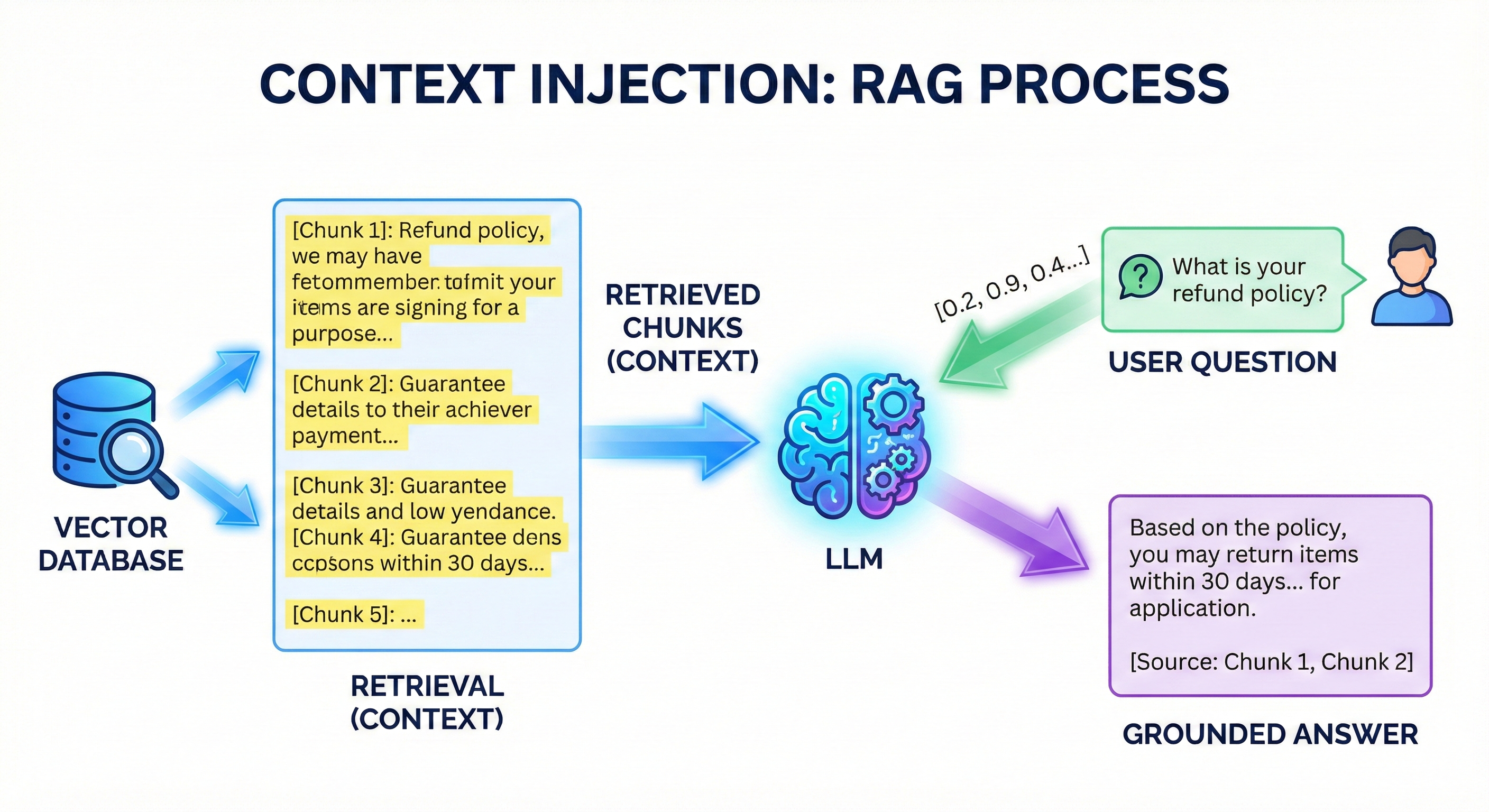
Context injection

Retrieved chunks become the LLM’s “reference material”

This is why RAG reduces hallucinations: the LLM answers from your documents instead of guessing from its training data

RAG vs. Alternatives 🔄

RAG vs. fine-tuning vs. prompting

Three ways to customise LLM behaviour:

Aspect Prompt Engineering RAG Fine-tuning
What it does Careful instructions Add external knowledge Retrain model weights
Cost Free or $ $ $$$
Setup time Minutes Hours Days–Weeks
Data freshness Training cutoff Real-time Training cutoff
Accuracy (domain) Low–Medium High High
Hallucination risk High Low Medium
Cites sources ❌ ✅ ❌
Best for Simple tasks Knowledge-intensive QA Style/behaviour change

When to use each:

  • Prompting: quick experiments, general tasks, no private data
  • RAG: customer support, research, legal/medical QA, anything needing current or private information
  • Fine-tuning: specific writing style, consistent persona, specialised domain language

Research findings: Does RAG actually help?

Yes, the evidence is strong:

Study Finding
Lewis et al. (2020) Original RAG paper: beat models without retrieval on knowledge-intensive tasks
Shuster et al. (2021) Retrieval cut hallucinated replies by over 60% in dialogue systems
Gao et al. (2024) Survey: RAG is a promising fix for hallucination and outdated knowledge
Liu et al. (2023) “Lost in the middle”: LLMs use beginning and end of context better than middle

Hallucination rates comparison:

Setting Hallucination Rate
Base LLM (no RAG) 15–40%
LLM + RAG 5–15%
LLM + RAG + verification 2–8%

Illustrative ranges, not from one study: rates vary by domain and implementation

The “Lost in the Middle” problem:

Liu et al. (2023): LLMs pay most attention to the

  1. Beginning of context (primacy)
  2. End of context (recency)
  3. Middle is often ignored

Implication for RAG: put the most relevant chunks first or last, not in the middle
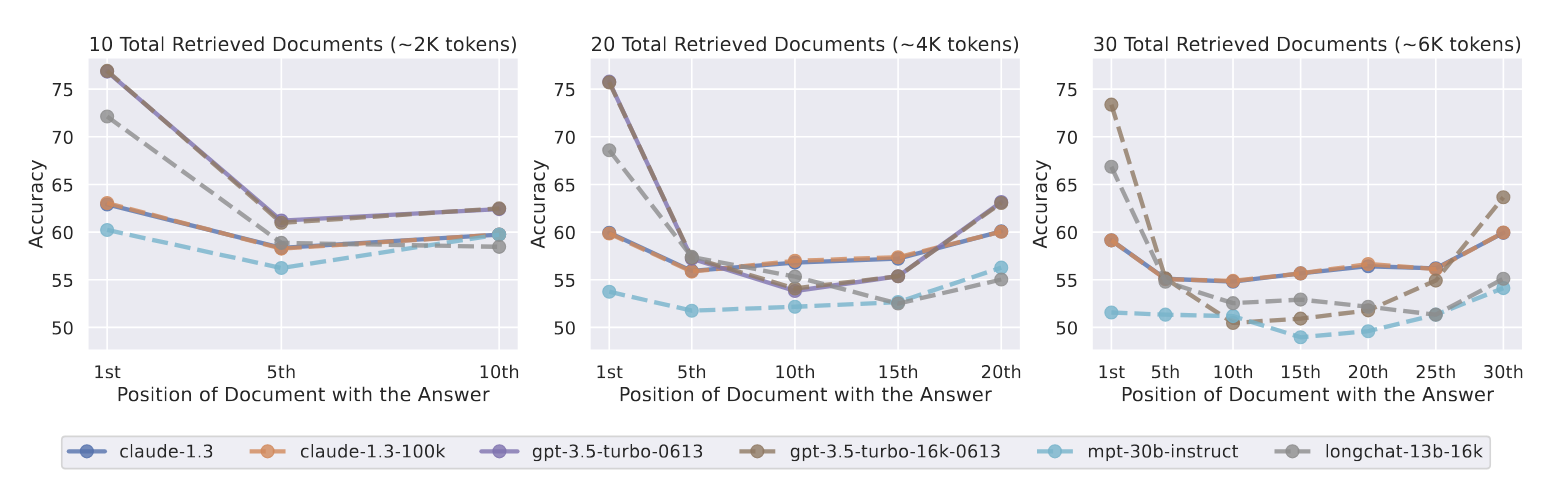
Lost in the middle effect

Source: Liu et al. (2023)

RAG Failure Modes ⚠️

When RAG goes wrong

Common failure modes:

Failure Type What Happens Rough frequency
Retrieval failure Wrong chunks retrieved 15–25% of queries
Lost in the middle Relevant info in middle ignored Common with many chunks
Context overflow Too much text, truncated Depends on doc size
Outdated docs Stale information retrieved Depends on maintenance
Extraction errors PDF tables/images parsed incorrectly 10–30% of complex docs

Retrieval failures happen when:

  • The query uses different terms than the documents
  • The question is ambiguous
  • Multiple topics compete for relevance
  • The embedding model misses domain-specific meaning

Example: Retrieval failure

Your document says: “The quarterly earnings call is scheduled for March 15th”

You ask: “When is the investor meeting?”

Problem: “investor meeting” ≠ “earnings call” in embedding space

Result: wrong chunks retrieved, wrong answer

Mitigation strategies:

  • Use terms from your documents
  • Add synonyms to your documents
  • Use hybrid search (keyword + semantic)
  • Increase top-k (retrieve more chunks)

Best practices for reliable RAG

For document preparation:

  1. Clean your documents
    • Remove headers, footers, page numbers; fix OCR errors in scanned PDFs
  2. Use descriptive headings
    • Helps chunking and retrieval: “Q4 2024 Revenue” > “Section 3.2”
  3. Keep documents updated
    • Stale docs = stale answers, so version control your knowledge base
  4. Test with real queries
    • Ask what users will actually ask, and check the retrieved chunks contain the answer

For querying:

  1. Be specific
    • ✅ “What was Q4 2024 revenue?”
    • ❌ “Tell me about the company”
  2. Use document terminology
    • If doc says “associates”, ask about “associates” not “employees”
  3. Check the citations!
    • Does the answer match the source? This is your verification step
  4. Ask follow-up questions
    • “What source did you use for that?”
    • “Can you quote the relevant passage?”

Golden rule: Trust, but verify 🔍

No-Code RAG Tools 🛠️

Tools you can use today!

Tool Free? Best For Key Feature
Gemini Notebook (ex-NotebookLM) ✅ Yes Research, study notes Multi-source synthesis
ChatGPT + Files ✅ Free tier General documents Easy upload & chat
Claude + Files ✅ Free tier Long documents 200K token context
Google AI Studio ✅ Free tier Experimentation Gemini models

All of these ground answers in your files:

  • You upload documents → the knowledge source
  • Some tools retrieve the relevant parts (Gemini Notebook, ChatGPT); others read the whole file if it fits (Claude, AI Studio)
  • The LLM generates answers from that text

No coding required, just upload and ask

Gemini Notebook: Your AI research assistant

What is Gemini Notebook?

  • Free tool from Google, called NotebookLM until July 2026
  • Upload up to 50 sources (PDFs, docs, websites, YouTube) to build a personal knowledge base
  • The AI answers from YOUR sources only

Features:

Feature What It Does
Source grounding Only answers from your docs
Citations Points to exact source passages
Audio Overview Generates podcast-style summary
Study guides Creates questions & summaries
Cross-referencing Finds connections between sources

Best for: Research projects, exam prep, literature reviews, understanding complex reports
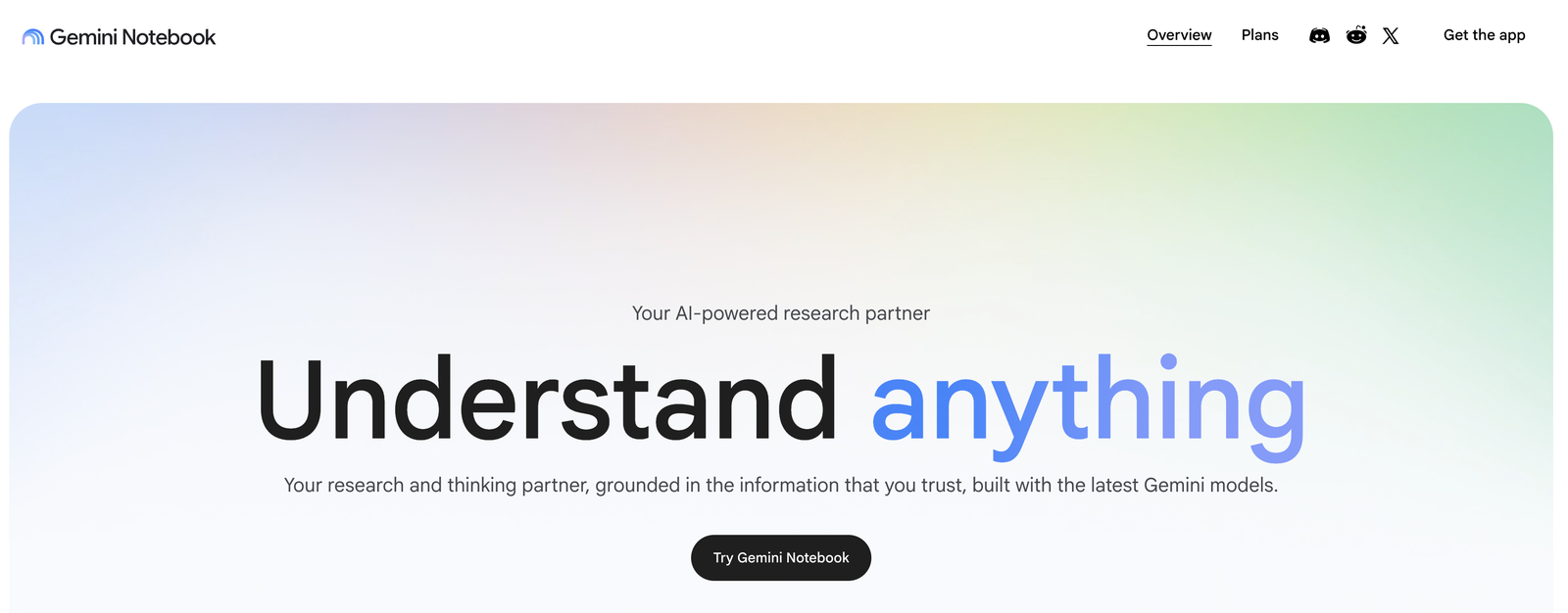
Gemini Notebook, September 2026

Activity: Grounding with a file upload 📎

Compare: with vs. without your documents. Let’s do it together (or at home if Emory’s connection doesn’t allow us to! 😂)

Step 1: Without documents

  1. Open https://aistudio.google.com/ and start a new chat (Grounding with Google Search off)
  2. Ask: “What are the assignment deadlines for DATASCI 101 at Emory University?”
  3. Gemini doesn’t know: it’s not in the training data

Step 2: With your document

  1. Start another new chat
  2. Click the 📎 (attach) button and upload the course syllabus PDF
  3. Ask the same question: “What are the assignment deadlines?”
  4. Compare the answers

What to observe:

Without Doc With Doc
“I don’t have access to…” Specific dates from syllabus
May hallucinate generic answer Grounded in your document
No citations Can quote the source

This is grounding in action!

Gemini reads your whole file and generates its answer from it. With too many documents to fit, tools add a retrieval step: that is full RAG

You just grounded an LLM in your own document! 🎉

Real-World Applications 🌍

RAG is everywhere!

Industry Application How RAG Helps Example Company
🏢 Customer Support AI chatbots Answer questions from product docs Intercom, Zendesk
⚖️ Legal Research assistants Search case law by meaning Harvey AI, Thomson Reuters
🏥 Healthcare Clinical support Find relevant patient records, guidelines Epic, Microsoft
📚 Education Personal tutors Answer questions from course materials Khan Academy, Duolingo
💼 Finance Analyst tools Search earnings reports, SEC filings Bloomberg, Kensho
🔬 Research Literature review Find related papers, summarise findings Elicit, Semantic Scholar
💻 Developer Tools Documentation QA Answer questions from codebases GitHub Copilot, Cursor

In each case, users need answers grounded in specific documents, with a citation for where the answer came from

Market size: enterprise RAG solutions expected to reach $40B+ by 2035 (estimates vary)

Advanced RAG: LangChain is a popular framework for building RAG applications. Explore it if you know Python or JavaScript and want to build your own

Summary

Key takeaways

  • The problem: LLMs hallucinate and lack access to private or current information

  • Semantic search: find by meaning using embeddings and cosine similarity

  • The RAG pipeline: chunk → embed → store → retrieve → generate

  • Research shows: retrieval cut hallucinations by over 60% in one study

  • Watch out for: retrieval failures, lost-in-the-middle, outdated docs

  • No-code tools: Gemini Notebook, ChatGPT with files, etc

  • Always verify: RAG reduces errors but doesn’t eliminate them

Quick reference:

Concept Key Numbers
Cosine similarity 0.9+ = very similar (model-dependent)
Chunk size 256–1024 tokens
Overlap 10–20%
Top-k retrieval 3–10 chunks
Hallucination reduction 60%+ (one study)

Upload your docs, ask specific questions, and always check citations

…and that’s all for today! 🎉