


DATASCI 101: Introduction to AI Applications

Lecture 07: How Machines See and Hear

Danilo Freire

Department of Data and Decision Sciences
Emory University

Welcome back! 🤓

Recap of last class

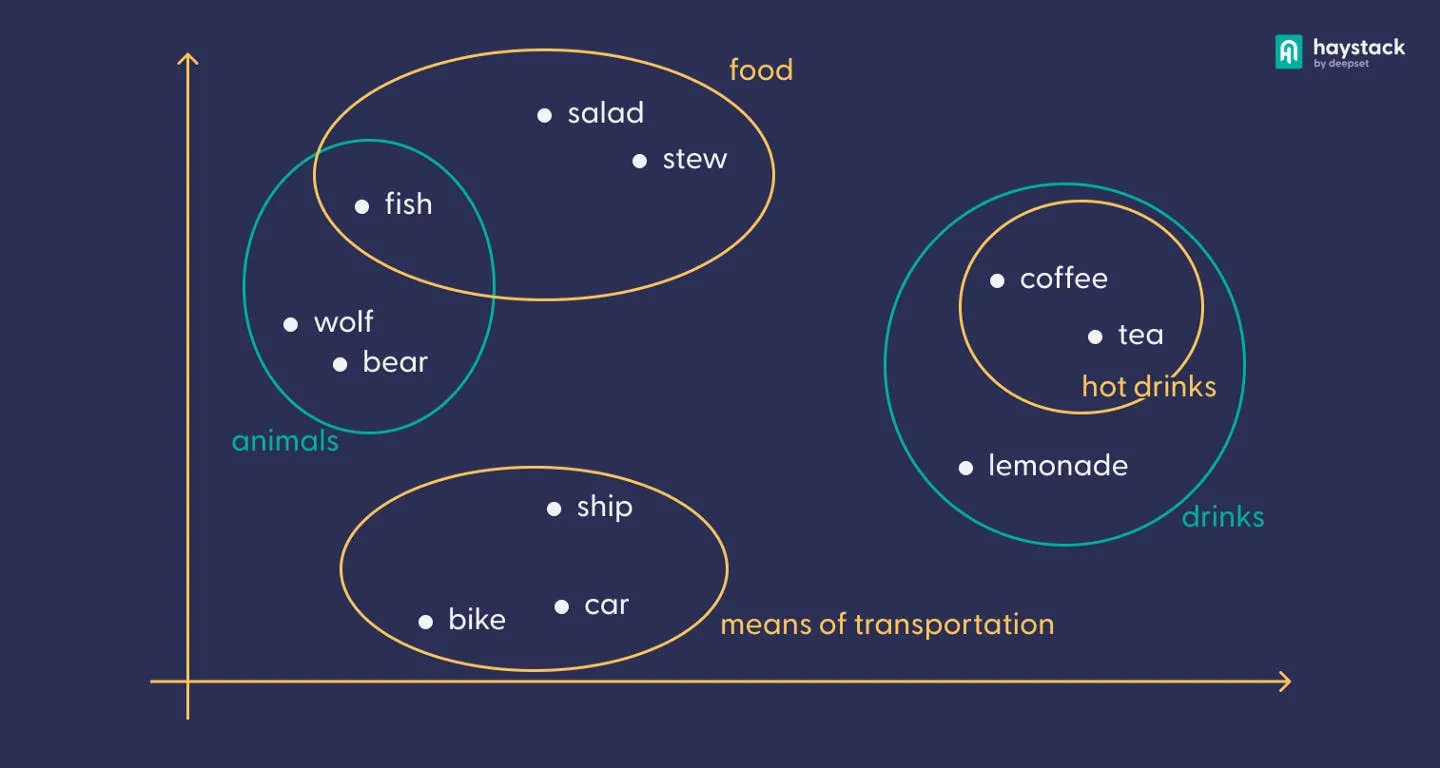
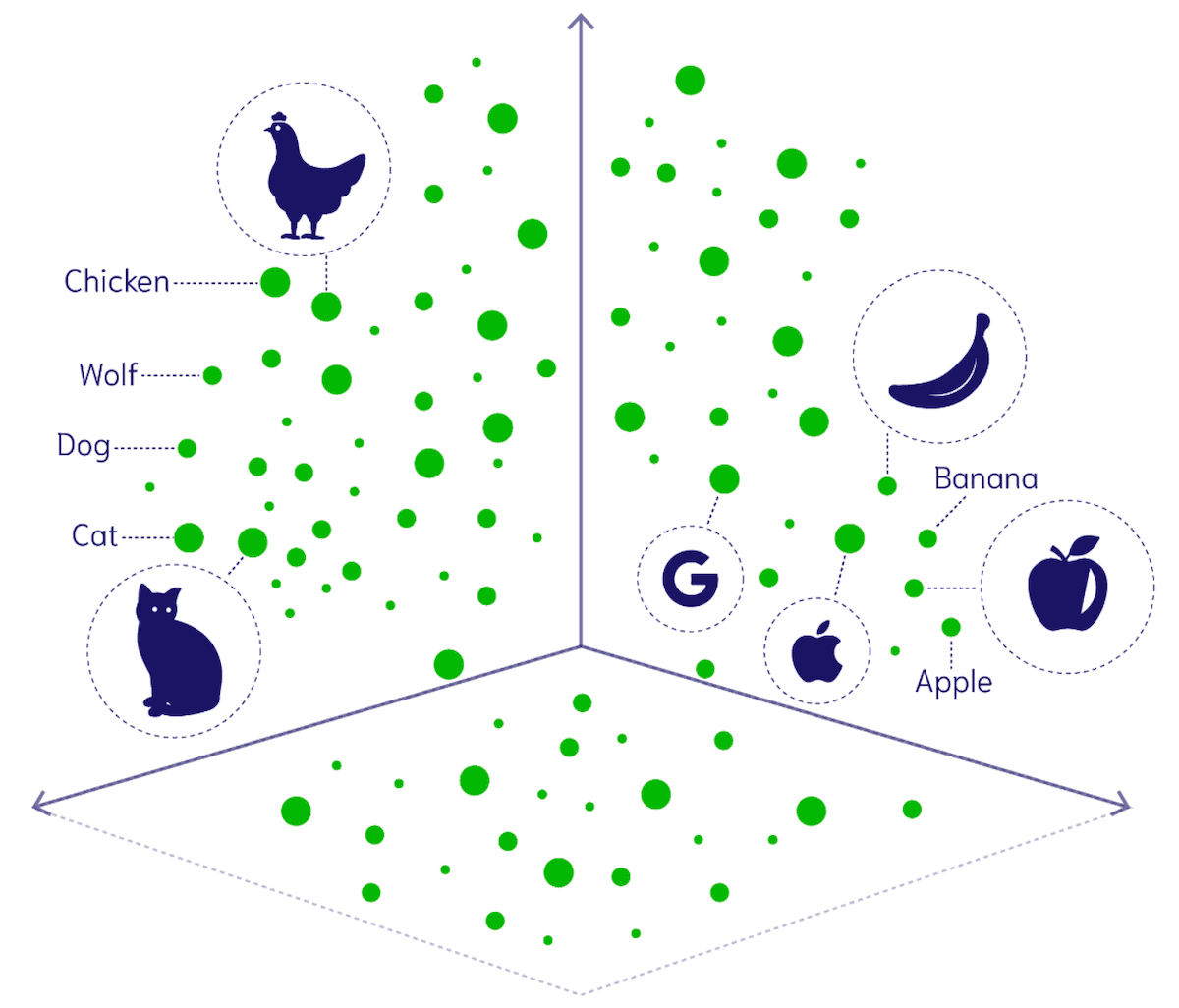
  • LLMs turn words into numbers (embeddings)
  • These numbers capture meaning: similar words sit close together
  • king − man + woman ≈ queen
  • The model learns which words tend to appear near each other
  • What about images and sounds? 🖼️🎵
  • Spoiler: they become numbers too!

Source: DeepSet AI

Lecture overview

Today’s agenda

Part 1: How Machines “See”

  • What computers actually see (just numbers!)
  • How AI learns to recognise objects
  • Activity: train your own image classifier

Part 2: How Machines “Hear”

  • Turning invisible sound waves into pictures
  • How machines understand speech

Part 3: The Big Picture

  • Everything becomes the same kind of numbers

Part 4: What This Means for Society

  • Class discussion: where do we draw the line?

Tweet of the day 😄

Power to the people! ✊🏻

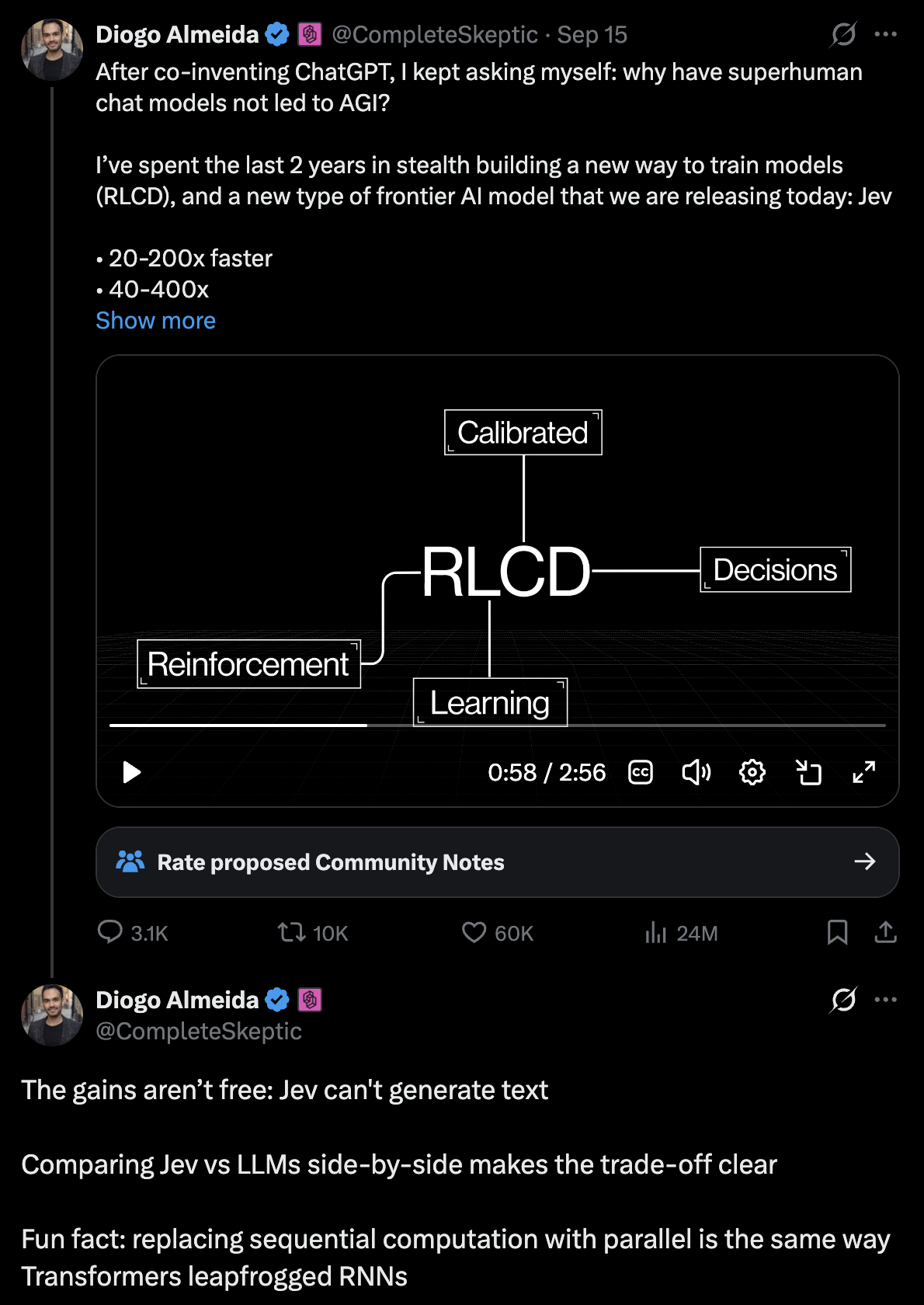
Second tweet of the day

This is very interesting! 🤯

https://x.com/CompleteSkeptic/status/2099925684256899543

https://typesafe.ai/blog/introducing-system-one-models-and-jev

Upcoming talk: AI, work and education

  • Speaker: Jeff Ruhnow, head of AI strategy at Francisco Partners
  • Former Principal Architect at Amazon
  • Hosted by the Department of Economics
  • Tuesday, 22 September, 4:00 to 5:15 PM
  • White Hall 112
  • RSVP: https://forms.cloud.microsoft/r/d0BkcCc35f

How machines “see” images 🔍

Discussion: Describe this to a computer 🤔

Imagine you need to describe a photo to someone who can ONLY understand numbers.

How would you do it?

Take 1 minute to discuss with your neighbour! ⏱️

  • What information would you include?
  • How would you represent colours? Shapes?
  • What makes this hard?

Like text, images need to become numbers

And there’s a nice way to do this…

This picture is unrelated to the class. It’s here just because the cat is cute! 😄

What computers actually see

It’s just a grid of numbers!

  • A digital photo is just a grid of tiny coloured squares (pixels)
  • Each pixel has three numbers, each saying how much light is there:
    • Red: 0 (none) to 255 (brightest red)
    • Green: 0 to 255
    • Blue: 0 to 255
  • Mix them together → millions of colours!
  • A 3x3 grayscale image (one channel only) looks like this:
[[255, 128, 0],
 [64, 200, 150],
 [0, 50, 255]]
  • A typical photo has millions of pixels, so millions of numbers to process
  • The problem: raw numbers don’t tell you “this is a cute cat with a hat”, and processing them all is inefficient 😺

Apple screen under a microscope

Each pixel = three numbers (Red, Green, Blue)

Your screen is showing millions of these right now!

Source: Reddit

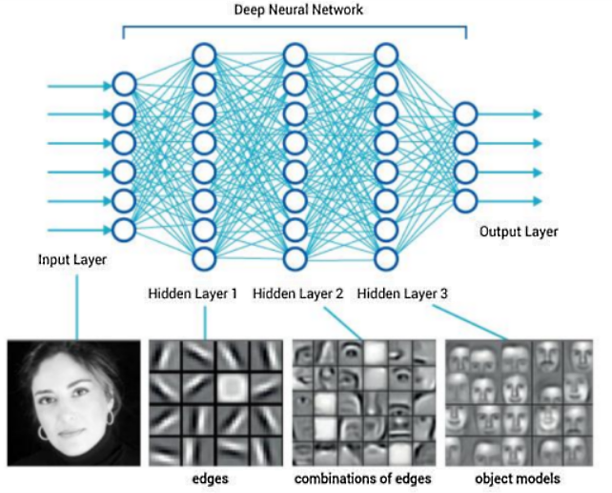
How AI learns to see

Like learning to read!

  • How you learned to read:
  1. Recognise letters
  2. Combine letters into words
  3. Combine words into sentences
  4. Combine sentences into meaning
  • AI vision works the same way!
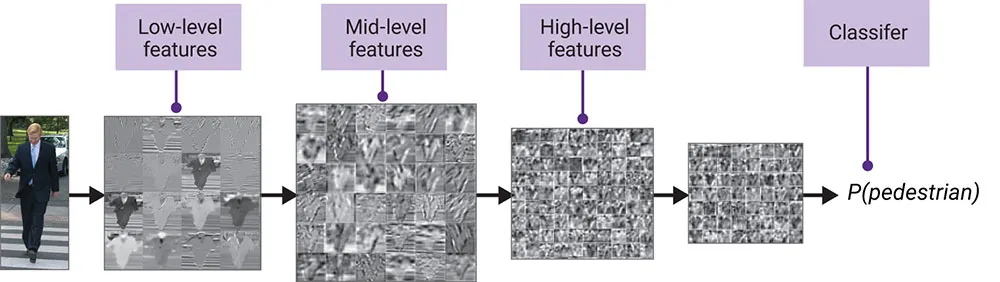
  1. Detect simple edges and colours
  2. Combine edges into shapes and textures
  3. Combine shapes into parts (eyes, wheels, petals)
  4. Combine parts into whole objects (cat, car, flower)
  • Each layer builds on the previous one 🧱

Feature hierarchy: edges → textures → parts → objects

Source: Towards AI

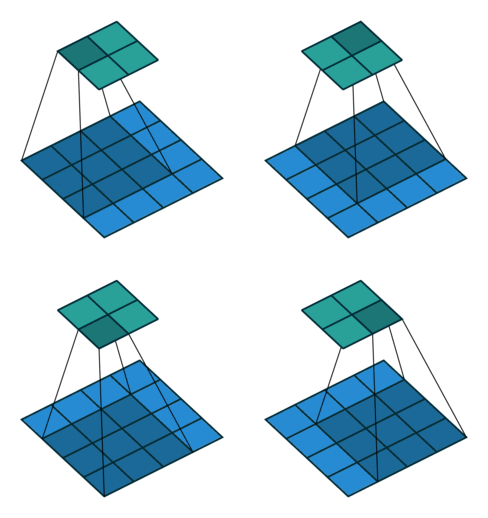
The convolution operation

A “sliding magnifying glass”

  • Convolution: a small filter slides across the image
  • At each position it multiplies element-wise and sums the result
  • Different filters detect different features: vertical and horizontal edges, corners, textures, gradients
  • The filter learns what to look for during training
  • Output: a feature map showing where that feature appears

Analogy: Like using a stencil to find specific patterns 🔍

Convolution: filter sliding over image

Source: vdumoulin/conv_arithmetic

Feature hierarchies

From edges to objects

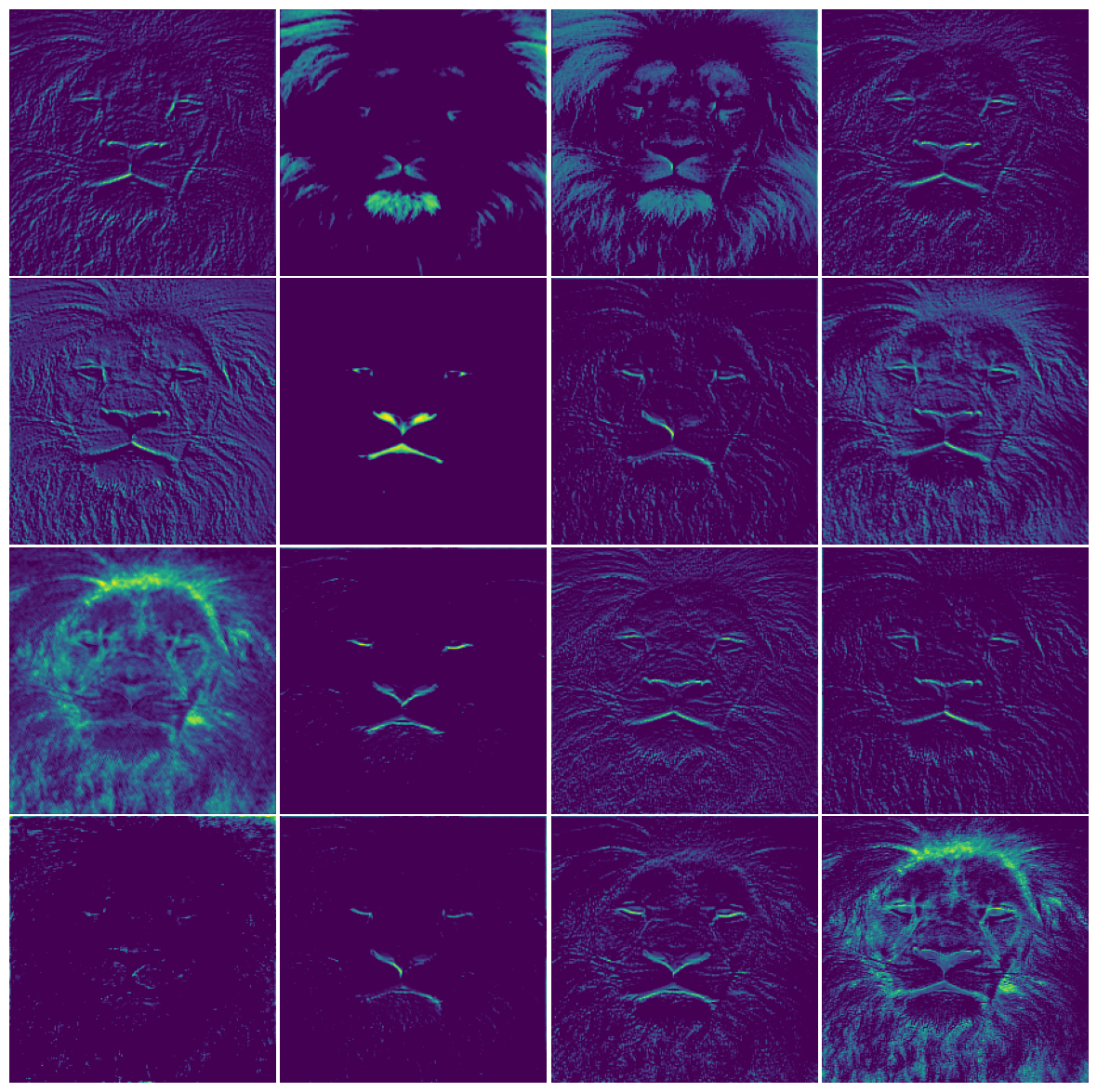
  • CNNs stack multiple convolutional layers, each building on the previous one:
    • Layer 1: Simple edges and colours
    • Layer 2: Textures and corners
    • Layer 3: Parts (eyes, wheels, leaves)
    • Layer 4+: Whole objects and scenes
  • This feature hierarchy composes simple features into complex concepts
  • Similar to how our visual cortex works

Feature extraction performed over the image of a lion

Source: Towards Data Science

The full CNN architecture

Putting it all together

What AI learns to see in different layers
  1. Input: Raw image (e.g., 224×224×3)
  2. Convolutional layers: Extract features (edges → textures → objects)
  3. Fully connected layers: Combine features for final decision
  4. Output: Class probabilities (e.g., 95% woman, 5% man)

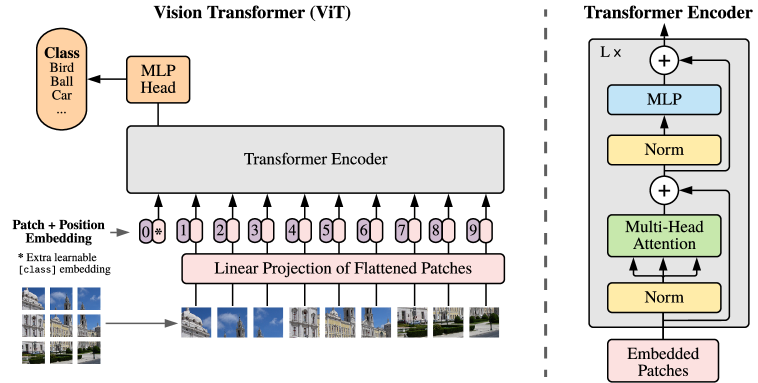
Vision Transformers (ViT)

“An Image is Worth 16×16 Words”

  1. Divide image into fixed-size patches (e.g., 16×16 pixels)
  2. Flatten each patch into a vector
  3. Add positional embeddings so the model knows patch locations
  4. Process through Transformer: the same attention as LLMs, so patches “look at” other patches for context
  • Same architecture for text AND images
  • Foundation for multimodal models like GPT-4V and Gemini

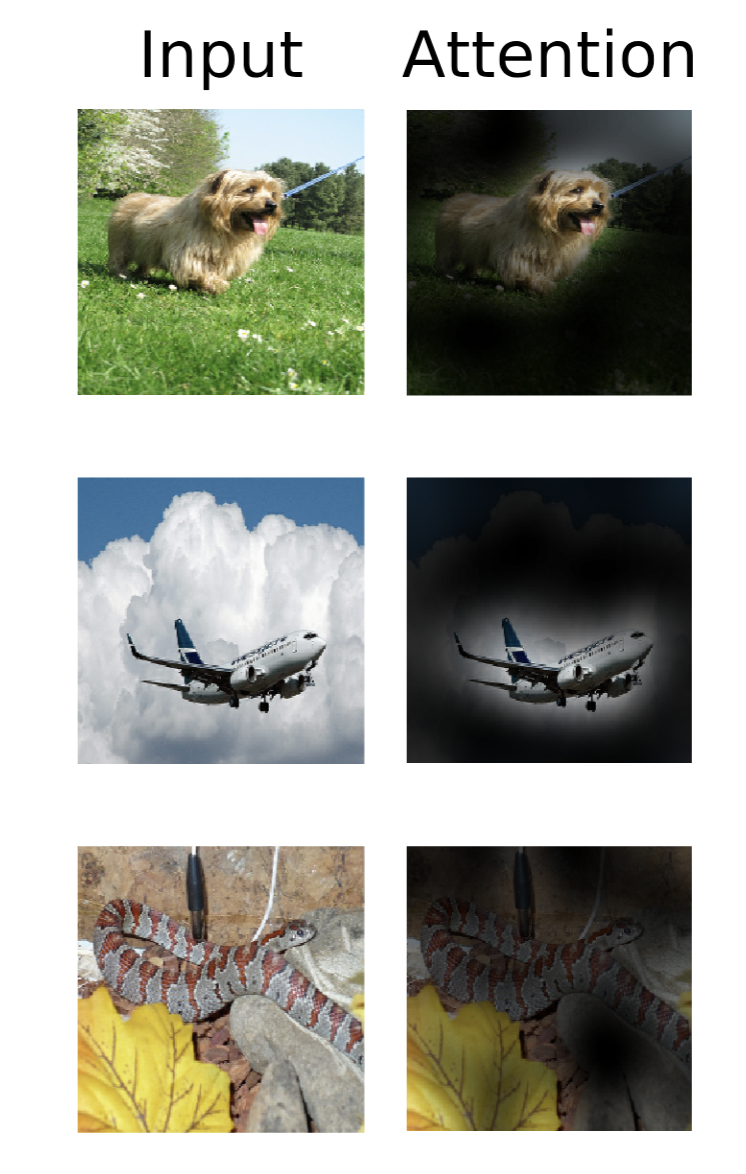
Vision Transformer architecture

Attention

Source: Dosovitskiy et al. (2020)

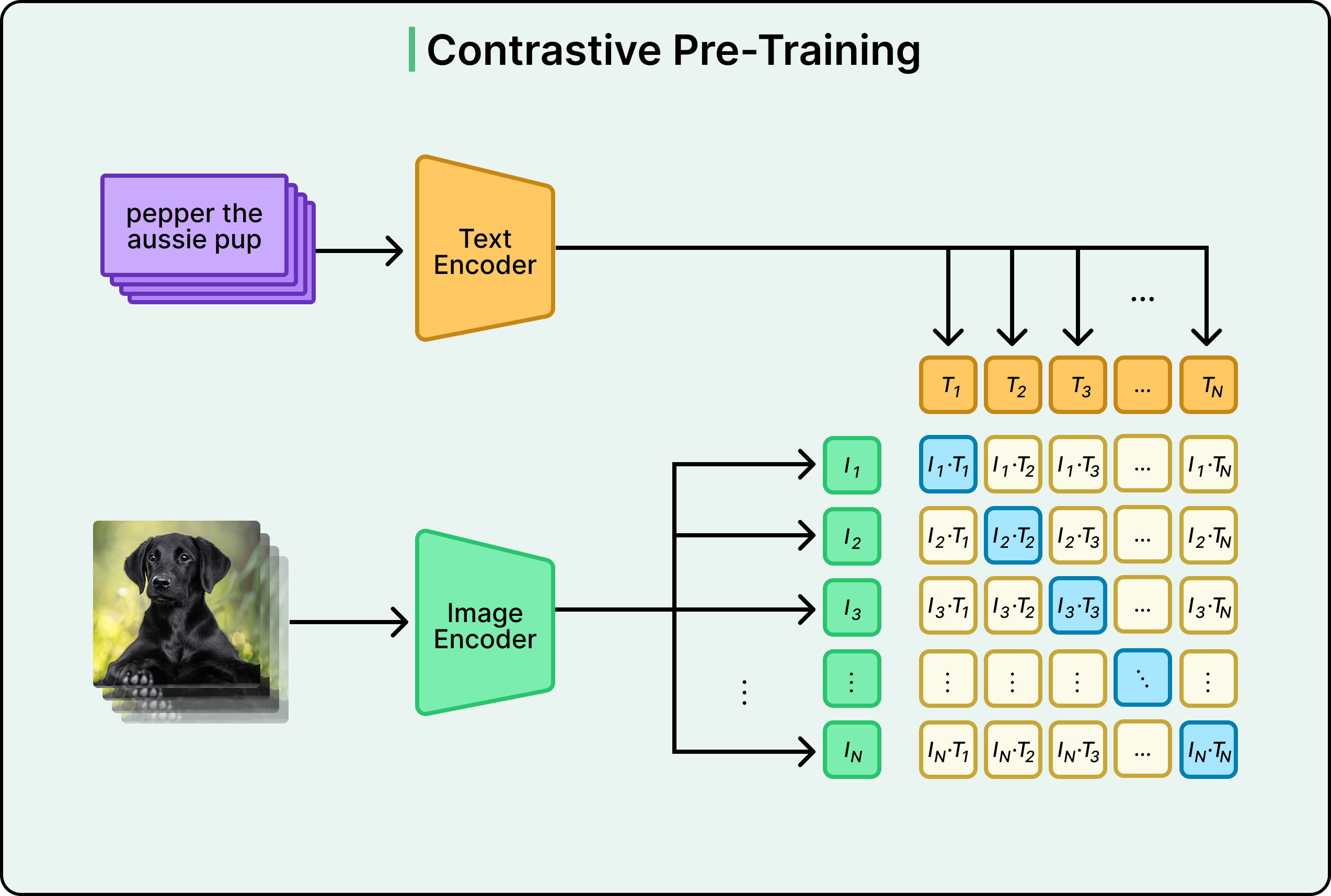
CLIP: Connecting images and text

The bridge to multimodal AI

  • CLIP (Contrastive Language-Image Pre-training) by OpenAI
  • Trained on 400 million image-text pairs from the internet
  • Key innovation: shared embedding space for images AND text
    • Image encoder → image embedding
    • Text encoder → text embedding
    • Train so matching pairs are close together
  • Result: matches images to text descriptions without task-specific training
  • Foundation for DALL-E, Stable Diffusion, and multimodal LLMs

CLIP learns to match images with their text descriptions

Source: OpenAI CLIP

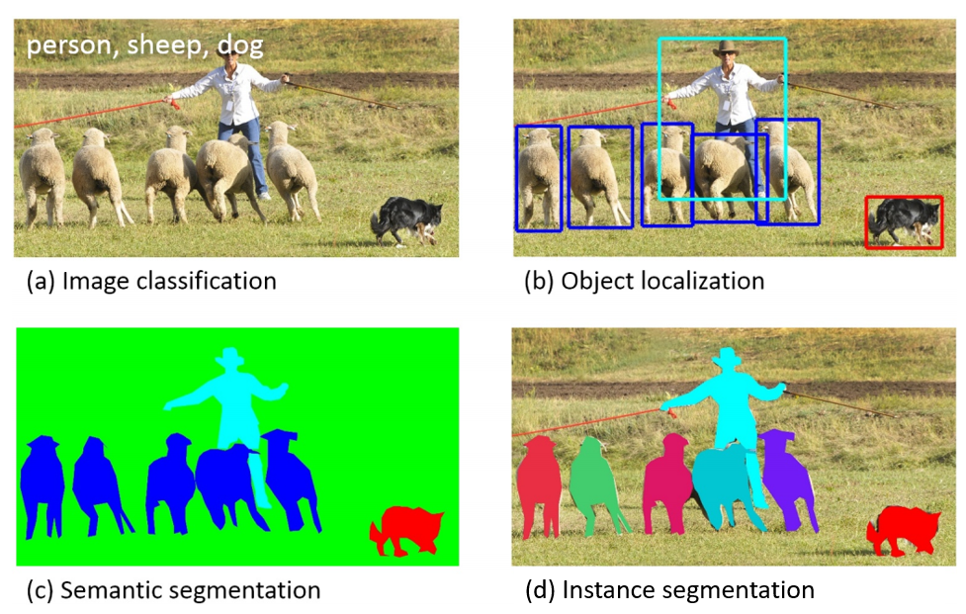
What can AI do with images?

Three main tasks

Classification vs Detection vs Segmentation
Task Question Real-world Example
Classification “What is this?” Instagram knowing your photo is a selfie
Detection “What and where?” Your phone camera finding faces
Segmentation “Which pixels are what?” iPhone’s Portrait Mode blurring backgrounds

Activity time! 🎮

Train your own AI!

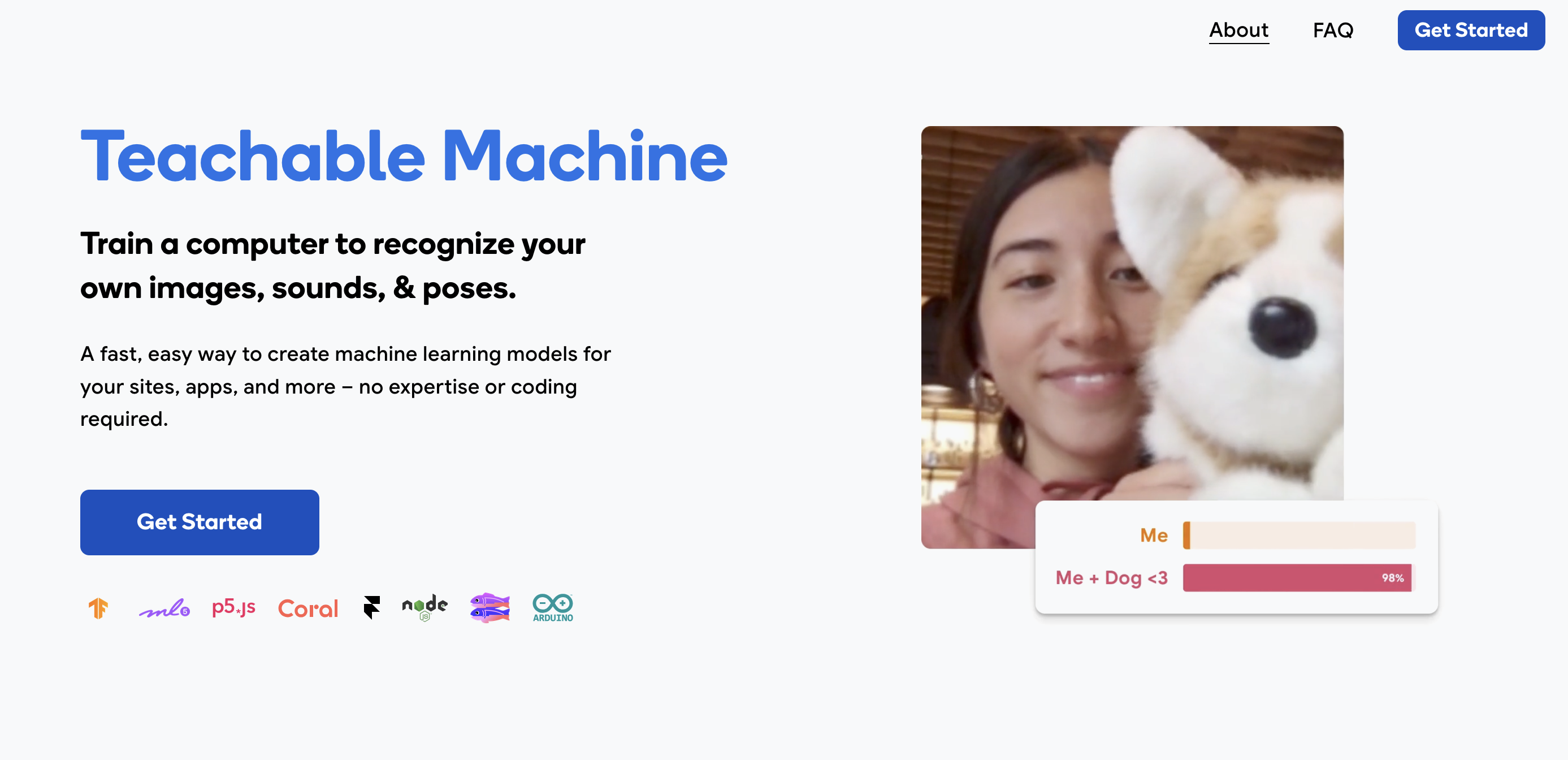
Teachable Machine demo

Train an image classifier: no coding required!

  1. Go to teachablemachine.withgoogle.com
  2. Click “Get Started” → “Image Project” → “Standard”
  3. Create 2-3 classes (e.g., “thumbs up”, “thumbs down”, “peace sign”)
  4. Record ~12 examples of each using your webcam (the website records 3 at a time)
  5. Click “Train Model” (takes about 10 seconds)
  6. Test it live!

Try this:

  • What happens if you show it something it wasn’t trained on?
  • Can you “fool” your model?

Teachable Machine interface

How machines “hear” audio 🎵

Sound is invisible…so how do we process it?

Sound is just vibrations in the air. We can’t see it!

The trick:

  1. Record the vibrations as a waveform (line going up and down)
  2. Transform the waveform into a picture called a spectrogram
  3. Use the same AI that understands images

It’s like creating a “photograph” of sound 📸🎵

This is why modern AI is so powerful: turn anything into pictures or numbers and reuse the same techniques

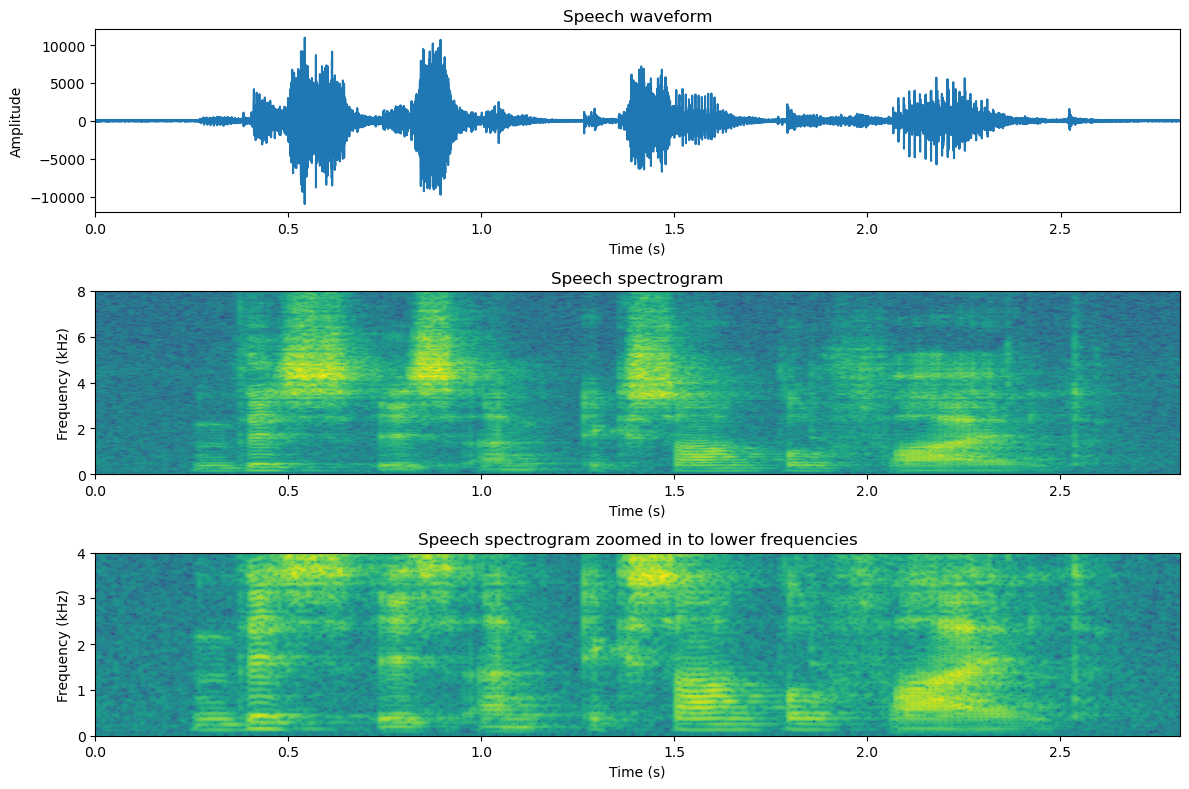
Waveform vs spectrogram vs mel-spectrogram

Top: Waveform (raw sound)

Middle: Spectrogram (sound as an image!)

Bottom: Mel-spectrogram (adjusted for human hearing, with more resolution for lower frequencies and less for higher frequencies)

Source: Bäckström et al (2026)

What the AI “sees” in your voice

In a spectrogram:

  • Horizontal axis: Time (left to right)
  • Vertical axis: Pitch (low notes at bottom, high at top)
  • Colour/brightness: How loud that frequency is

Patterns AI can find:

  • Your unique voice “fingerprint”
  • The difference between “cat” and “bat”
  • Emotion (are you happy? angry? tired?)
  • Whether you’re speaking or singing
  • What language you’re using
  • You can even create spectrogram art! See some here

Fun fact: Dogs, cats, and humans all have distinctive spectrogram patterns! 🐕🐱👤

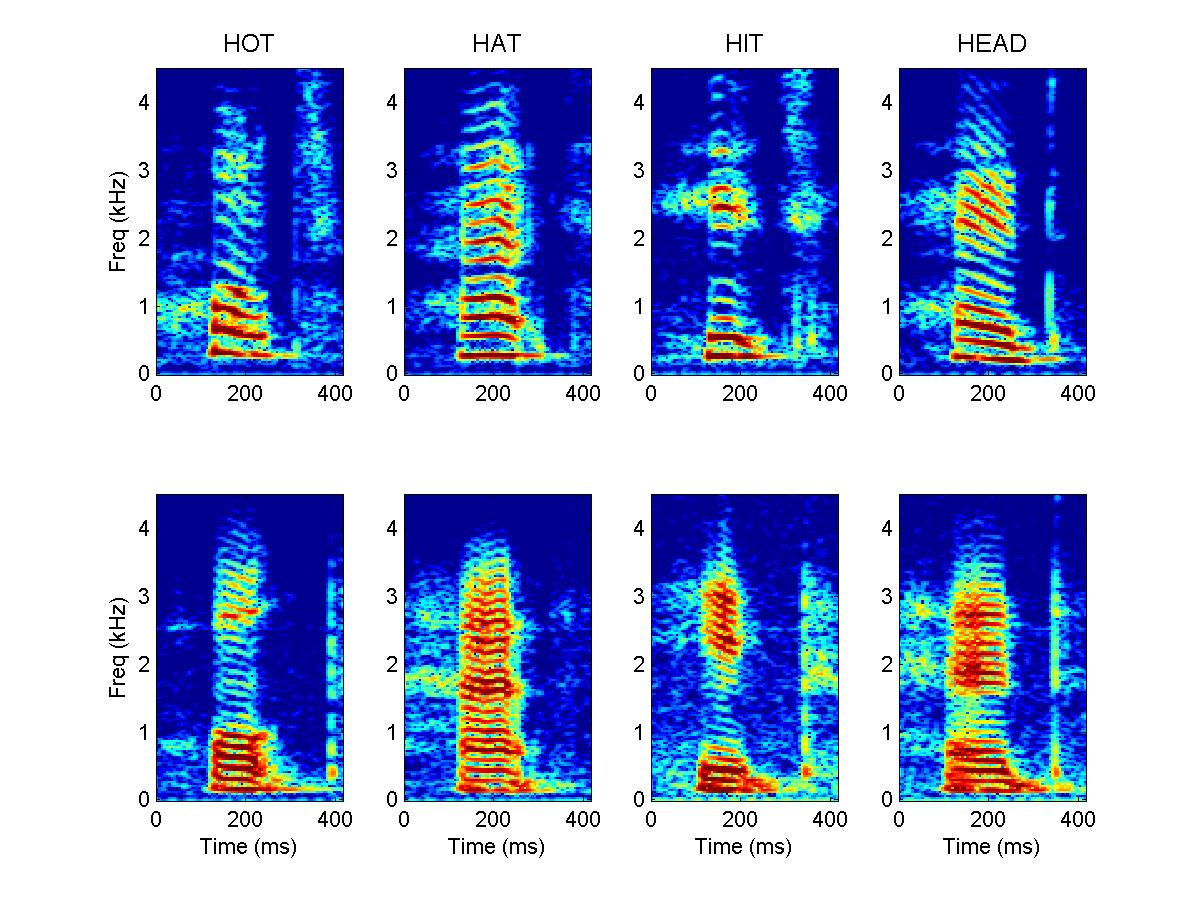
Mel spectrogram of speech. The first row is by an individual with high-pitched voice, the second row is by an individual with low-pitched voice

Source: Schnupp et al (2012)

Activity: See your own voice! 🎤

Spectrograms in real-time

Try this later:

  1. Go to musiclab.chromeexperiments.com/Spectrogram
  2. Allow microphone access
  3. Watch what happens when you:
    • Hum a low note vs a high note
    • Say “aaaah” vs “eeeeh” vs “ooooh”
    • Whistle
    • Snap your fingers or clap

What to notice:

  • Low sounds appear at the bottom, high sounds at the top
  • Vowels create stable horizontal bands
  • Percussive sounds (claps) create vertical spikes
  • Your voice has a unique pattern, like a fingerprint!

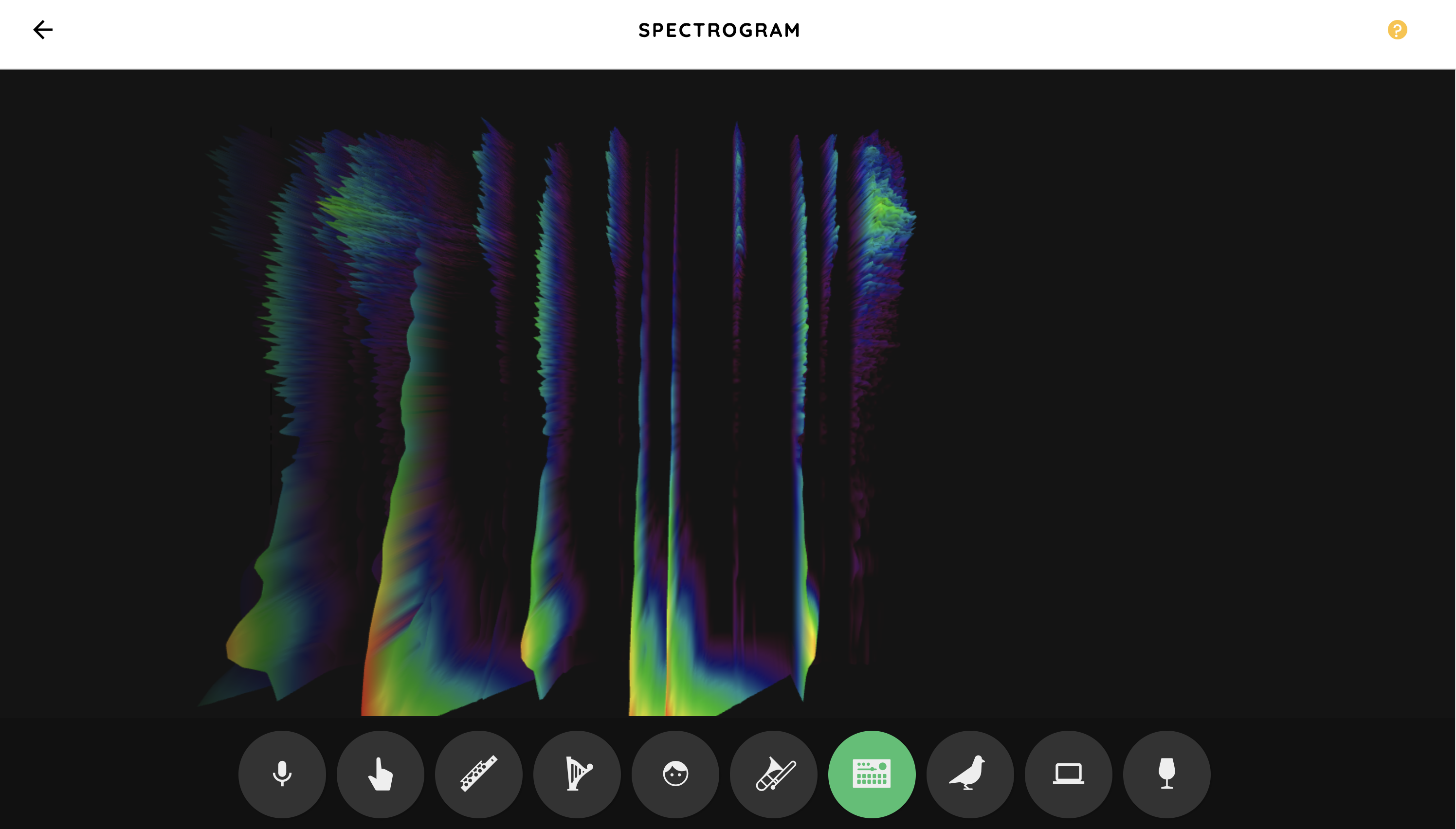
Spectrogram of a drum machine

musiclab.chromeexperiments.com/Spectrogram

Try making different sounds and watch the patterns!

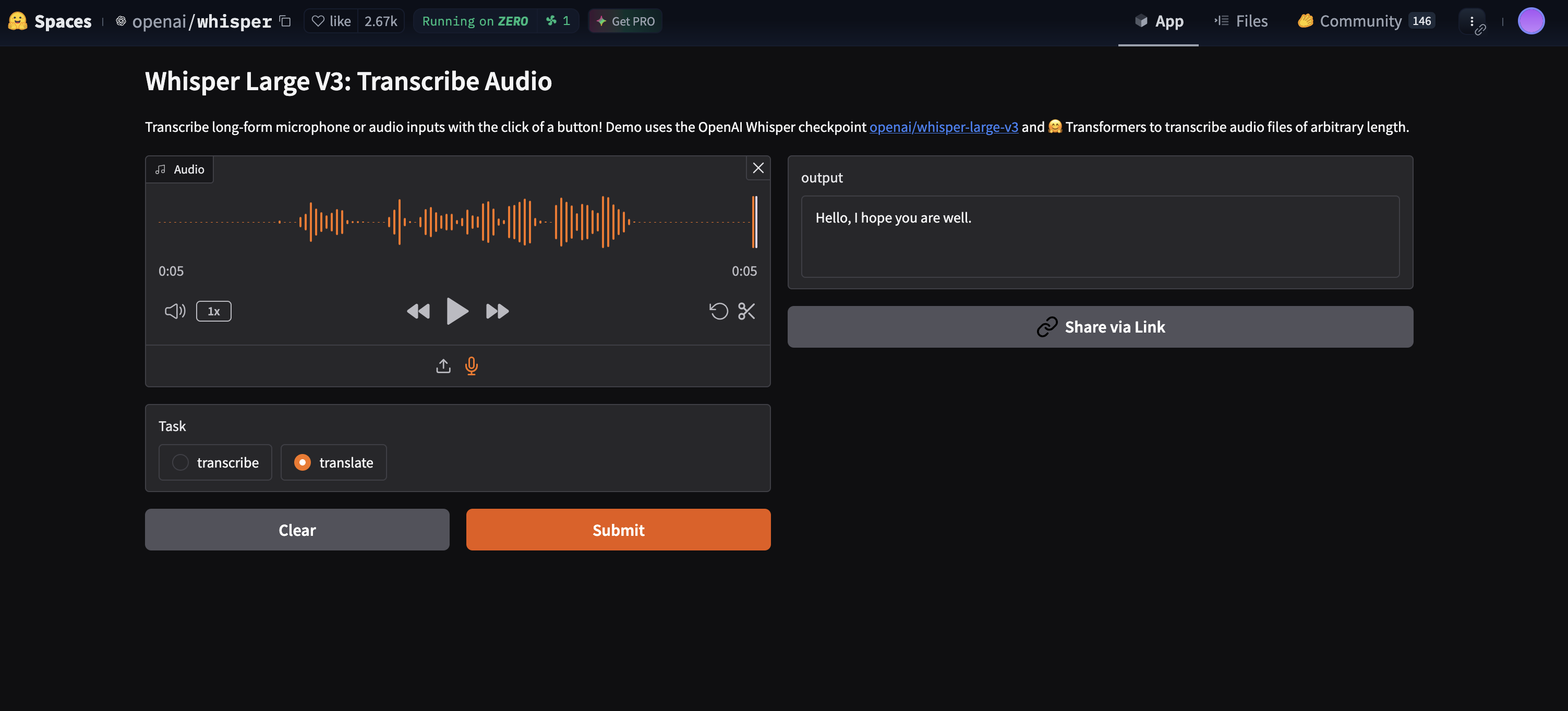
Whisper: How machines understand speech

Whisper is OpenAI’s speech recognition system:

  • Trained on 680,000 hours of audio from the internet
  • Understands 99 languages
  • Handles accents, background noise, and different speaking styles

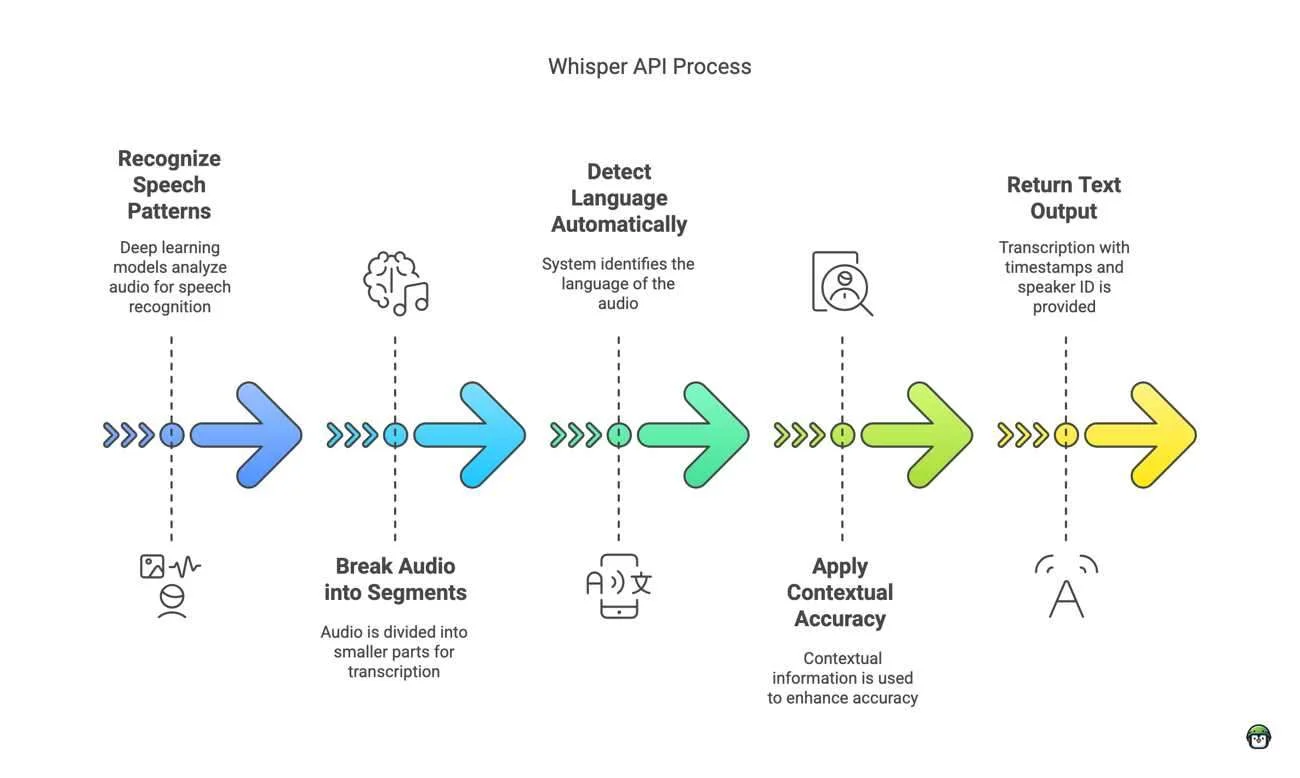
How it works:

  1. Slice: Break audio into short windows (typically 25ms)
  2. FFT: Convert each window from waveform to frequencies (how much of each frequency is present)
  3. Mel mapping: Apply mel scale to match human perception
  4. Stack: Create 2D spectrogram from all windows
  5. Process: Use Transformers, same as text and images
  6. Context: Use attention to predict the next tokens
  • Architecture: encoder-decoder Transformer
    • Encoder: processes the mel spectrogram
    • Decoder: generates text tokens
  • Open source and free to use

Siri, Alexa and Google Assistant use their own systems, built on the same ideas

Activity: Test speech recognition! 🎤

Try the Whisper demo:

huggingface.co/spaces/openai/whisper

Experiments to try at home:

  1. Record yourself speaking normally
  2. Try speaking with an accent
  3. Record with background noise (music, talking)
  4. Try a different language if you speak one!
  5. Speak very fast or very slow

Observe:

  • What does it get right? Wrong?
  • Does it understand your accent?
  • What about punctuation? Who decides where sentences end?

Hugging Face Whisper demo

AI can compose music now 🎵

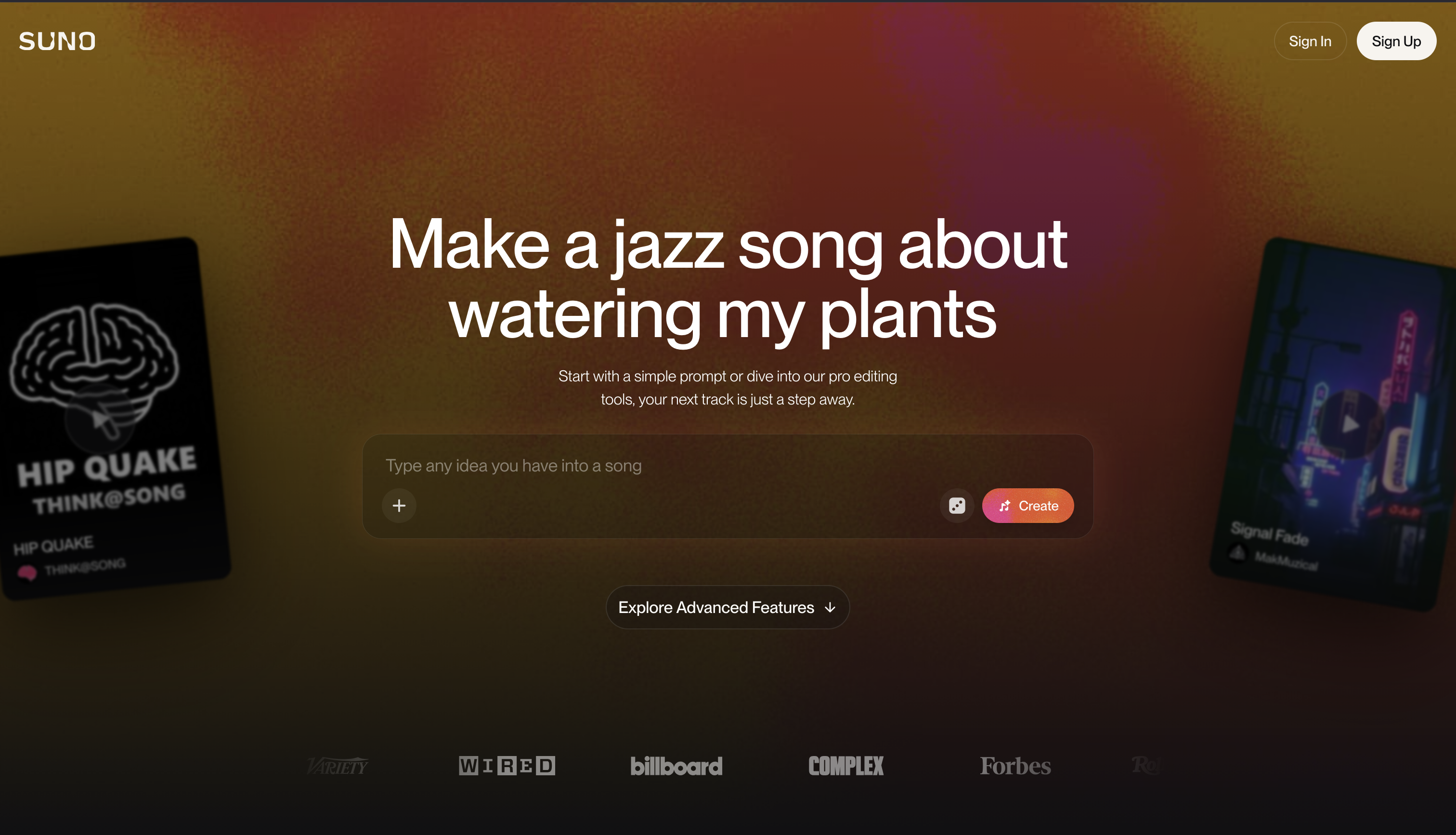
Suno.ai and AI music

Suno.ai generates complete songs from text prompts:

  • Give it a description: “upbeat pop song about studying for exams”
  • It creates melody, harmony, rhythm, and vocals, a full song in about 30 seconds

How does it work?

  • Trained on millions of hours of music
  • Learns chord progressions, song structures, and vocal styles
  • Uses the same “sound → numbers → AI” pipeline

The questions this raises:

  • Anyone can now create professional-sounding music
  • Who owns AI-generated music?
  • Some AI songs sound eerily similar to real artists
  • Musicians worry about their livelihoods

Suno AI music generation

suno.ai. Try generating your own song!

Discussion: If AI creates a song that sounds like Taylor Swift, is that copying? Should it be legal?

Everything becomes numbers! 🌐

Everything becomes numbers

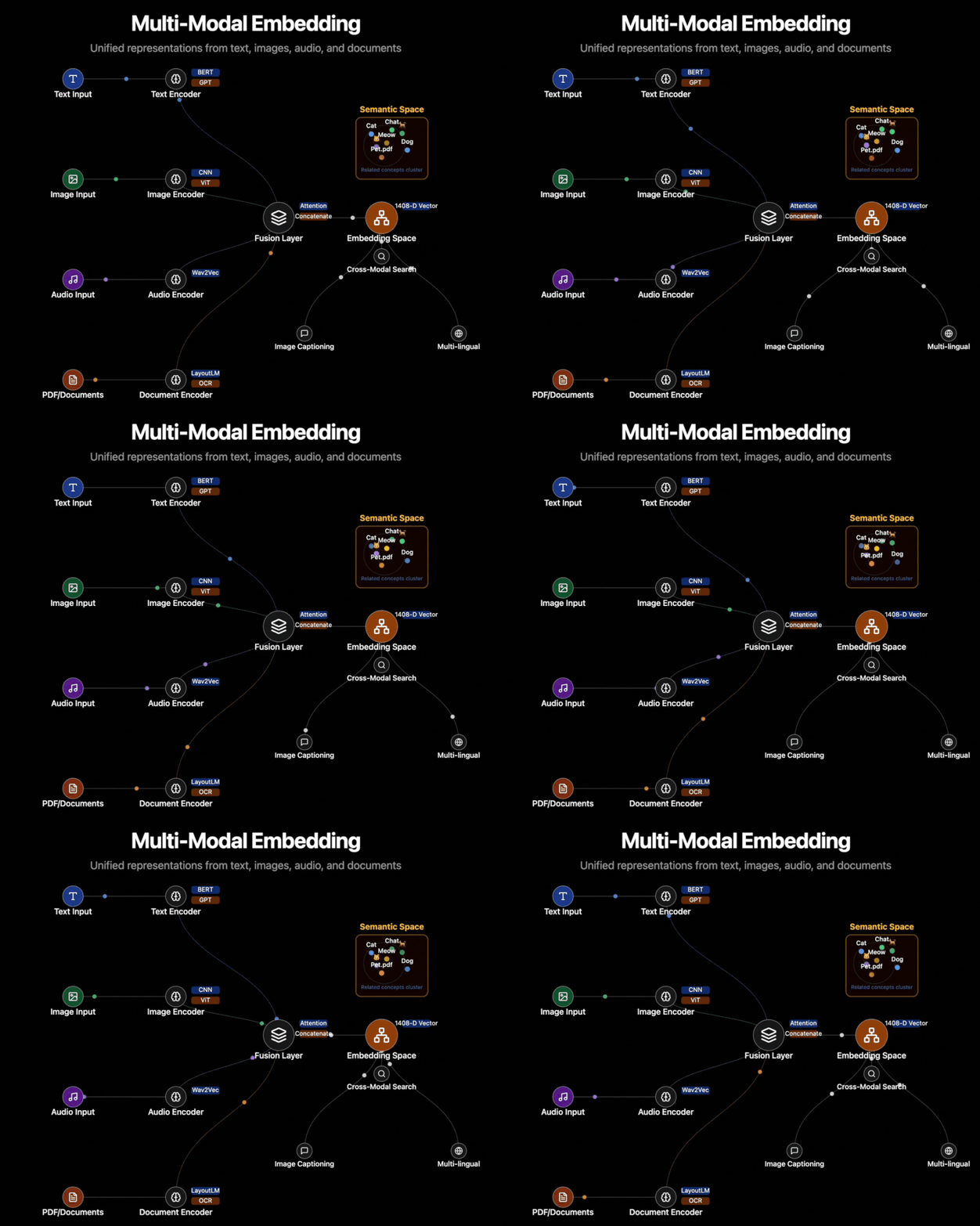
  • Text, images, and audio all become embeddings, the same mathematical representation:
    • Text token → 4096-dimensional vector
    • Image patch → 4096-dimensional vector
    • Audio segment → 4096-dimensional vector
  • Once in embedding space, the LLM doesn’t know the original modality
  • This is why multimodal models handle text, images, and audio at the same time

All modalities converge to embeddings

Text, images, and audio all become the same kind of numbers, so AI can understand them together!

The three-part architecture

How open multimodal models work

Multimodal LLM architecture: Encoder → Projector → LLM

  • Open example: LLaVA
  • GPT, Gemini and Claude don’t publish their designs
  • OpenAI and Google say theirs learn all modalities together
  1. Modality Encoder: Vision Transformer (images) or Whisper (audio), both pre-trained specialists
  2. Projection Layer: Aligns encoder outputs to the LLM’s embedding space, and is often surprisingly simple
  3. LLM Backbone: The “brain”, processing everything as tokens

What this means for society ⚠️

Class discussion: Where do we draw the line? 🤔

In small groups: voice and image generation

Should AI-generated content require…

  • Watermarks that can’t be removed?
  • Disclosure that it’s AI-made?
  • Consent from people being depicted?
  • None of the above (free speech)?

How would you enforce it?

Take 2 minutes, then we’ll share perspectives!

Summary

Main takeaways

  • Images = grids of numbers: AI spots patterns, from edges to objects

  • Sound = pictures of vibrations: turn audio into spectrograms, then use image AI

  • The big insight: text, images, and audio all become embeddings

  • Multimodal AI: ChatGPT, Claude, and Gemini see images because everything speaks the same mathematical “language”

  • Hands-on: you trained your own AI with Teachable Machine

  • Critical thinking: should AI voices and images need watermarks, disclosure or consent?

… and that’s all for today! 🎉